Category: Technique

  • FileMaker 2025! Explore the new features

    FileMaker 2025! Explore the new features

    [vc_row bg_color=””][vc_column][vc_column_text]
    Claris has just announced the release of FileMaker 2025 (the commercial name for version 22).
    As usual, this article will walk you through what’s new and offer a critical perspective—both to help analyze the direction Claris is taking and to help you better understand the changes.

    Key points to consider

    Let’s start with a few important notes you should read before upgrading.

    • FileMaker Server 2025 only allows connections from FileMaker Pro 2024 (21) and 2025 (22). So be careful if your deployment still includes older versions.
    • Starting with version 22, major updates will now be supported via in-app updates, making it easier to keep client machines up to date.
    • Very important—and likely to complicate transitions if you’re working with a mix of versions: on Windows, it is no longer possible to install FileMaker Pro 2025 alongside older versions. FileMaker Pro 22 is expected to replace previous installations. (I haven’t tested this myself, so feel free to share your experience to clarify this point.)
    • If you’re using OData, consider waiting before updating your server. While there are significant improvements, some changes may break existing integrations (see the section on FileMaker Server at the end of this article).

    This is also the first time the Mac and Windows versions of the user interface diverge. On macOS, the developer interface now more closely resembles Apple’s own apps—like Keynote, Pages, or Numbers (more details on that below). But even the end-user interface is affected, with a new toolbar design. Frankly, I don’t quite understand why the icon set wasn’t updated on Windows too—for the sake of consistency.
    [/vc_column_text][/vc_column][/vc_row][vc_row bg_color=””][vc_column][vc_column_text]

    AI, AI, AI

    Already a major theme in version 21 (and let’s not forget that AI has been part of FileMaker since version 19 in 2020 via CoreML), artificial intelligence takes center stage in FileMaker 2025.

    I won’t go into all the implementation details here—there are numerous new functions and script steps. For an in-depth look, I still recommend reading the offficial release notes from Claris. But overall, here’s what stands out:

    • FileMaker 2025 continues in the same direction as version 21, prioritizing end-user interaction with data, rather than an “agentic” approach where AI would assist the developer by generating code or interfaces.
      Personally, I think this is the right strategy—after all, FileMaker’s “code” is already so fast to produce.
      That said, the major improvements in the XML representation of files (notably when saving a copy as XML) and the enhanced Upgrade Tool integrated into FileMaker Server suggest Claris is actively preparing for some form of developer assistant down the road.

    The main new AI features include:

    • RAG (Retrieval-Augmented Generation): limits LLM responses to data from a specific corpus (your documents, website, etc.), improving accuracy and reducing hallucinations

    • Semantic search, including text and image search—on the server side

    • Natural language to SQL query generation

    • Model hosting directly within FileMaker Server, with some models even bundled with the FileMaker Pro installer for even easier deployment

    That last point is worth discussing. FileMaker Server now includes a new admin console tab where you can enable locally installed AI models. While this is impressively simple to use, resource management is a real concern. Currently, there’s little to no way to control how much memory or GPU capacity is used by the models versus the FileMaker Server itself.
    Unless you’re running on powerful local hardware—like a Mac Studio with plenty of RAM and VRAM—you risk slowing down your entire deployment. We can probably expect Claris to allow offloading AI processing to a secondary machine in the near future, much like what’s already possible with WebDirect.

    For now, most hosting providers—including our own fmcloud.fm—have chosen to disable this AI tab by default and only enable it in custom configurations.

    [/vc_column_text][vc_column_text]

    French Localization Revisited

    It’s a minor point, but worth mentioning nonetheless: I had the opportunity to suggest improvements to Claris regarding several unnecessary translations and abbreviations in the French interface.

    Many of these changes have now been implemented, leading to a more consistent and clearer UI. Most of them will feel completely natural—you probably won’t even notice.

    However, I’d like to draw your attention to two specific functions: ObtenirTexteDynamique and ObtenirTexteDynamiqueEnJson.
    These now use TexteDynamique instead of TexteEnDirect, in order to align with Apple’s translation of Live Text.
    This change makes sense in context—but if you’re used to the old naming, you might spend a while looking for them.

    [/vc_column_text][vc_column_text]

    Found Set Navigation

    A major new feature: the ability to store and restore a list of records using their internal Record IDs, as returned by the Get ( RecordID ) function.

    The new GetRecordIDsFromFoundSet ( type ) function returns either a text string or a JSON array of record IDs, depending on the type parameter.

    [/vc_column_text][ish_table header_bg_color=”color2″ border_color=”color5″]

    Parameter value Result Format
    0 list of IDs separated by carriage returns – ¶ or Char (13): 75¶76¶77¶78¶79¶81¶83¶87¶88¶89
    1 JSON array of IDs as strings (I don’t really see the point)
    2 JSON array of IDs as numbers
    3 list of intervals separated by carriage returns: 75-79¶81¶83¶87-89
    4 JSON array of intervals

    [/ish_table][vc_column_text]

    Key points to remember:

    • The function returns an immediate result—it does not interact with the data layer. No data is downloaded between the server and the client.

    • Sort order is preserved, but no contextual information is included (no table, no layout, and no sort criteria—records are in the correct order, but the criteria used to sort them are not retained).

    • There’s no built-in function to convert between a list (or array) of IDs and a compact interval-based format, and vice versa. You need to choose your format at the time of storing the record set:

      • For lightweight storage or simple restoration, the interval format is much more efficient.

      • But if you plan to use the Go to Related Records script step later, you’ll need the full list of Record IDs.

    Restoring a found set is done, logically, via the new Go to list of records script step. It accepts any variant of the result from the function mentioned above and lets you specify the target layout and open a new window if needed.

    Error handling and behavior have been aligned with the Go to Related Records script step for consistency.

    Important note: If the sort order was custom—either because the found set had been sorted originally, or because the order was manually constructed (e.g. "3¶1¶2"), which allows for orders that couldn’t be achieved via standard sorting—then the restored found set will be semi-sorted.
    Why? Because FileMaker cannot reconstruct the sort criteria, so it cannot actually perform a sort. This means:

    • Sub-summary based on sort order layout parts will not display, and

    • The GetSummary function will not return expected results.

    Why does this matter?

    • Combined with Perform Script on Server (PSoS) and transactions, this makes it much easier to delegate the processing of a found set to the server.

    • You can store and restore multiple found sets, which opens up powerful use cases like maintaining a navigation history.

    • While it doesn’t offer all the features of a snapshot link (e.g., sort metadata, warning if records are deleted), you can pass found sets between users or processes—even in WebDirect, with no need for file system access.

    Bonus: Here’s a custom function to enhance this capability by embedding additional metadata alongside the found set…

    [/vc_column_text][vc_column_text]

    Replace Field Contents Without Triggering Auto-Enter

    To me, this is the most groundbreaking new feature in FileMaker 2025. It’s been at the top of my feature request list for a long time.
    You can now—exclusively within a script—choose to bypass auto-enter options when using Replace Field Contents.

    Use cases:

    • After migrating data from a legacy system: clean up or correct values without altering modification timestamps

    • Populate a new field across existing records, without interfering with calculated fields, timestamps, or modification tracking

    Pro tip:
    If you use a developer custom menu set, consider replacing the default Replace Field Contents command with a script that only includes that step. This way, you—as a developer—can decide whether to check or uncheck the Perform auto-enter options box.

    Note:
    We now have three script steps that can bypass auto-enter behavior:

    1. Import Records

    2. Open Transaction

    3. Replace Field Contents

    [/vc_column_text][vc_column_text]

    JSONParse

    This new calculation function allows you to store not just the usual text representation of a JSON object or array in a variable, but a true parsed JSON object, enabling much faster processing (and I really mean much faster).

    Example use case:

    Let’s say you have a JSON array stored in $json and you want to loop through its elements—either via script or using the While function.

    Set Variable [ $json ; JSONParse ( $json ) ]

    This keeps $json unchanged when used with text or numeric functions (e.g., Length ( $json ) or Left ( $json ; 1 )),
    but it now also contains a fully parsed JSON object, which significantly speeds up calls to JSON functions like JSONGetElement.

    Additionally, the new JSONParsedState ( $json ) function lets you check whether $json holds a parsed object or array—and tells you the type: 3 (object), 4 (array)

    [/vc_column_text][vc_column_text]

    Insert Text: Length Limit Removed

    Now that the target of the Insert Text script step can be a variable, this step has become popular again—since it allows you to define a text constant without invoking the calculation engine, meaning no need to escape quotes or carriage returns.

    However, the 30,000-character limit used to be a constraint. That’s now resolved: the new limit is 250,000,000 characters (yes, two hundred and fifty million).

    Note: If you’re using the MBS plugin on macOS, make sure to update it—very large variables could cause crashes. (In any case, keeping the plugin up to date is always a good idea.)

    [/vc_column_text][vc_column_text]

    Folders for Custom Functions

    Along the same lines, you can now organize custom functions into folders.
    Unfortunately, this new feature comes at the expense of something I consider essential: the ability to sort functions alphabetically or by creation order.

    The newly added search field only partially compensates for the lack of sorting.

    More critically, creating folders in FileMaker 2025 (version 22) makes the custom function list unreadable in earlier versions. Combined with the fact that FileMaker 2025 can no longer coexist with previous versions on Windows, this poses a serious compatibility concern.

    Besides, the custom function management window design is far from perfect.
    We’re back to old-school rectangular buttons that are -to my knowledge- only used in the Manage Layout dialog, but not even using the same margin, font size…
    (For comparison: manage layouts window on the left, custom functions window on the right.)

    [/vc_column_text][vc_column_text]

    Script Workspace: Collapsible Code

    You can now collapse and expand sections of code in scripts—particularly for script steps that introduce indentation, such as If, Else, End If, Loop, Open Transaction, and so on.

    Note: Regarding indentation—disabled script steps no longer affect indentation, making scripts easier to read when some steps are turned off.

    [/vc_column_text][vc_column_text]

    More Powerful SQL

    Numerous improvements have been made to the SQL engine used via ODBC or through plug-ins, as well as the ExecuteSQL function. Thanks to an updated underlying library, you can now use features such as intervals, IN clauses, and even ALTER statements.

    This means, for example, you can now rename a field using a plug-in capable of executing SQL (like MBS or BaseElements) along with an ALTER query.

    The addition of FETCH NEXT also makes it easier to implement pagination systems.

    Another enhancement is the introduction of a new system table: FileMaker_ValueLists.
    This allows you to query non-relational value lists, along with their individual values via dynamically generated tables like:
    FileMaker_ValueList_{ValueListName}.

    [/vc_column_text][vc_column_text]

    Extract Text from a PDF

    A new calculation function allows you to extract text from a PDF stored in a container field.

    Note: this isn’t magic or OCR—it simply extracts the text layer already present in the PDF. And that’s already a very welcome addition.

    [/vc_column_text][vc_column_text]

    Improvements to the Manage Database Dialog

    The updated interface brings a few new features:

    • Just like with fields, you can now add comments at the table level. Nice!
      …Except Claris forgot to give us a corresponding calculation function to access them.
    • The return type of calculation fields is now displayed in the field list—finally!
      Unfortunately, the icon to the left of fields in the calculation editor still doesn’t reflect the data type. But hey, it’s a start.

    [/vc_column_text][vc_column_text]

    Layouts

    When modifying the database structure, changes are automatically reflected in layouts.
    Previously, you could configure the app to prevent new fields from being added to the current layout. Now, you can go a step further and disable all automatic layout updates—no new fields, no label changes, and no auto-generated layouts for new tables.

    But the real treat—the small feature you’re going to love—is this:
    You can now add objects to a group without ungrouping it (and thus without losing hide conditions or other settings). This can be done via the menus, or more intuitively through the Object panel.

    Naturally, the reverse is also possible—you can now remove objects from a group just as easily.

    [/vc_column_text][vc_column_text]

    Windows-Specific Improvements

    Two major improvements on Windows, in my opinion:

    • The Send Mail script step (using the default email client) should now work properly with all email clients—including Thunderbird—not just Outlook. And for Outlook users, compatibility issues with recent versions should finally be resolved.

    • If the user is connected to the local network via Entra ID, the Web Viewer will inherit that authentication. This is a significant improvement for scenarios where an internal web app requires authentication.

    [/vc_column_text][vc_column_text]

    macOS-Specific Improvements

    There’s a lot to cover in this section. As mentioned earlier, Claris is aligning more closely with its parent company, Apple—and it was about time that this alignment translated into the user experience.
    For a cross-platform product like FileMaker, it was problematic that Mac users would feel lost in an interface that didn’t reflect macOS conventions.

    Here are the most notable changes:

    • The system accent color defined in macOS settings is now applied to FileMaker dialogs.

    • The design of the left and right panes (fields/objects/add-ons on the left, inspector on the right) has been completely reworked. Personally, I find myself scrolling more in the inspector—but the visual refresh is still welcome.

    • The Table view now offers new options for a much cleaner visual result.
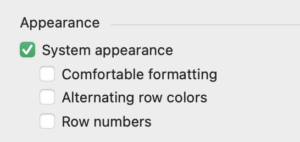
    • The Launch Center has been redesigned. Be aware: removing a favorite or recent file isn’t very intuitive—you have to select it and press Delete on the keyboard.

    • And perhaps most importantly, the toolbar has been overhauled: new icons, full customization of individual toolbar elements, and the removal of colored icons for layout mode toolbar.

    [/vc_column_text][vc_column_text]

    FileMaker Server

    As mentioned earlier, most of the big changes on the server side revolve around AI: semantic search on the server, RAG (Retrieval-Augmented Generation), and local model execution.

    Significant improvements have also been made to OData, especially around aggregation functions (including AS). This means you can now fully control the response shape—for example, by concatenating first and last names and returning it as fullName.
    For now, though, these aggregation functions only apply to the $select portion of the query—not to $filter (the SQL-equivalent of WHERE). That remains, in my view, the main reason to continue using ODBC. Hopefully a future update will address this.
    On a positive note, issues with special characters introduced in version 21 have now been resolved.
    ⚠️ Important: a significant change has been made to how ROWID is returned, which may require you to update your parsing logic. I must admit, this design choice caught me by surprise.

    Installing and updating an SSL certificate via Let’s Encrypt is now extremely easy (something our service, fmcloud.fm, has been doing for a long time).

    You can now define the WebDirect home page from both the Admin Console and the Admin API.

    In WebDirect, users are now shown a warning before leaving the app when they click the browser’s Back button.
    Finally—no more needing to rely on Romain Dunand and Ceydrick Valentini’s clever workaround.

    From FileMaker Pro, you can also disable the context menu on container fields for WebDirect users.

    That’s it for this initial tour!
    I hope this helped you get a quicker handle on what FileMaker 2025 brings.
    Feel free to share your thoughts or questions in the comments below.

    [/vc_column_text][/vc_column][/vc_row]

  • Writing a calculation function: json2sql

    Writing a calculation function: json2sql

    [vc_row bg_color=””][vc_column][vc_column_text]After spending two days writing a calculation function, I figured I wasn’t a day short, and that sharing the story behind writing this function could be interesting for other developers—not so much for the function itself, but to capture the mindset and the general ideas that help approach a complex function.

    Moreover, since Claris has honored me with a spot at the Engage conference next March in Austin, with a topic as unusual and pretentious as “how I, Fabrice Nordmann, tackle a problem to solve with the FileMaker platform,” I need to start seriously reflecting to understand my own process in order to explain it. As readers, you’re serving as my test audience, for which I thank you.[/vc_column_text][vc_column_text]

    First, let’s explain what the function does.

    The function is called json2sql and enables the formulation of an SQL query for FileMaker using a JSON parameter.

    Indeed, the JSON writing function, JSONSetElement, became quite enjoyable to use with FileMaker 21, and you quickly get used to it, while writing SQL remains cumbersome—especially if you want to write it well, without dependency on field names, so that the query doesn’t break if a field is renamed.

    The idea, therefore, is to pass a JSON parameter to this function, have it translate the parameter into an SQL query, and execute it (that was the initial idea, but things got much more complicated afterward, as you’ll see).

    We already had a function that we use frequently, sql.match (_requestedField ; _matchField ; _match), which allows retrieving values from a column (_requestedField) in records matching a criterion in a query of this type.

    SELECT _requestedField WHERE _matchField = _match

    It allows us to handle a large portion of the queries we need when coding in FileMaker.

    But, of course, it’s very limited. If you want multiple columns, functions, multiple comparisons (WHERE)… it’s not enough.

    We also have a set of functions that help us write SQL cleanly, like **sql.table**, **sql.col**, **sql.in.clause**… but nothing as cool as JSON.

    Plus, there were dirty dishes in the sink, so it was clearly the perfect moment to come up with a new function to write.

    So here we go!

    First, what should be the “signature” of this function? What name? What parameters?

    I like to keep things simple, so:

    json2sql ( _json )

    Exactly, JSON is already designed to structure information, so I’ll include everything in the JSON—it looks nice. (Spoiler: it won’t end up that way.)[/vc_column_text][vc_column_text]So, I’m thinking about the structure of the JSON, keeping in mind that the function ultimately needs to call the native function:

    ExecuteSQL ( sqlQuery ; fieldSeparator ; rowSeparator { ; arguments... } )

    If you’re not familiar with the ExecuteSQL function, let’s recap: sqlQuery is a SELECT-only SQL query. You can use ? placeholders instead of comparison values, which FileMaker will replace with items from the argument list at the end of the function, in order. The advantage of this approach is that FileMaker handles data types for you (converts dates to SQL format, adds quotes around text but not numbers, manages decimal separators, etc.).

    For example, if I write:

    ExecuteSQL ( "SELECT primaryKey FROM invoices WHERE clientName > ? AND invoiceDate = ? AND totalAmount > ?" ; "" ; "" ; "L" ; Date ( 6 ; 1 ; 2024 ) ; round ( 100/3 ;2 ) )

    Then, FileMaker will interpret it automatically and execute the following query:

    SELECT primaryKey FROM invoices WHERE clientName > 'L' AND invoiceDate = '2024-06-01' AND totalAmount > 33.33

    (adds single quotes, converts the date, and uses a period as the decimal separator, even if my file uses a comma, since SQL interprets the period).

    That’s our quick refresher on ExecuteSQL; now, let’s get back to writing the function.

    We’ll have a JSON structured using a function like:[/vc_column_text][vc_column_text]

    JSONSetElement ( ""
       ; [ "query" ; <a complex JSON object I will think about later> ; JSONObject ]
       ; [ "fieldSeparator" ; "" ; JSONString ]
       ; [ "rawSeparator" ; "" ; JSONString ]
       ; [ "arguments" ; <a JSON array, since arguments must be ordered> ; JSONArray ]
    )

    [/vc_column_text][/vc_column][/vc_row][vc_row bg_color=””][vc_column width=”1/1″][vc_column_text]Note that I wish to use these notations

    • "{table}"."{column}" instead of simply {column}
    • "{table}" instead of {table}

    This approach helps avoid issues with SQL reserved names and oddly named fields, like those with spaces. It’s essential, in my opinion, to adopt this mindset: everyone should be able to use this function in any FileMaker file. I make no assumptions that fields will be named “correctly” or that the decimal separator will match mine, or that the language will be French (even though I personally use the English version of FileMaker). So, always think “ubiquity”: the function should work everywhere, and if it can’t, that limitation should be deliberate, acknowledged, and documented.[/vc_column_text][/vc_column][/vc_row][vc_row bg_color=””][vc_column width=”1/1″][vc_column_text]The “algorithmic” structure of the query is therefore:

    "SELECT" & [ loop over an ordered list or array of column names ] & " FROM " & [ table, which is information I can extract from the same list if I fully qualify field references with the table::field notation ]

    followed by an optional section (criteria aren’t mandatory):

    & " WHERE " & [ loop over an array of criteria composed of a logical operator (except for the first one), a column, a comparison operator, and a value ]

    [/vc_column_text][vc_column_text]I finally dive into writing a JSON prototype for the query parameter.

    So I open the Data Viewer and…[/vc_column_text][vc_column_text]

    JSONSetElement ( ""
       ; [ "query.columns[+]" ; GetFieldName ( invoice::invoiceNumber ) ; JSONString ]
       ; [ "query.columns[+]" ; GetFieldName ( invoice::invoiceDate ) ; JSONString ]
       ; [ "query.columns[+]" ; GetFieldName ( invoice::amount ) ; JSONString ]
    )

    [/vc_column_text][vc_column_text]Here’s the first array—the list of column names (this is indeed the name, not the value, so the type is always String).

    Except… I realise I forgot about functions. I know I don’t want to handle them just yet, but my structure needs to allow for future expansion. I’m also keeping in mind that if I ever want to manage joins, I’ll need a bit more information about the columns, but that’s for later. Starting over:[/vc_column_text][vc_column_text]

    JSONSetElement ( ""
       ; [ "query.columns[+].name" ; GetFieldName ( invoice::invoiceNumber ) ; JSONString ]
       ; [ "query.columns[:].function" ; "Sum" ; JSONString ]
       ; [ "query.columns[+].name" ; GetFieldName ( invoice::invoiceDate ) ; JSONString ]
       ; [ "query.columns[+].name" ; GetFieldName ( invoice::amount ) ; JSONString ]
    )

    [/vc_column_text][vc_column_text]Good, now I have an array representing the list of columns, and I need to do something with it.

    First and foremost, I need an environment for this. So, I write in my Data Viewer:[/vc_column_text][vc_column_text]

    Let ([
       _json = JSONSetElement ( ""
             ; [ "query.columns[+].name" ; GetFieldName ( invoice::invoiceNumber ) ; JSONString ]
             ; [ "query.columns[:].function" ; "Sum" ; JSONString ]
             ; [ "query.columns[+].name" ; GetFieldName ( invoice::invoiceDate ) ; JSONString ]
             ; [ "query.columns[+].name" ; GetFieldName ( invoice::amount ) ; JSONString ]
          );
       _query = ""
    ];
       _query
    )

    [/vc_column_text][vc_column_text]

    I can now tackle the query parameter and observe the result.

    I won’t include the entire content of the Data Viewer here—just the _query parameter of the Let function.

    [/vc_column_text][vc_column_text]

    "SELECT " & While ([
            j = _json ;
    	          c = ValueCount ( JSONListKeys ( j ; "columns" )) ;
    	          i = 0 ;
    	          r = "" ;
    	          v = "" ;
    	          to = "" ;
    	        toq = "" 
    	     ];
    	        i < c ;
    	     [
    		        v = Substitute ( JSONGetElement ( j ; "columns[" & i & "].name" ) ; "::" ; ¶ ) ;
    		        function = JSONGetElement ( j ; "columns[" & i & "].function" ) ;
    		        // as we are selecting from 1 table only, let's extract the table occurrence name only during the first iteration
    		        to = Case ( i = 0 ; GetValue ( v ; 1 ) ; to ) ;
    		        // quoted version, to avoid issue with reserved words or blanks
    		        toq = Case ( i = 0 ; Quote ( to ) ; toq ) ;
    		        column = GetValue ( v ; 2 ) ;
    		        colq = Quote ( column ) ; // quoted version
    		        // append to the list
    		        r = List ( r ; Case ( IsEmpty ( function ) ; colq ; function & "(" & colq & ")" )) ;
    		        i = i+1
    	     ];
    		        Substitute ( r ; ¶ ; ", " ) & " FROM " & to 
       )
    )

    [/vc_column_text][vc_column_text]First, rest assured, I didn’t write this all in one go. But I can’t dissect each step, or you’d get bored, and the dishes in the sink would start to smell…

    A few things to note:

    • I didn’t handle functions right away.
    • I follow several conventions for my While loops, which make the process faster:
      • The iterator is always i (except in nested loops, where it’s j).
      • I start with c (the number of iterations) and initialize i (the iterator), r (the result), and usually v (the processed value).
      • The condition is almost always i < c.
      • Incrementing the iterator (i = i+1) is in the first parameter of the logical part or last when working on a JSON array (zero-based).
      • I only added comments later.

    You might also wonder why I have to and toq, column and colq, instead of just the q (quoted) versions. You’re right; at this stage, it’s not necessary. I left them here to make comparison with future versions easier (saving you some work!).[/vc_column_text][vc_column_text]

    WHERE clause

    I started with the criteria.

    I began writing the array, but at that point, I needed some data—or at least a table and fields for testing.

    I asked ChatGPT to provide me with a sample dataset in CSV format, making sure it included various data types (text, including at least one column with multi-line text, numbers, and dates) and duplicates (to enable grouping). I also ensured that some column names included spaces or accented characters. I dragged the CSV file onto the FileMaker icon, which converted it into an .fmp12 file, and voilà, I was ready to work “for real.” Well, almost. I first needed to convert the date data from the YYYY-MM-DD format to FileMaker’s format, DD/MM/YYYY in my file. That should have clued me in, but… you’ll see.

    Then, back to the Data Viewer.[/vc_column_text][vc_column_text]

    JSONSetElement ( "" 
       ; [ "criteria[+].column" ; GetFieldName ( invocies::total ) ; JSONString ]
       ; [ "criteria[:].operator" ; "<" ; JSONString ]
       ; [ "criteria[:].value" ; 100.23 ; JSONNumber ]
       ; [ "criteria[+].column" ; GetFieldName ( invoices::invoiceNumber ) ; JSONString ]
       ; [ "criteria[:].operator" ; "LIKE" ; JSONString ]
       ; [ "criteria[:].logicalOperator" ; "OR" ; JSONString ]
       ; [ "criteria[:].value" ; "NC%" ; JSONString ]
       ; [ "criteria[+].column" ; GetFieldName ( invoices::clientVatNumber ) ; JSONString ]
       ; [ "criteria[:].operator" ; "=" ; JSONString ]
       ; [ "criteria[:].value" ; "*" ; JSONString ]
       ; [ "criteria[+].column" ; GetFieldName ( invoices::taxTotal ) ; JSONString ]
       ; [ "criteria[:].operator" ; "=" ; JSONString ]
       ; [ "criteria[:].value" ; "=" ; JSONString ]
       ; [ "criteria[+].column" ; GetFieldName ( invoices::date ) ; JSONString ]
       ; [ "criteria[:].operator" ; ">" ; JSONString ]
       ; [ "criteria[:].value" ; Date ( 12 ; 1 ; 2015 ) ; JSONString ]
    )

    [/vc_column_text][vc_column_text]As you can see, with the new [+] and [:] notation in version 21, it’s incredibly easy to write an array naturally. With [+], I start a new row, and with [:], I add a “column” (“attribute”) while staying in the same row.

    This allows me to write in a very natural way, and new ideas come to mind as I go. For example, I thought of using common, practical search operators in FileMaker, such as “=” (empty) and “*” (not empty). So, I included these cases in the prototype, planning to map them to IS NULL and IS NOT NULL in SQL. What’s important here is that I hadn’t considered this before starting, but as I worked, I realised it would be manageable and decided to integrate it right into the first version.

    First pitfall

    On the other hand, while writing this prototype, I realize something I hadn’t thought of (I should have, but I must face the truth, even if it disappoints my mother: I am imperfect).
    Note: For my grandmother, whom I mentioned earlier (article in French), it’s all black or white; she has a very Boolean way of thinking.

    And so, the issue is that when it comes to date comparison, I realize that if I pass the arguments as ?, as I initially wanted, so they can be substituted with values (see above on the ExecuteSQL syntax), the type will inevitably be lost through JSON, as JSON lacks a date type. As a result, FileMaker won’t be able to pass the correct data type, seeing only text or a number.

    This adds to what I already had in mind: to pass a variable number of parameters to a function, as indicated by {}(optional) and (variable number) in the function’s signature:

    ExecuteSQL ( sqlQuery ; fieldSeparator ; rowSeparator { ; arguments... } )

    And this, I know, will force me to use indirection and the Evaluate function… and I’m not thrilled about it at this stage, especially when dealing with field name independence, quotation marks, type conversions, and so on. In short, it’s a hassle that will complicate writing this function, maintaining it, and potentially affect its quality. We’ll get to indirection (Evaluate) later, but for other reasons.

    So I’m dropping the idea of passing arguments with ?, and I’ll need to insert the values directly and correctly in the JSON using a function I already use to format SQL queries: sql.getAsSqlData ( _data ; _type ). This is particularly relevant for date, time, and timestamp data types. Numbers are well managed by JSON.

    As I write this, I realize that the function name json2sql might not be the best choice. In our function library, the first word helps categorize functions alphabetically based on what they handle. We have a slew of text.<something>, json.<something>… but here, it seems the focus is more on SQL than JSON. So I should probably rename the function sql.fromJson… I’ll have to think this over a bit more.

    [/vc_column_text][vc_column_text]This mishap led me to reconsider the signature I had chosen, with a single JSON parameter.

    Although I could have continued in this direction, I realized that including fieldSeparator and rowSeparator parameters in the JSON wouldn’t highlight the difference from ExecuteSQL or the way arguments are passed. I decided to revise this approach and move to the following signature:

    json2sql ( _jsonQuery ; _fieldSeparator ; _rowSeparator )

    which resembles the signature of the native function more closely:

    ExecuteSQL ( sqlQuery ; fieldSeparator ; rowSeparator { ; arguments... } )

    and it lightens the documentation that the user (developer) will need to read to use the function.

    This, too, is part of the “mindset” I adopt when writing a custom function: I aim to respect the conventions of the FileMaker platform and to be as consistent as possible. I’m not giving up the underscores before the parameters, though; firstly, they remind the user that this is a custom function, and secondly, it’s a convention I find quite important in my code. But let’s not get into naming conventions…[/vc_column_text][vc_column_text]I then add to my function the part that handles the criteria (the WHERE clause):[/vc_column_text][vc_column_text]

    <the first part of the function here>
    & Case ( not IsEmpty ( JSONListKeys ( j ; "criteria" )) ; 
       " WHERE " &
       While ([
          i = 0 ;
          c = ValueCount ( JSONListKeys ( j ; "criteria" )) ;
          v = "" ;
          r = ""
       ];
          i < c ;
       [
          f = GetValue ( Substitute ( JSONGetElement ( j ; "criteria[" & i & "].column" ) ; "::" ; ¶ ) ; 2 ) ;
          o = JSONGetElement ( j ; "criteria[" & i & "].operator" ) ;
          o = Case ( IsEmpty ( o ) ; "=" ; o ) ; // default comparison operator is =
          lo = JSONGetElement ( j ; "criteria[" & i & "].logicalOperator" ) ; 
          lo = Case ( IsEmpty ( lo ) ; "AND" ; lo ) ; // default logical operator is AND
          value = JSONGetElement ( j ; "criteria[" & i & "].value" ) ; 
          type = JSONGetElementType (  j ; "criteria[" & i & "].value" ) ;
          // this ugly things converts the data to JSON then parses it as a string to handle decimal separators and single quotes.
          v = Case ( type = JSONNumber or type = JSONBoolean ; Substitute ( JSONSetElement ( "" ; "v" ; value ; JSONNumber ) ; [ "{\"v\":" ; "" ] ; [ "}" ; "" ] ) ; "'" & value & "'" ) ;
          r = r & Case ( i ; " " & lo & " " ) // the logical operator is omitted for the first criterion
              & Quote ( f ) & " " & Case ( o = "=" and ( IsEmpty ( value ) or value = "=" ) ; "IS NULL" ; o = "=" and value = "*" ; "IS NOT NULL" ;  o & " " &  v ) ;
          i = i+1 
       ] ;
          r
       )
    )

    [/vc_column_text][vc_column_text]A few comments:

    • This part is conditional on finding a criteria array in the JSON. I could have included the ” WHERE ” directly in the While result, but I find this approach more readable. It’s immediately clear that it’s the WHERE clause of the query.
    • For the comparison operator (o), if it’s empty, I default to “=”. Considering default values helps make the function easier to use.
    • For the logical operator, the default is AND.
    • As anticipated, handling * and = is very straightforward (see the definition of r).

    [/vc_column_text][vc_column_text]I’ll briefly cover the other clauses: GROUP BY, ORDER BY, OFFSET, and FETCH FIRST. They’re fairly straightforward in the function’s code.

    Just note that I intentionally excluded OFFSET by percentage, as it introduced ambiguity in the JSON parameter—should I send a number (5) or a text (“5%”)? Also, I’ll admit that I’ve never used the percentage offset, so I didn’t want to add unnecessary complexity, at least not in the first version.[/vc_column_text][vc_column_text]

    // GROUP BY
    & Case ( not IsEmpty ( JSONListKeys ( j ; "group" )) ; " GROUP BY " &
    
       While ([
          i = 0 ;
          c = ValueCount ( JSONListKeys ( j ; "group" )) ;
          f = "" ;
          r = ""
       ];
          i < c ;
       [
          f = GetValue ( Substitute ( JSONGetElement ( j ; "group[" & i & "].column" ) ; "::" ; ¶ ) ; 2 ) ;
          r = List ( r ; Quote ( f )) ;
          i = i+1 
       ] ;
          Substitute ( r ; ¶ ; ", " )
       )
    )
    
    // ORDER BY
    & Case ( not IsEmpty ( JSONListKeys ( j ; "sort" )) ; " ORDER BY " &
       While ([
          i = 0 ;
          c = ValueCount ( JSONListKeys ( j ; "sort" )) ;
          d = "" ;
          r = ""
       ];
          i < c ;
       [
          f = GetValue ( Substitute ( JSONGetElement ( j ; "sort[" & i & "].column" ) ; "::" ; ¶ ) ; 2 ) ;
          d = JSONGetElement ( j ; "sort[" & i & "].dir" ) ; 
          d = Case ( IsEmpty ( d ) ; "A" ; d ) ;
          r = List ( r ; Quote ( f ) & Case ( Left ( d ; 1 ) = "d" ; " DESC" ; " ASC" )) ;
          i = i+1 
       ] ;
          Substitute ( r ; ¶ ; ", " )
       )
    )
    
    // OFFSET and FETCH FIRST
    & Case ( JSONGetElement ( j ; "offset" ) ; " OFFSET " & JSONGetElement ( j ; "offset" ) & " ROWS" )
    & Case ( JSONGetElement ( j ; "limit" ) ; " FETCH FIRST " & JSONGetElement ( j ; "limit" ) & " ROWS ONLY" )

    [/vc_column_text][vc_column_text]

    SQL execution, and it’s done!

    And so, here I am with a function that creates a perfect SQL query from a JSON parameter. All that was left was to execute the SQL and return the result.

    Nothing could be simpler.

    A few tests. It works like a charm! The queries work perfectly—I get the correct results, with or without functions, with or without criteria…

    And then… I had an idea.

    And that’s when things started to go sideways…

    …but I’ll tell you all about it in part two.[/vc_column_text][vc_column_text]

    Conclusions of Part One

    • Get into a specific mindset. Here, I know I’m working on a generic function, so it must be capable of operating in any context and be easy for any developer to use. When I create a function for a client project, I prefix the function name with the project name, and at the end of the project, I review these functions to see if any should be made generic and added to our toolkit. But if some qualify, I NEVER do so without reviewing the code to ensure it’s consistent with our other functions, and that it accounts for cases we didn’t need in this specific project.
    • Respect the FileMaker platform whenever possible and write functions in a way that makes them naturally usable within that context.
    • Thinking about handling default values prevents forcing the user (the developer) to specify all parameters.
    • Plan, but not too much. I have an idea of what the function needs to do, and I defer some possibilities right away (like joins in this case), but on the other hand, I don’t close myself off to ideas that may come up along the way (such as handling the comparison operators = and * in this example). As you’ll see in the second part, having an idea midway through cost me a lot of time, but on the other hand, the result was worth the effort.
    • Work with data. Start with concrete examples and move towards abstraction. This approach is far more efficient than building an entire mental structure, only to confront it with reality later and realize it doesn’t work.
    • Think about data types, and keep in mind that when looping (While), multi-line texts are a data type in themselves.
    • Have conventions (like the While loop structure here, among others) and stick to them.

    [/vc_column_text][/vc_column][/vc_row]

  • Everything about FileMaker 2024

    Everything about FileMaker 2024

    [vc_row bg_color=””][vc_column][vc_column_text]FileMaker 2024 has just been announced by Claris!

    [/vc_column_text][/vc_column][/vc_row][vc_row bg_color=””][vc_column width=”1/1″][ish_button el_text=”See on Claris.com” url=”url:https%3A%2F%2Fcontent.claris.com%2Fclaris-filemaker2024-announce-1morething-lp|target:_blank” size=”medium” align=”center” color=”color7″ text_color=”color4″ border=”no”][/vc_column][/vc_row][vc_row bg_color=””][vc_column width=”1/1″][vc_column_text]As usual, when Claris announces a new version of FileMaker you’ll find everything you need to know on our blog, for geeks and non-geeks alike.

    Ready, set, go![/vc_column_text][/vc_column][/vc_row][vc_row bg_color=””][vc_column width=”1/1″][ish_headline tag_size=”h2″]Artificial Intelligence (AI) and Large Language Models (LLM)[/ish_headline][vc_column_text]This is of course THE most visible feature of this 2024 version, but also the most complex to explain and master. We’ll be dedicating a separate article to it. You should know, however, that it is now possible to interact with virtually all large language models such as Chat GPT (Open AI), Gemini (Google) or Llama (Meta/Facebook).

    You can use these models for semantic searches on your own data (so you can search for data by formulating queries in human language!), or ask the chart tool to graph your data.

    But it doesn’t stop there. With a little practice, you can develop your own FileMaker code generator to generate complicated calculations or functions.

    It may take a lot of time to save a little, but it’s beautiful :)[/vc_column_text][/vc_column][/vc_row][vc_row bg_color=””][vc_column width=”1/1″][ish_headline tag_size=”h2″]Open Quickly, a new way of interacting with your applications[/ish_headline][vc_column_text]For several versions now, the shortcut Cmd-option-K (macOS)/Ctrl-alt-K (Windows) has been used to change models, but only in model mode.

    Open Quickly opens up much greater possibilities, but also presents a risk that developers should be aware of.

    I recommend that you pause reading this article afterwards, take a look at your applications to see if you’re not affected, and come back to read the rest later.

    What’s it all about?

    1. the functionality is now so powerful that it also needed to be more accessible. The shortcut is therefore Cmd-K (macOS) and Ctrl-K (Windows). Opening the left panel in template mode is therefore relayed to the second level (Cmd-option-K / Ctrl-alt-K). This is quite logical
    2. Open Quickly is now available in all other modes (use, search, preview), and can activate 3 types of elements:
      1. layouts (those in the current file, if defined to be visible in the layout list, or those for which you have editing rights). If you select a layout, you go to that layout (remaining in the same mode). If you hold down the option key (macOS)/alt (Windows), the icon changes and the layout opens in a new window.)
      2. Scripts. Scripts appear in the list if they are defined to be visible in the list, or if you are logged in with an account that allows script modification.This is where the “problem” lies. If you have the right to modify scripts, you can select a script to modify it or, by holding down option (macOS)/alt (Windows), execute the script. If you don’t have this right, the script is executed. This is a fantastic feature! You can really create very efficient interfaces, but it’s extremely important not to expose scripts that can’t be executed by a user without clicking on a specific button. So review your applications to uncheck the visibility box for scripts that should not be accessible.
    3. Files (recent files and favorites are accessible). Open Quickly is also a great launcher.

    [/vc_column_text][/vc_column][/vc_row][vc_row bg_color=””][vc_column width=”1/1″][ish_headline tag_size=”h2″]JSON functions gain in power[/ish_headline][vc_column_text]A new function and a new development make working with JSON much more efficient.

    JSONMakeArray ( listOfValues ; separator ; type )

    allows you to convert a list separated by carriage returns (¶) into a JSON Array. The list being, for historical reasons, the most widespread structural element in FileMaker, this is a possibility that was really lacking and often prevented you from improving/modernizing your code without embarking on lengthy and costly refactoring.

    New operators [+] et [:]

    The new operators make it much easier to write JSON arrays.

    [+] allows you to move to the next index

    [:] allows you to stay on the same index.

    So the simple expression:

    JSONSetElement ( “”

       ; [ "contact[+].nameLast" ; "Doe" ; JSONstring ]
       ; [ "contact[:].nameFirst" ; "John" ; JSONstring ]
       ; [ "contact[+].nameLast" ; "Smith" ; JSONstring ]
       ; [ "contact[:].nameFirst" ; "Emma" ; JSONstring ]
    )

    returns:

    {
       "contact" :
       [
          {
             "nameFirst" : "John",
             "nameLast" : "Doe"
          },
          {
             "nameFirst" : "Emma",
             "nameLast" : "Smith"
          }
       ]
    }

    The [:] operator can also be used to retrieve the last element of an array using the JSONGetElement function.

    GetLiveTextAsJSON

    is a new function reserved for Apple operating systems (whether FileMaker Pro, FileMaker Go or FileMaker Server) which, like GetLiveText, allows you to retrieve the text contained in an image, but this time in JSON.[/vc_column_text][/vc_column][/vc_row][vc_row bg_color=””][vc_column width=”1/1″][ish_headline tag_size=”h2″]Execute FileMaker Data API can now do Write operations[/ish_headline][vc_column_text]The Execute FileMaker Data API script step is now capable of writing to the database, and therefore precisely of creating a new record, modifying or duplicating records, and of course deleting them.

    It is now possible to perform (almost) any operation on the database from within a FileMaker script, without changing context.

    Advantage or disadvantage? since the Data API works in another session, modifications made in this way do not trigger any script (triggers), nor are they taken into account in the OnTransactionWindow event… on the other hand, this means you can write to the database independently of the current transaction.[/vc_column_text][/vc_column][/vc_row][vc_row bg_color=””][vc_column width=”1/1″][ish_headline tag_size=”h2″]Revert transaction in subscripts[/ish_headline][vc_column_text]About transactions… one of the weaknesses of implementing script transactions was that the entire transaction had to take place in the same script.

    Although this doesn’t fundamentally change, the Revert transaction script step can now be in a sub-script, which alleviates the problem.[/vc_column_text][/vc_column][/vc_row][vc_row bg_color=””][vc_column width=”1/1″][ish_headline tag_size=”h2″]Server side scripts (PSoS), callback and notifications[/ish_headline][vc_column_text]These are improvements, but not the least of them:

    When running a script on a server, you can now call the callbak script by name. What’s more, notifications (Configure Local Notification) now work on Pro (macOS and Windows). We wondered why this wasn’t the case, but here it is. It’s now easy to run a script on a server and get a notification on your Mac/PC screen when it’s finished.

    What’s more, it’s now possible to determine whether the callback script should resume a paused script.

    Unfortunately, although we have access to the configuration of buttons and almost every aspect of a system notification, we can’t control the icon or image. he technique outlined here by Laurent Spielmann, of 1-more-thing (2016), is therefore still useful.[/vc_column_text][/vc_column][/vc_row][vc_row bg_color=””][vc_column width=”1/1″][ish_headline tag_size=”h2″]Other improvements for FileMaker Pro[/ish_headline][vc_column_text]In addition to these new features, dozens of bugs have been resolved.

    More subtle improvements include

    • support for variable repetition numbers in file paths. So, for example, you can export data to a file whose path is contained in $var[3].
    • this is big: the engine used for conversion to/from XML/XSLT has been replaced, moving from Xeres/Xalan to libxml2/libxslt. This enables EXSLT functions to be supported. There’s no doubt that we’ll soon be seeing the emergence of some fine applications within the FileMaker framework.
    • The Web Viewer is evolving. On Windows, the installer updates WebView2 Runtime, which will prevent some applications from not running until a manual installation.
    • More importantly, Web Viewers (macOS and Windows) now support WebRTC. This means we’ll be able to integrate applications such as videoconferencing and others into our FileMaker applications.
    • Last note (there are a few other little things, but we’ve got to stop somewhere), the EPS format is no longer supported as an image on macOS. Claris thus follows Apple in discontinuing EPS support in its operating system.

    [/vc_column_text][/vc_column][/vc_row][vc_row bg_color=””][vc_column width=”1/1″][ish_headline tag_size=”h2″]How about FileMaker Server 2024?[/ish_headline][vc_column_text]FileMaker Server 2024 is not to be outdone. There are some very nice new features here too.

    First of all, there’s no change in compatibility between Pro/Go and Server. Versions 19.4.2 of FileMaker Pro and Go will still be able to connect.

    Performance enhancements

    By caching CSS (for Web Direct) and, above all, the link graph, new server sessions should open faster. This should result in faster PSoS sessions, with less overhead.

    https tunneling is now also available on macOS and Windows versions of the server. Until now, it was only available for Linux. FileMaker can now be installed anywhere. You don’t even need to open port 5003.

    Let’s Encrypt SSL certificates can now be easily installed using a supplied system script (Linux and macOS only). For your information, these certificates have been installed free of charge for some years now, if you choose to host your server on fmcloud.fm.

    Progress has been made on the “Custom OAuth” side. You can now configure the icon, and everything can be done via the Admin API.

    The Admin API adds new functionalities such as uploading and downloading database files (beware, containers don’t follow! this is logical but presents a real problem). You can also modify the contact information that accompanies email notifications.

    Administrator roles have been enhanced. Each administrator can act on his own databases, while the main administrator can act on all of them. Multiple administrators can share the same folders.

    The “Script Events” log can now be activated on the server side, thus separating the server event log from the script log.

    Also in the log section, the “Set Error Logging” script step now works for Web Direct and Data API.
    Also, TopCallStats and Statistics logs (stats.log) are now enabled by default. Please note that we anticipate that on some extremely busy configurations with large numbers of users, enabling TopCallStats may cause problems. If you notice a drastic drop in performance after upgrading to FileMaker Server 2024, consider disabling this log.

    In the admin console, the log viewer has improved too.

    The ergonomics of the “Programs” panel have been improved. For example, you can double-click to modify programs or display the columns of your choice in the list, filter the list, duplicate several programs at once…

    Finally! you can now block new connections via the admin API and the admin console. This means you can finally close files without new users connecting or reconnecting during the closing process.[/vc_column_text][/vc_column][/vc_row][vc_row bg_color=””][vc_column width=”1/1″][ish_headline tag_size=”h2″]Middle-East and Central Europe versions available on Linux[/ish_headline][vc_column_text]It’s a first! Not only are the localized versions published by Winsoft International

    for the Middle East (allowing you to design interfaces for right-to-left languages such as Arabic, Hebrew and Persian) and for Central Europe are available at the same time as the classic version, but the server is now also available for Linux.

    This means you can generate PDFs on the server, or offer your users Web Direct interfaces designed specifically for these languages.

    Of course, these versions are immediately available on fmcloud.fm, 1-more-thing’s hosting service. You’ll need the appropriate license, which we can also provide.[/vc_column_text][/vc_column][/vc_row][vc_row bg_color=””][vc_column width=”1/1″][ish_headline tag_size=”h2″]Compatibility[/ish_headline][vc_column_text]FileMaker Pro 2024 (or 21.0) requires

    • macOS Ventura 13 or higher
    • Windows 10 ou 11

    and can connect to FileMaker Server 19.4.2 and higher. (Please note that we find it hard to understand why connection to 19.4.2 is still tolerated, as it doesn’t contribute to the indispensable updating of the servers. If you absolutely must remain in FileMaker Server 19, we strongly recommend that you upgrade to FileMaker Server 19.6.4 without delay. Similarly, if you need to keep a version 20 (why? since 21 offers the same compatibility with client versions), please update your server to 20.3.2.
    At fmcloud.fm, 100% of our servers are up to date.

    FileMaker Server 2024

    • Ubuntu 20.04 LTS Server (AMD64)
    • Ubuntu 22.04 LTS Server (AMD64 or ARM64)
    • macOS Ventura 13 or higher
    • Windows Server 2019 or 2022

    Pro/Go Clients with 19.4.2 or greater can connect.[/vc_column_text][/vc_column][/vc_row][vc_row bg_color=””][vc_column width=”1/1″][ish_headline tag_size=”h2″]Where to start? Where to find FileMaker?[/ish_headline][vc_column_text]If you’re just starting out with the platform, we recommend going through the free trial our fmcloud.fm hosting service to get started.

    In less than 10 minutes, you’ll have a trial copy of FileMaker Pro and a server installed in the cloud.

    A short video explanation here.[/vc_column_text][/vc_column][/vc_row]

  • Video: Get Started With FileMaker in 10 minutes… for FREE

    Video: Get Started With FileMaker in 10 minutes… for FREE

    [vc_row bg_color=””][vc_column][vc_column_text]When it comes to database management and application development, the FileMaker platform has been a trusted choice for years. However, with so much information available, it can sometimes seem like a daunting task to get started. That’s where Fabrice Nordmann comes in to simplify the process for you.

    Who is Fabrice Nordmann?

    Fabrice Nordmann is a seasoned, certified FileMaker expert with a passion for making complex concepts easy to understand. With his help, you can confidently navigate the FileMaker platform and start creating your own applications.

    What’s in Store?

    This 10-minute long video guide is your key to unlocking the power of the FileMaker platform. Here’s what you can expect:

    1. Easy Access: The first step is often the most challenging, but Fabrice will guide you through it. He’ll show you how to download the FileMaker software hassle-free.

    2. Installation: Worried about the technicalities of installation? Fear not! Fabrice will walk you through the installation process, making it a breeze.

    3. Creating Your First App: The heart of the FileMaker platform lies in creating your own applications. Fabrice will demonstrate how to set up your very first app, secure it, and upload it to the cloud so it’s available from anywhere in the world. And the best part? You can do it all for free!

    4. Learning the Basics: You will see how multiple clients can collaborate in real time, and how FileMaker Pro is used to create contents that can be used directly from the browser using Web Direct.

    5. Troubleshooting: Stuck on a particular problem? Fabrice will address common issues and provide troubleshooting tips to keep you moving forward.

    Why Choose FileMaker?

    FileMaker is a powerful and versatile platform that allows you to create custom applications tailored to your specific needs. Whether you’re looking to streamline business processes, manage data efficiently, or build an app for personal use, FileMaker can do it all.

    The best part? Fabrice Nordmann’s guide makes it accessible to everyone, regardless of your technical background. You don’t need to be a coding wizard to create impressive applications with FileMaker.

    Conclusion

    Don’t let the abundance of information about the FileMaker platform intimidate you. Fabrice Nordmann’s video guide offers a straightforward, step-by-step approach to get you started. By the end of the video, you’ll have the knowledge and confidence to create your own applications in the cloud, all without spending a dime. The trial is entirely free.

    So, if you’re ready to dive into the world of FileMaker, let Fabrice Nordmann be your trusted guide. Watch his video, and you’ll be on your way to mastering this versatile platform in no time. Get ready to unlock your creativity and productivity with FileMaker today![/vc_column_text][vc_video link=”https://vimeo.com/1morething/filemaker-get-started” align=”center”][/vc_column][/vc_row][vc_row bg_color=””][vc_column width=”1/1″][ish_list]

    Summary

    • Deploy a server in the cloud
    • Download and install FileMaker Pro
    • Create your first app
    • Secure your app for the cloud
    • Upload your app in the cloud. It’s now available from anywhere in the world.
    • Enable Web Direct to share your app with your team
    • Modify your app with FileMaker Pro
    • Edit records with FileMaker Pro and Web Direct

    Remember

    • Server admin credentials are used only to:
      • access the admin console
      • upload files from FileMaker Pro
      • access your backups using FTP
    • For all other requests for credential, the database account is used, not the server account.
    • The cloud hosting service used in this video is fmcloud.fm

    [/ish_list][ish_button el_text=”Start your journey here” url=”url:https%3A%2F%2Fwww.fmcloud.fm|title:Start%20You%20Journey” size=”big” align=”center” color=”color7″ text_color=”color4″][/vc_column][/vc_row]

  • FileMaker 2023 20.2 – Layout Calculations – Video

    Claris has just announced a new release of FileMaker, 20.2.

    Among other new features and improvements, let’s take a closer look at layout calculations.

    Video by Fabrice Nordmann

    Updates:

    • I forgot to mention symbols in the video. Introduced very early (FileMaker Pro 2 or earlier), symbols like ## (page number), @@ (record number), “//” (current date)… were updated in FileMaker 15 (unsure). The notation {{RecordNumber}} allowed access to all Get function parameters. {{HostApplicationVersion}} for instance.
    • the new layout calculations being a subclass of the merge feature of text objects, it is possible to use them in labels of the old button/popover button objects. But there are important limitations to that, so you definitely won’t do it. These are:
      • the UI doesn’t allow access to the calculation dialog, so you have to type the formula precisely and without mistake
      • as opposed to simple text objects (new behaviour described in the video), buttons cannot be resized to a smaller size than their contents (in that case, the calculation formula), at least using the mouse (you can achieve this using the inspector)

    New to FileMaker? Watch our Quick Start video and get started in 10 minutes.

  • FileMaker 2023 – “Audit log”

    FileMaker 2023 – “Audit log”

    [vc_row bg_color=””][vc_column width=”1/1″][vc_column_text]As we saw in this detailed review of what’s new in FileMaker 2023, one of the two flagship features, along with Perform Script on Server With Callback, is what Claris calls “Audit Log.”

    There is so much to know about this feature that we preferred to dedicate a full post to it.[/vc_column_text][ish_headline tag_size=”h2″]Not an audit log[/ish_headline][vc_column_text]First of all, let’s agree that even if Claris’ marketing didn’t resist the temptation to call it that, this feature is not a real audit log, and this for several reasons.

    • First of all for a simple reason: this feature does not log anything. It does allow a developer to build an audit log on top of it.
    • Then an audit log, to be worthy of its name, must meet certain requirements of inviolability (it must not be possible to make a modification without it being logged, it must not be possible to modify an entry in the log…). Even if we will see that this is the best FileMaker could offer, the new functionality does not meet these criteria.

    Does this mean that you should pass by without looking? Not at all! The new feature is very exciting, but as Camus said, “to name things wrongly is to expose oneself to criticism” (or something like that). And exposing yourself to criticism from an external auditor who was sold an “audit log” that wasn’t an audit log… that’s a situation I’d rather avoid.

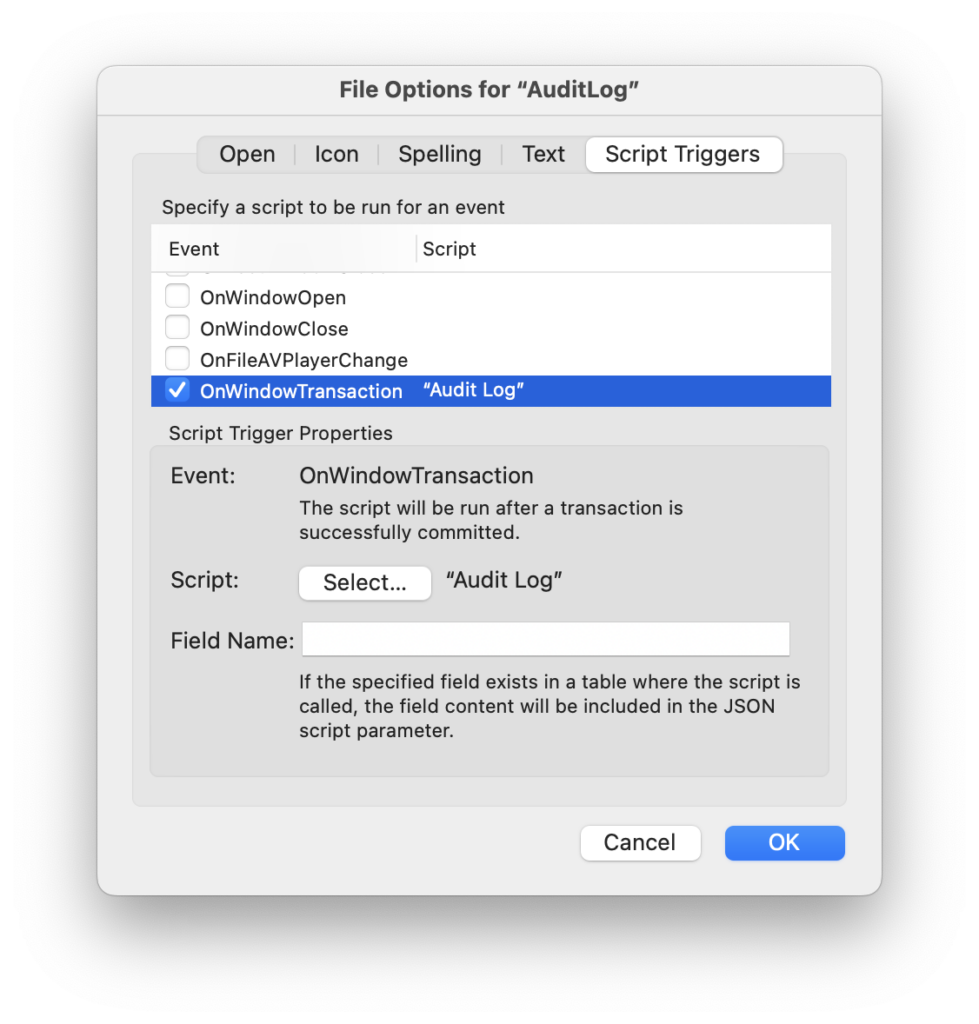
    So no, the audit log is not an audit log. So be it. What should we call it then?[/vc_column_text][ish_headline tag_size=”h2″]Window transactions[/ish_headline][vc_column_text]This is the “technical” name of the feature. This is the name under which it is found in FileMaker Pro, and it seems to me to be much closer to reality.

    Window transactions show up as a script trigger in the file options, and will apply to all transactions.

    Once enabled, every transaction (or almost every transaction) will trigger the script.

    What is a transaction ? A transaction is not particularly what Claris called a transaction in version 19.6.
    A transaction is simply the act of creating, modifying, deleting a set of records (including a single record) and committing. It already existed before 19.6, even if 19.6 allowed to write transactions more easily, or to make some actions “transactional” when it was not possible before.
    Note that the modification of a global field, which is not strictly speaking a data modification, does not cause a window transaction, (except of course if the modification of a global field leads to a modification of another field, which is standard, by means of an calculated result auto-entry).

    In short, you have understood what a data transaction is. During a transaction you can :

    • create new records
    • modify records
    • delete records

    Window transactions are the closest thing FileMaker has to a data transaction, or more precisely to an event that takes place on a data transaction.

    But these are window transactions. So you still need a window, even a virtual one.

    In other words, direct interactions with the data layer are excluded from these transactions:

    • Data API (unless it executes a script)
    • OData (unless it runs a script)
    • PHP/XML (unless running a script)
    • ODBC
    • Truncate table script step
    • A file is defined as an external data source of an interface file in which window transactions are enabled (active trigger), but data is modified from another file.

    That’s why even if a log system was provided, this feature would not allow a real “audit log”.[/vc_column_text][ish_headline tag_size=”h2″]How window transactions work[/ish_headline][vc_column_text]As we have already mentioned, the configuration interface can be found in the file options (File Menu)

    Audit Log file options trigger

    On peut sélectionner le script qui sera activé quand on valide une transaction, et indiquer facultativement le nom hard-codé d’une rubrique. Comme pour les autres déclencheurs au niveau du fichier, seul un script du fichier en cours peut être sélectionné. Dans ce cas ci, c’est un peu dommage, mais on comprend bien la raison.

    Quand une transaction est validée, le script sera déclenché et recevra automatiquement un paramètre en JSON tel que :[/vc_column_text][/vc_column][/vc_row][vc_row bg_color=””][vc_column width=”1/1″][vc_column_text]

    {
       "fileName":
       {
           "tableName":
           [
                 [ //(for each record):
                      modification type ("New", "Modified" ; "Deleted"),
                      record ID,
                      "optional parameter"
                 ];
                 [ 
                      modification type ("New", "Modified" ; "Deleted"),
                      record ID,
                      "optional parameter"
                 ]
            ]
       }
    }

    [/vc_column_text][vc_column_text]As you spotted at first glance because you are now JSON experts, the modified records are elements of an array, with 3 pieces of information so you need to know the order: the type of modification (New, Modified, Deleted), the record ID, and the optional parameter, which will be present but empty if you didn’t set it.

    The other thing you immediately noticed is that there is no trace of modified data or field names.[/vc_column_text][ish_headline tag_size=”h3″]Optional parameter[/ish_headline][vc_column_text]The content of the optional parameter comes from the field that you can choose in the file options.

    If you did not specify a field name and there is a field named OnWindowTransaction, this field will be taken into account instead.

    So at the time of the transaction commit, for each record created, modified, or deleted (in this last case the field is evaluated before deletion), the field -which can of course be calculated- is evaluated and its content passed as an optional parameter for this record.

    JSON

    Note that if the content of the field is a JSON, it is not rendered as a string (“stringified”). To be very precise, in order not to waste too much time validating each JSON, which would greatly slow down transactions with many records, FileMaker considers that if the content of the field starts and ends with { and } or [ and ], it is a valid JSON.[/vc_column_text][ish_headline tag_size=”h3″]Mass transactions[/ish_headline][vc_column_text]There are nine ways to edit multiple records in one operation with FileMaker.

    Some of them are perfectly handled by the window transactions, others are not.

    Let’s eliminate the ones that are not handled first, but keep them in mind if we really want to talk about audit logging:

    • External requests directly on the data layer (Data API, OData, PHP/XML, ODBC). In the case of script execution (and therefore the existence of a window), window transactions will take place.
    • Truncate table script step.
    • Modification of the data schema (you can delete a table, create a calculated field or modify a calculation formula, validate the modification, then change the type of field to make it a standard field, and the data has been modified without a window transaction.
    • Let’s add a variant of this: file creation by conversion. If, for example, you drag an Excel file onto the FileMaker icon, you will obtain a file with a table and data, even before you have been able to configure any triggers or scripts.

    Handled methods are :

    Non-transactional methods :

    Transactional methods:

    • Transactions through relationships, as they have existed since FileMaker became relational (FileMaker 3, released in 1996): you can modify the main record (the one displayed) as well as create, modify and delete related records (deletion requires a portal object).
    • FileMaker 19.6 transactions, which are the same thing except that :
      • they can be done while changing context (no need for a relationship anymore)
      • they can include other types of mass transactions (import, delete all records, replace field contents)

    Importance of using “19.6” script transactions for bulk transactions

    For transactional methods, it is quite obvious: a transaction will cause one and only one window transaction (all created, modified and deleted records will be in the script parameter)

    As for the other three methods (import, delete all, replace), it is very advantageous to also include them in a transaction.

    Indeed, as opposed to our FM AuditLog Pro (which will obviously be updated very soon to take advantage of this new feature) which managed to combine the different real transactions into one logical transaction, the window transactions exactly reflect the internal workings of FileMaker.

    For example, when you delete all the records, FileMaker deletes them 100 by 100. When you import, it depends on the format of the file (in increments of 25 for the csv format, but in alternating increments of 25 and 1000 for the .mer format (a csv with the column headers), in increments of 500 for Replace field content…
    In short, that’s all I had discovered while developing FM AuditLog Pro, but this “internal popote” is surely not interesting for the user and we would have preferred that an import or a deletion be summarized in one transaction. But this is not the case, the OnWindowTransaction script will be triggered as many times as there are internal transactions. It is therefore very important to encapsulate these operations in a script transaction.

    Tip : if the user himself can perform an import, a deletion of the found set, or a field contents replacement, we recommend to use the custom menus to replace these commands, with associated scripts such as:

    Open transaction
       Import records
    Commit transaction

    There remains the marginal case where the user is already in the case of a transaction with a paused script. If we want to avoid error 3 for nested transactions (an error that is not a problem but it is less pretty and we like it to be pretty), then we can write :

    If [ Get ( TransactionOpenState )]
       Import records
    Else
       Open transaction
          Import records
       Commit transaction
    End if


    Data API, OData, XML

    As far as these modes of interaction with FileMaker are concerned, there is the possibility of giving preference to scripts. In order to guarantee the validity of an audit log (in the strict sense), it can be ensured in the security settings that these modes of interaction can only modify records if a script is running.

    not isEmtpy ( Get ( ScriptName ))

    Unfortunately, this comes at the cost of reduced performance.

    We can really regret that the script step Execute FileMaker Data API has read-only access. It would be so much easier to convert the API calls into scripts…[/vc_column_text][ish_headline tag_size=”h2″]Drag and drop and Replace Field Contents[/ish_headline][vc_column_text]Since the beginning, two events have been distinguishable in the way of modifying data: drag and drop and Replace Field Contents.

    Indeed, these two events have the particularity of being able to operate on records not previously opened, to modify the records, and to keep them “closed”, without triggering an OnRecordCommit event.

    Well, that’s great news: window transactions can now capture these events. If the active record is not open when you start a replace action or drag content onto a field, then a window transaction will be triggered after the event.

    In terms of data integrity, this is a big improvement![/vc_column_text][ish_headline tag_size=”h2″]Caveats[/ish_headline][vc_column_text]One of the difficulties encountered when setting up a script to log transactions is to disable the script after recording the transaction.

    Remember, all transactions taking place in a file window trigger the script.

    Workaround: write at the beginning of the script an exit condition like

    If [ Get ( LayoutName ) = <theLayoutOnWhichILogTransactions>
       Exit Script
    End If
    The rest of the script

    An annoying bug

    The version released today has a very annoying bug. We hope that it will be fixed in a future update.

    When running the onWindowTransaction script, the Close Window is simply ignored. It does not return an error but has no effect. – update: this is fixed in 20.1.2, released on Jun-7.[/vc_column_text][ish_headline tag_size=”h2″]An audit log… why?[/ish_headline][vc_column_text]If you’ve read this far, you’ll be rewarded, because beyond the technical aspects, the big question is: “what to do with this new feature?”

    As you will see, the potential is enormous .

    Examples of use:

    • Of course, keep track of the changes. This makes sense, but it should not be forgotten
    • Updating related records, or even “views”. It’s an eternal challenge with FileMaker -without table triggers (OnUpdate)- to update related records. For example, if I update the amount of a payment, I want the corresponding invoice to be updated, as well as the customer record (to know the balance). From now on, I can definitely detect that a record in the PAYMENTS table has been created/modified/deleted and update the corresponding records.
    • It is easy to imagine view tables that replace list views and that synthesize the information that the user needs to see, without calculation and without links, in order to optimize the scrolling or sorting speed.)
      For example, a record in the CUSTOMERS table, which is linked to n invoices, n orders, n payments… can have its counterpart in the CUSTOMERS_VIEW table, with standard (non-calculated) fields that allow for very fast lists. It is indeed relatively easy to develop a logic that causes such a record to be refreshed as soon as a payment, an order or an invoice is modified in a transaction.
    • With a tool like FM AuditLog Pro 3.0 in preparation, it will not only be possible to roll-back transactions as with FM AuditLog Pro 2.0, but it will also be possible to re-execute transactions on another server, for example in a scenario where users work on several continents, each on their own server, but where changes need to be rolled-back to a central server.

    So, I hope that these few hints have helped you see the potential of this new feature and that you enjoyed this article enough to share it on the social networks.[/vc_column_text][/vc_column][/vc_row]

  • FileMaker 2023

    FileMaker 2023

    [vc_row bg_color=””][vc_column][vc_column_text]

    FileMaker 2023 is available! an in-depth exploration.

    Claris just announced the immediate availability of the new version of FileMaker, FileMaker 2023.

    It has been a long time since we published a long article about a new version of FileMaker. The main reason to that was probably that numbering system in version 19 did not give rise to much excitement. Even if some minor versions included important new features, it was difficult to draw attention to them.

    With FileMaker 2023, however, Claris sounds the clarion call. Not only the commercial name of the product changes: FileMaker 2023 and not FileMaker 20 (which is the version number), but we get a brand new icon.

    FileMaker 2023 icon

    We can always discuss the aesthetics or joke that it’s the Pac-man from the Claris logo that swallowed a FileMaker file, it’s still a nice change.
    And while we’re on the subject of logos, let’s note that Claris Connect is also getting its own.

    Icone Claris Connect

    Here comes Pac-man again, but with a bow tie.

    Makes you want to play Trivial Pursuit, doesn’t it? Well, it’s a good thing because this article will hopefully answer a lot of questions.[/vc_column_text][/vc_column][/vc_row][vc_row tag_size=”h2″ align=”” icon=”” icon_align=”left” tag=”h” bottom_margin=”” bg_color=””][vc_column width=”1/1″][ish_headline tag_size=”h2″]A version for nerds[/ish_headline][vc_column_text]I might as well say that the most spectacular aspects of this version have already been covered above (the name and the icon), because FileMaker 2023 will not make end users jump through hoops with flashy features.
    On the other hand, it will delight them because their developers or advanced users will be able to respond much more efficiently to certain problems that they had to work around with difficulty until now.

    Actually, I myself have been looking for a long time for the consistency of this version. At first sight, a patchwork of disparate evolutions, but on closer inspection, there is really a goal of consistency, stability and scalability.

    If I had to draw two “messages” to summarize the new features of this version, it would be:

    1. The FileMaker platform is alive. Some people feared that Claris Studio would take up too many resources at Claris at the expense of FileMaker and the corresponding components of the Claris platform. This version is a clear answer to these concerns, we will see why.
    2. Claris has not given up on making FileMaker a platform of its time, capable of serving larger numbers of users processing more data, and more integrated. To do this, it relies on the community of developers by providing them with tools, admittedly a little “geeky”, but devilishly interesting.

    [/vc_column_text][/vc_column][/vc_row][vc_row tag_size=”h2″ align=”” icon=”” icon_align=”left” tag=”h” bottom_margin=”” bg_color=””][vc_column width=”1/1″][ish_headline tag_size=”h2″]Note on compatibility[/ish_headline][vc_column_text]FileMaker Pro 2023 is compatible with

    • masOS Monterey or greater (Ventura, for which several issues have been fixed)
    • Windows 10 or greater

    FileMaker Server 2023 is compatible with

    • masOS Monterey or greater
    • Windows Server 2019 or greater
    • Ubuntu 20 or greater (AMD and ARM)

    On the other hand, after 4 years of maintaining the compatibility of the server with FileMaker Pro 18, it will not be able to connect to FileMaker Server 2023. So be careful. The minimum required version is FileMaker 19.4.2.

    Of course, FileMaker Pro 2023 can be connected to FileMaker Server 19.4.[/vc_column_text][/vc_column][/vc_row][vc_row bg_color=””][vc_column width=”1/1″][ish_headline tag_size=”h2″]New for the end-users (there are some!)[/ish_headline][vc_column_text]As you know, users are impatient. So let’s start with the new features that concern them directly.

    • It is now possible to read a QR code from a document stored in a container field, both on the server and on the client (FileMaker Pro/FileMaker Go). New automated document flows are therefore possible. For example, it is possible to link a document to a record automatically.
    • The LiveText feature (macOS / iOS) is now server compatible (mac OS)
    • Import of the license certificate! Finally! Double-clicking on a Claris license certificate will now start the license registration process. This will simplify the life of users and administrators.
    • Sending email with OAuth2 authentication. Yes, I agree, considering the title it could be put in the “for geeks” section, but in fact it concerns very directly the users who were confronted with the evolution of Gmail and Office 365 messaging. You can use them again directly from FileMaker.
    • Support of sFTP for the Insert from URL script step..
    • Another technical update but one that will please some users and administrators: the maximum number of files hosted on FileMaker Server is increased from 125 to 256. I bet this will be a question on the next certification exam, you will have read it here first 🙂

    Two more points on Claris Connect to please the users, and then we attack the heavy stuff.

    • This is one of the most important points: Claris Connect, the Claris automation and orchestration service (vidéo) has now a free tier.
    • FileMaker Pro has a new script step, Trigger Claris Connect Flow, that makes it extremely easy to integrate the two tools. To be honest, I can’t think of a reason why this wasn’t the case before. The fact remains that it is now possible to trigger a Claris Connect flow and get the result in a variable without any particular knowledge of cURL. This is a great way to make Claris Connect much more attractive, even for advanced developers.

    This time, it is the end of the “user” functions, the rest – the most important by far – will be…[/vc_column_text][/vc_column][/vc_row][vc_row bg_color=””][vc_column width=”1/1″][ish_headline tag_size=”h2″]…reserved for geeks, developers, and demanding administrators…[/ish_headline][vc_column_text]All right. Are we among ourselves now? Can I use a lot of acronyms and jargon?

    Don’t worry, I’ve got to squeeze in a few, but there are some great new features. Hang on, I’m saving the best for the last.[/vc_column_text][ish_headline tag_size=”h3″]FileMaker 2023, a major software update[/ish_headline][vc_column_text]This is very reassuring for the platform. A large part of the libraries and frameworks that underlie the platform have been updated, especially on the server. Java, Vaadin, Tomcat… This is an excellent sign that Claris is really working on the platform and is not just making surface advances to please marketing.

    A little surprise though: Java is updated to 17 when the most recent version is 19, but I don’t know the reasons or the implications.

    A little regret too: the WebKit embedded in the web viewer is still the same, and it’s a pity because many javascript libraries take advantage of recent evolutions. For example, our incredibly successful add-on 1MT PDF Viewer cannot integrate certain features.[/vc_column_text][ish_headline tag_size=”h3″]An ARM version and a load balancer for an ambitious strategy[/ish_headline][vc_column_text]As we have already mentioned, Claris’ strategy is to reduce the number of versions of FileMaker Server, and therefore to support only Linux.

    This is an excellent choice that we have been calling for for a long time, because it will allow Claris to go much faster in development.

    The fact remains that… not all customers run Linux. That’s why we’re probably going towards a Linux server that can be virtualized on macOS or Windows, so the user won’t see any difference.

    But many PCs, starting with recent Macs, are now running on an ARM architecture and not on x86.

    With FileMaker 2023, Claris is releasing a version of FileMaker Server for the ARM processor. According to our tests, this is not yet a miracle in terms of performance, but it is very important for the developer community to know that this version already exists and that it will be improved and optimized.

    By the way, Ubuntu 22 is now supported. This means that Claris now supports Ubuntu 20/AMD, Ubuntu 22/AMD, Ubuntu 22/ARM, and of course the macOS and Windows versions of FileMaker Server. That’s already quite a lot, but in addition the Linux versions are also declined in Claris Server (the equivalent of FileMaker Server for the new Claris platform)[/vc_column_text][ish_headline tag_size=”h3″]Load balancing, cache management and garbage collector[/ish_headline][vc_column_text]The Linux versions of FileMaker Server, which use the NginX web server, now make it very easy to install secondary servers to manage a real load balancing for Web Direct users.

    Between us, the performance we already achieve on fmcloud.fm, due to its modern Docker architecture, means that we have never, even in extreme cases, faced limitations of the web server’s capacities, but we are curious to see the impact on the most demanding applications.

    Cache management

    Version 19.6 had already made it possible to delete the client (FileMaker Pro) cache from the application preferences. Version 20 (FileMaker 2023) adds Get ( CacheFileName ) and Get ( CacheFilePath ) functions, which allow to delete the cache file by script, in order to perform performance tests without restarting the application. Yes it’s wicked geeky, but it’s really good news for the optimizations we’re fond of.

    On the server side, a new feature allows you to allocate more or less cache memory to list views on Web Direct. Specifically, it is possible to configure the number of records that Web Direct should pre-load in order to make scrolling smoother. This feature did not make its way into the admin console, don’t waste time looking for it.

    Java garbage collector

    Two features: a button to trigger the garbage collector, and the possibility to schedule this process, like running a script or, as since version 19, like cleaning the cache.

    I won’t go into the details of what garbage collection is, but it is a process that frees up memory addresses that have not been freed up by the process that allocated them. In other words, it cleans up where the developers of the server or one of its many components forgot to do so. We’re curious to see what this can improve in scenarios where the server was using more and more memory as Web Direct connections were made.[/vc_column_text][ish_headline tag_size=”h3″]More FileMaker Server 2023 features[/ish_headline][vc_column_text]I can feel it, you would like us to get to the big news, but even though they are more quiet, the ones that are coming are big news, ordered in increasing importance, according to a universal and objective point of view: mine.

    • I’ll pass on the management of canceled backups. This completes the possibility to cancel backups that appeared with FileMaker Server 19.5
    • Access to the administration console of the Linux version of the server can now be controlled by Active Directory.
    • The name of the schedules can be up to 100 characters, which is much more comfortable than the previous 31.
    • New connections are blocked when a file is in the process of being closed. Until now, closing a file caused users to log out, but if a new connection occurred during the process it could not be prevented. This is a great improvement for administrators of applications with a large number of users.
    • Data API now supports Save as PDF.
    • Log server-side scripts. Two new features :
      • the “Set Error Logging” script step is now server compatible.
      • script events are now recorded in a different log file than server events. ScriptEvent.log. Excellent news, but it may potentially require you to review your procedures, if you had automated processing on log files.
    • OData becomes very, very powerful as it can now work on related data. OData is probably the least known of the FileMaker data publishing methods, yet it is extraordinarily simple and powerful.

    [/vc_column_text][ish_headline tag_size=”h2″]The big news[/ish_headline][vc_column_text]Finally! the two main new features of FileMaker 2023.

    [/vc_column_text][ish_headline tag_size=”h3″]Perform Script on Server With Callback[/ish_headline][vc_column_text]Since FileMaker 13 it is possible to easily execute a script on the server from the client (actually since before that if you follow our adventures).

    This opened up many possibilities, with much faster and more secure processing.

    Moreover, it allowed the execution of parallel processes, the client not being forced to wait for the end of the script execution on the server. The client could therefore go about its business, or even trigger other scripts on the server, while the server was working.

    The problem was that the client had no way of being notified that the server had finished its work. We had to develop complicated messaging systems, and the client had to regularly check that no messages had arrived.

    This is now history since a new script step Perform Script on Server With Callback (PSoSWC) allows you not only to execute a script on the server, but also to have another script triggered on the client workstation when it has finished.

    This means that you can, for example, notify the user that his report is ready or that a heavy operation has been completed.

    Tip : the script result (defined in Exit script) of the server script is taken as the script parameter of the callback script..

    Regret: unlike the other two main script steps allowing to execute a script (Perform Script and Perform Script on Server), it is not possible to call a script by its name! (neither the callback script, nor even the server script). What a pity![/vc_column_text][ish_image image=”80278″ size=”full” align=”center”][ish_headline tag_size=”h3″]Window Transaction (or “audit log”)[/ish_headline][vc_column_text]As you may or may not know, audit logs have almost become a personal obsession. The main reason for this “hobby” of keeping track of data changes is probably that it is not possible in FileMaker to have a 100% reliable audit trail. A kind of Holy Grail quest. Vain but beautiful.

    Nevertheless, by developing FM AuditLog Pro, I believe I have unlocked many of the mysteries of FileMaker, understood some of the finer points of the calculation engine, security, and of course the data model and dependency tree.

    Needless to say, reading in the new features the mention of “Audit log” was enough to arouse my attention. This feature is a little wonder, but it is “low level”, and it is designed so that you can make your own log system. It is not in itself an audit log.

    Here is the principle in a few words. We are publishing simultaneously an article entirely dedicated to this feature which needs explained further.

    • There is a new trigger at the file level (File Options)
    • If this trigger is activated, any record validation or record deletion will trigger this script.
    • The script will receive a JSON parameter indicating the files, tables, records (ID) concerned, as well as the type of modification (New, Modified, Deleted)
    • Within this JSON parameter, we can add a custom parameter for each record which will be the content of a field named OnWindowTransaction. It is possible to choose another name in the file options, but this name will have to be consistent in all the tables of the file. This field can of course be calculated, to contain the name of the fields and the modified values, or other information you may want to add.
      If the content of this field is JSON, this JSON will not be converted to string.
    • Of course, the script allows to record the transactions.

    [/vc_column_text][ish_headline tag_size=”h3″]Bonus : work with Base Tables[/ish_headline][vc_column_text]In connection with the audit log, Claris provides us with a few functions for working on tables, as opposed to table occurrences.

    Everywhere in FileMaker, with a few exceptions (the Tables tab of the database definition, security, Truncate table script step), the word “Tables” refers not to tables but to table occurrences.

    The real tables appeared only in a system table, queryable with the ExecuterSQL function, FileMaker_Tables, which represents the table occurrences, but has a BaseTableName column.

    In version 19, Claris added another table: FileMaker_BaseTableFields, which looks very much like a deduplicated view of FileMaker_Fields.

    This is finally changing, with a series of new functions and SQL tables.

    • BaseTableNames ( file ) allows to list all the tables (names) of a file
    • BaseTableIDs ( file ) allows to list the IDs of these tables.
    • GetBaseTableName ( field ) is used to obtain the name of the base table of a field.
    • A new system table, FileMaker_BaseTables, has the following columns: BaseTableName, BaseTableID, Source (<Internal>, MYSQL…), ModCount.

    Unfortunately this arsenal is very incomplete. The FileMaker_BaseTables system table, as well as FileMaker_BaseTableFields which appeared in 19, do not take into account the tables of external files referenced in the relationship graph of the current file. It is therefore complex (but possible) to retrieve the ID of a table from a linked file.
    The absence of a GetFileName ( field ) function and of a GetBaseTableName ( field ) function, or even of a BaseTableID column in the FileMaker_Fields system table, does not make these requests any easier.[/vc_column_text][ish_headline tag_size=”h2″]In conclusion…[/ish_headline][vc_column_text]As we have seen, this version is full of new features (and I haven’t covered everything!), which at first sight are very disparate and form a patchwork.

    In reality, there are very strong implications. I will try to summarize them in order to get a general idea.

    • Towards a single Linux server, on ARM as on x86. Don’t panic yet, I did write “towards”.
    • A server capable of managing more applications (256), more users (load balancing) and better equipped to manage memory, even to configure it finely.
    • Increasingly powerful OData and Data APIs.
    • Tools for debugging server-side scripts.
    • Easier integration with Claris Connect, and a free tier for the latter.
    • Perform Script on Server With Callback. A great incentive to delegate even more to the server.
    • An “audit log” which makes it possible to memorize transactions and thus to be able to re-execute them on another server…

    As we can see, and in accordance with the vision we announced several years ago, the central component of the platform is increasingly the server. It is becoming easier and more efficient to design solutions in which FileMaker Pro/Go is only a de luxe front end and delegates the heavy lifting to FileMaker Server, like Web Direct. The choice of a hosting service has therefore never been so crucial. (comparison sheet on fmcloud.fm).

    I hope that this long article will help you to discover FileMaker 2023 faster and further. Don’t hesitate to share on the social networks.[/vc_column_text][/vc_column][/vc_row]

  • WebDirect and the Back button

    WebDirect and the Back button

    Edit (July 2025): This technique is now native in FileMaker 2025.


    WebDirect was introduced as component of FileMaker Server 13 and has evolved regularly since then.

    It makes your FileMaker custom applications available in the browser and available through the Internet, Claris making sure that the user experience is as close as possible from FileMaker Pro’s.

    This has proven very useful in corporate companies where installing a software like FileMaker Pro on desktop computers isn’t trivial.

    Web Direct is a good option if you need to expose your app to external users or to build a customer portal for instance.

    WebDirect requires FileMaker Server

    The “back button” issue

    An often heard complaint though is that users are disconnected when they click the Back button of their browser. This button is confusing because it’s very similar and at the same top left corner than FileMaker Pro record navigation widget.

    Our work-around

    Here is our solution, freely downloadable and usable. It’s a single HTML file.

    This HTML file disables the back button if a user connects to a custom app using the file URL.

    Using the back button will result in a message telling the user he can’t use that button.

    To install, simply download the file and place it in this directory of your FileMaker Server machine

    • On Windows : FileMaker Server\HTTPServer\conf\
    • On the mac : FileMaker Server/HTTPServer/htdocs/

    Repertoire de destination du fichier html

    Next edit the HTML with a simple text editor and modify the “solution” variable to indicate your FileMaker file name.

    Fichier html destiné à l'ouverture de la solution en Webdirect


    Usually, a user uses this kind of URL to connect to his custom app:

    • https://<server>/fmi/webd/<filename>

    With this solution he should rather use:

    • https://<server>/<htmlfilename>.html

    In our example this would be: https://1mt_server/1mt_Tasks.html

    NB : If you’re using this solution with a http connection instead of https, don’t forget to edit the uri, variable in the HTML file (change https into http).

    Download the file here: Zip-file-iconWebDirect_Wrapper.zip

    Do not hesitate to share this blog post!


  • FileMaker 19: get a list of IDs with Execute FileMaker Data API

    FileMaker 19: get a list of IDs with Execute FileMaker Data API

    [WARNING: this video is for advanced developers only and does not explain the details of the technique. It’s here to share an idea only, not code]


    One of my favorite features in FileMaker 19 is the new, undocumented script step, Execute FileMaker Data API.

    The FileMaker Data API used to be a FileMaker Server only feature, used to integrate FileMaker data to a web service or a workflow. It is now available on the client side (FileMaker Pro) !

    As I already wrote, it could be improved and I hope it will be in later releases, but it’s already a game changer.

    Today I’m sharing a technique based on it, hope I made it understandable.

    You can skip the long intro where I explain WHY I’m doing this by going directly to 5:40.


  • FileMaker.PerformScript Javascript class extended

    FileMaker.PerformScript Javascript class extended

    [vc_row bg_color=””][vc_column][vc_column_text]With the release of FileMaker 19, it becomes easier than ever (it was already largely possible before – I had the opportunity to show the “#hash trick” in a few conferences 😉 ) to make FileMaker and Javascript communicate. Notably by executing Javascript code in a Web Viewer thanks to the script step Perform Javascript in Web Viewer (FileMaker asking the Web Viewer to execute a Javascript), and to the FileMaker.PerformScript Javascript class (“FileMaker script name”, “Optional parameter” ), Javascript calling a FileMaker script.

    However, in our opinion, the latter lacks some possibilities. We have mentioned here the impossibility to resume a FileMaker script that would be paused, but there is also the absence of possibility to differentiate the called script (callback) according to success or failure. This article develops this last point and provides a solution.

    Synchronous programming

    No library is necessary, but I had to write my own class that extends a bit FileMaker.PerformScript to FileMaker.PerformScript ( scriptName, parameter, successCallback, errorCallback ).

    A small example to make a bidirectional interaction between FileMaker and Web Viewer. It is a system of callback and/or promise, a way that Javascript often calls something from the outside and depending on whether everything went well (success) or badly (error), you let something happen in your Javascript application.

    In fact, it all boils down to this: “FileMaker, call this script. If it went well do this, if it went badly do that”.

    A concrete example with calendar integration: if the user changes the location of an event, he must call FileMaker and save it in the database. If this was NOT successful (for example, a commit error), the transaction must be canceled and the event returned to its original location so that the user sees that it was not saved. This is called asynchronous programming, and it is something that you must absolutely understand if you want to continue with Javascript.

    So in the calendar, here’s what really happens:

    1. The action in Javascript is called, with immediate actions: what to do if it goes well, what to do if it goes bad.
      Internally, these actions are recorded, and Javascript calls FileMaker.
      The Javascript code isn’t “running” anymore, there is no more pause, we have actually reached the end of the code.
      FileMaker does its job and decides if it wants to tell the Web Viewer if it went well or badly.
      The Web Viewer executes the pieces of code (saved in step 1).

    In code :[/vc_column_text][vc_column_text]

    #BUSINESS LOGIC
    #add as much logic as you want, for instance try to write to a folder
    
    #DEMO: a custom dialog
    Show Custom Dialog [ Title: "Choice"; Message: "Was the record saved?"; Default Button: “Yes”, Commit: “No”; Button 2: “No”, Commit: “No” ]
    
    If [ Get ( LastMessageChoice ) = 1 ]
        #we pass success to the callback
        Set Variable [ $result; Value:JSONSetElement ( "" ;
    [ "id" ; JSONGetElement ( Get ( ScriptParameter ) ; "id" ) ; JSONString ]; [ "success" ; Get ( LastMessageChoice ) = 1 ; JSONString ]
    )]
    Else If [ Get ( LastMessageChoice ) = 2 ]
        #we pass error to the callback
        Set Variable [ $result; Value:JSONSetElement ( "" ;
    [ "id" ; JSONGetElement ( Get ( ScriptParameter ) ; "id" ) ; JSONString ]; [ "error" ; Get ( LastMessageChoice ) = 2 ; JSONString ]
    )]
    End If
    
    #RETURN TO WEB VIEWER
    Perform JavaScript in Web Viewer [ Object Name: "wv"; Function Name: "fmcallback"; Parameter 1: $result ]

    [/vc_column_text][vc_column_text]As you’ll see in the example, I’ve put a library in there. It took a lot of sweat and tears to make it all work. I would like to explain how it all works, but it boils down to this:

    I’ve expanded the FileMaker.performScript a little bit so that you can now include a success callback and an error callback. I record it and then I call the FileMaker script. I adjust the parameter a bit, because I add another “id” and then the parameter as passed.
    Think of it as a kind of “phone line that FileMaker can remember”. When FileMaker calls the web viewer again with this id, the web viewer knows what action it is.

    In fact, the Web Viewer tells FileMaker, “Hello, I’m action 23 and I’d like you to save this record. Afterwards, FileMaker tells the Web Viewer that action 23 went very well!

    And here is an example, play with it and if there are any questions, feel free to ask them below! It’s a rather difficult concept, but once you’ve mastered asynchronous programming, you’ll want to do the same in FileMaker 🙂

    Promise

    Oh yeah, for the diehards: it also works with promise (on Mac anyway, on Windows not sure), so you can do that too :[/vc_column_text][vc_column_text]

    fm.performScript ( "getData", "" )
        .then ( (data) => {
           //data is script result of getData
           data.sort();
           fm.performScript ( "storeData", data);
         })
        .then ( ( data ) => {
           //data is script result of storeData
           //do things here
        })
        .catch ( ( error ) => {
            //this is the error of getData or storeData, cool isn't it? :)
            alert(error);
     
        })
    

    [/vc_column_text][/vc_column][/vc_row][vc_row bg_color=””][vc_column width=”1/1″][ish_button el_text=”Download demo” url=”url:https%3A%2F%2Fwww.1-more-thing.com%2Fwp-content%2Fuploads%2F2020%2F06%2F1MT_javascriptCallBack.zip|title:Download%20demo||” size=”big” align=”center” color=”color7″ text_color=”color4″][/vc_column][/vc_row]

  • filemaker2tableau, a new way to connect your FileMaker data to Tableau

    filemaker2tableau, a new way to connect your FileMaker data to Tableau

    Sometimes, a leader has to go beyond what’s just available.

    As 1-more-thing, a world leader in the FileMaker/Tableau integration, we’ve decided to share our home made FileMaker/Tableau connector, an alternative to the one distributed by Claris with FileMaker Server.

    This new connector is based on the latest version of Tableau’s Web Data Connector (WDC) and includes a simple an intuitive interface to help you connect your FileMaker data with your Tableau Software dashboards.

    Comparison with the native Claris Tableau connector

    • autocompletion of the list of databases (FileMaker files)
    • autocompletion of the list of available layouts
    • “multi-table” connection: connect several layouts in one go and import all data at once!

    Easy install

    • Download the lastest version on GitHub (yes, it’s free and Open Source) https://github.com/1-more-thing/fm2tableau/releases/latest
    • Unarchive into a subdirectory of the web directory of your FileMaker Server:
      • Windows :
        C:/Program Files/FileMaker/FileMaker Server/HTTPServer/conf
      • macOS:
        /Library/FileMaker Server/HTTPServer/htdocs/httpsRoot
    • From Tableau, connect to your server by using your server location and the subdirectory name (eg: https://my.filemaker.server/fm2tableau)

    Important remarks :

    • The connector must be installed on the FileMaker Server machine (CORS restrictions)
    • oAuth authentication is not (yet) supported. It will be shorly.
    • Requirements are the same than with the native connector bundled with FileMaker Server (Data API enabled and fmrest extended privilege assigned to the account)

    Connect FileMaker to Tableau in 30 seconds

    filemaker2tableau video

  • Claris Connect: the new integration/orchestration platform by Claris

    Claris Connect: the new integration/orchestration platform by Claris

    Today Claris made its new integration/orchestration platform available: Claris Connect.

    During DevCon 2020 in Orlando, Brad Freitag (@bradfreitag), CEO of Claris International announced the acquisition by Apple/Claris of the Italian startup Stamplay.

    A few months later, Claris Connect is born! This new platform allows you to create and automate very complex data workflows in minutes… without any technical background.

    What was requiring several days of development to integrate various web services can now be accomplished very easily, including logic, error trapping, data transformation…

    Giuliano Iacobelli
    Giuliano Icacobelli (@Giuliano84), founder of Stamplay & Fabrice Nordmann (@FabriceN), 1-more-thing

    Watch this video by Romain Dunand (@airmoi), and enjoy!

    In this example we will integrate a WordPress powered web site with WooCommerce plugin, a FileMaker Server hosted database and Office 365. Note that Claris Connect is independent from FileMaker software, used here as an example only.


  • Custom apps integrated into a Central System: the example of UCLouvain

    Custom apps integrated into a Central System: the example of UCLouvain

    [vc_row bg_color=””][vc_column width=”1/4″][ish_image image=”19437″ size=”theme-half”][/vc_column][vc_column width=”3/4″][vc_column_text]For the last 5 years we have been the reference consultant for FileMaker at the Catholic University of Louvain (UCLouvain).

    With no less than 240 programs of study, this university, spread over 7 sites in Belgium, welcomes more than 30 000 students. With an excellent reputation in education, UCLouvain is also renowned in the field of research.[/vc_column_text][/vc_column][/vc_row][vc_row bg_color=””][vc_column width=”1/1″][ish_headline tag_size=”h3″]Responding to a variety of needs[/ish_headline][vc_column_text]The FileMaker platform plays an important part in the creation of a significant number of custom applications used within the UCLouvain. The ease of ownership of the tool has enabled the various stakeholders to step in and take part in the creation of various management solutions tailored to the specific needs of the administration of each faculty or department. Management of internships, follow-up of memoirs, registrations for group work, inventories of teaching materials, management of university housing, job offers for students … the variations of personalized apps are as numerous as there are professions and approaches within the university.

    In our consulting work, we assist users in their process of creating tailor-made solutions. We train them in generic training sessions on the FileMaker platform: one day is dedicated to growing user skills and five half-days are dedicated to introduce the participants to app development; we coach them and implement together features in their specific tools and we develop the most complex parts of their solutions.[/vc_column_text][/vc_column][/vc_row][vc_row bg_color=””][vc_column width=”1/1″][vc_row_inner][vc_column_inner width=”1/2″][vc_column_text]This year, we have one more resource in our palette of technological modules: the integration of the central information system’s API.
    To illustrate this breakthrough, let’s study the case of student management.

    Many decentralized databases in the faculties treat student files for needs that are very specific to their faculty. For example, physiotherapy students or marketing student’s internships are not managed the same way. However, certain indispensable data are common to the different faculties. The main one being the student’s identification: name, first name, coordinates.[/vc_column_text][/vc_column_inner][vc_column_inner width=”1/2″][ish_image image=”19488″ size=”full” stretch_image=”yes”][/vc_column_inner][/vc_row_inner][vc_row_inner][vc_column_inner width=”1/1″][ish_headline tag_size=”h3″]Enterprise Services Bus (ESB)[/ish_headline][vc_column_text]Now, the central administration has a colossal system for managing student files containing all the administrative information as well as the study path.

    Why not tap into this extensive reservoir to obtain the information that local systems need? This is made possible through an Enterprise Service Bus (ESB). From the FileMaker solution we send a question to the ESB that responds to us in a format that FileMaker analyzes and understands. “ESB, what is the name of the student whose registration number is 123456? What is his registration status, what is his email address, etc.? The response received takes the form of a JSON object that FileMaker can interpret thanks to its native JSON format parsing functions.

    The advantage is that you can quickly have up-to-date information and avoid re-entering existing data or risk getting it wrong.[/vc_column_text][/vc_column_inner][/vc_row_inner][/vc_column][/vc_row][vc_row bg_color=””][vc_column width=”1/2″][ish_headline tag_size=”h3″]Authentication Active Directory[/ish_headline][vc_column_text]Moreover, we have extended this approach of relying on the institution’s central information systems to the authentication mechanisms used to access solutions. For example, when a student has to register online for group work directly in the FileMaker database, it is no longer necessary to have created an account in the file security. We establish the link between the FileMaker file security layer and the Active Directory University central authentication system. Students can use their UCLouvain Global ID to connect to the FileMaker solution. There is no more account and password to create in each file, students no longer have to memorize several passwords. The University’s large Active Directory and the external authentication features of FileMaker Server handle the job.[/vc_column_text][/vc_column][vc_column width=”1/2″][ish_divider][ish_image image=”19479″ size=”full” stretch_image=”yes”][/vc_column][/vc_row][vc_row bg_color=””][vc_column width=”1/1″][ish_headline tag_size=”h3″]Take aways[/ish_headline][vc_column_text]These integrations (link with ESB and Active Directory authentication) greatly reduce the tasks to be performed by the student files’ managers in the faculties and make it possible to put all the attention towards the specific functionalities of the local programs.[/vc_column_text][/vc_column][/vc_row]

  • Quick Find: the forgotten feature

    Quick Find: the forgotten feature

    Released with FileMaker 11, more than 8 years ago in 2010, Quick Find is probably one of the most underestimated features in FileMaker.

    For some reason, there wasn’t even much emphasis in the product marketing when it was released. Platform evengelists would mention it as a ‘Google-like search engine within FileMaker’, product documentation said ‘search in all fields of current layout’, but it was never said clearly how powerful this feature is.

    And it is extremely powerful.

    First of all, let’s sum up the various implementations of Quick Find in the product.

    • Quick Find search field in the toolbar. This is probably the first thing one would mention while thinking about Quick Find: the Toolbar includes a search field where the user can type criteria and trigger the find hitting Enter. There’s already something to mention about it: this search field is available only in browse mode. It would, I think, make perfect sense to have it also in find mode. It is common to see users first think they want to find something and therefore switch to Find mode, then only to realise they could use Quick Find. They have then to go back to browse mode before they can use it, which is a bit odd and might be a reason why Quick Find isn’t as seamless as it could.
    • Perform Quick Find script step. Does the same as hitting enter while the search field is active, except the criteria can be specified. It is therefore trivial to build your own Quick Find interface, and it works in Find mode too!
    • In layout mode, Quick Find badges at the bottom right of layout objects. The Magnifying glass can be green or orange, depending on how fast FileMaker presumes the find will be. Basically, it’s green for indexed or indexable fields of current table, and orange for unindexed or related fields. Note that I wrote ‘layout object’ and not field: a text object including merge fields can be included in Quick Find index. Other types of objects can’t, even if they include layout level calculations (button bars, web viewers, tab panels) or merge fields (buttons).
    • In the inspector behaviour panel, a checkbox labeled ‘Include field for Quick Find’ is active when a field or a text object containing merge fields is active. Very unfortunately, FileMaker has decided from the beginning that every new field object added to the layout would be included by default in Quick Find. This is, from my point of view, the main reason why this feature is underestimated and, I would say, rather dangerous. Because the first Quick Find performed on a layout will trigger the indexing of all indexable fields included in the Quick Find, having all these fields included will cause a huge, unnecessary index. Quick Find is powerful because you can select which fields are included, but having them selected by default weakens the feature itself: who would like to search in a phone number or in a boolean in the context of a Quick Find? It ends up in returning irrelevant data, and causes the index to grow incredibly.
    • In the layout format dialog, a checkbox labeled ‘Enable Quick Find’, checked by default allows to disable Quick Find on the layout. The badges mentioned above are then greyed out, and the Quick Find search field is disabled in browse mode. Next to this checkbox, a button says ‘Reset Quick Find’, which basically will include all fields for Quick Find, because this is the default setting)
    • Finally, still in layout mode, in the View/Show menu, you can enable or disable the layout badges. By default they are disabled, which is a pity because this is your only chance to avoid having too many fields included in the Quick Find. These show options have to be adjusted before you upload the file on a server, otherwise you’ll have to set them again for every session.

    Tips and tricks

    Here are a few things you should know before we come to the core of this blog post

    • Quick Find doesn’t support operators like *, …, //, =, ==, etc.
    • There is no ‘constrain found set’ or ‘omit record’ equivalents. You can’t use Quick Find to fine tune a previously found set of records.
    • Error trapping is different for Quick Find than with a simple Perform Find. Namely, if you get a 401 error (no records found), the previous found set is preserved, whereas with Perform Find you end up with 0 (zero) record. So if you’re used to trapping the error with Get ( FoundCount ) = 0 instead of Get ( LastError ) = 401 , you’ll have to adapt your scripts for Quick Find.
    • Fields on the right hand side of the layout and therefore not visible in form and list views can be included in Quick Find. A very clear and easy way to manage fields that are included in Quick Find is to select all objects from the left (visible) part of the layout and uncheck the ‘Include field for Quick Find’ box, and on the right part, add a Quick Find zone with only the fields you want to search, and of course include them in Quick Find.
    • If your solution hides the toolbar completely and you’re sure the users won’t use the toolbar Quick Find search field, you can push this logic a bit further and disable Quick Find on the layout and create dedicated layouts with only the fields you want to perform Quick Find on. This way you’re sure than even if you add some fields to your main layout, they won’t be included in Quick Find, because it’s disabled there.

    Now the big thing

    But wait, didn’t I write that the power of Quick Find was underestimated? so where’s this power I was talking about?

    Well, it’s simply the way Quick Find does search. Because we’ve had the classic Find mode and Perform Find script step for so long, many overlooked the Quick Find feature thinking it was just like a find, but on many fields at a time.

    Say I have a Contact table with firstName, lastName, occupation, city, of which firstName is the only field not included in the Quick Find. And I’m looking for a plumber in Cincinatti. What you would do with the classic find is

    • go to find mode
    • enter ‘plumber’ in the occupation field
    • enter ‘Cincinnati’ in the city field
    • hit enter to perform the find

    In the old days, if one wanted to propose a ‘Google-like’ search (even before we’d heard of Google), he could add an indexed calculation field to the table like

    city & " " & lastName & " " & occupation

    and enter ‘plumber Cincinatti’ in find mode, and that’s because FileMaker considers individual words in the same field as criteria with an AND operator.

    But with Quick Find, you don’t have to create this field because what Quick Find does is NOT

    • go to find mode
    • enter ‘plumber cincinatti’ in lastName
    • new request (OR)
    • enter ‘plumber cincinatti’ in occupation
    • new request (OR)
    • enter ‘plumber cincinatti’ in city
    • perform find

    If it was this, then no records would be found because none of the fields contains the 2 words.

    What Quick Find does just cannot be done with Perform Find. It takes each word and does all possible combinations. So with ‘plumber Cincinatti’, it takes the first word (plumber) and finds all records where one of the 3 fields contains ‘plumber’ and then among those, it finds all records where one of the 3 fields contains ‘Cincinatti’. This explanation has nothing to do with HOW it does it (the process is probably very different from this). I’m only trying to explain WHAT it does.

    But the magic doesn’t stop here. This combinatory search also works with related records! So you can for instance search for ‘plumber Cincinatti approved supplier’ where ‘approved supplier’ is a value to be found in the related company table. The only thing you have to do is insert that field on the layout and make sure it’s included in the Quick Find.

    In the attached sample file, you will see a search engine that gets results from multiple tables. In the old days, you would have had to draw complex relationships with a bunch of ≤ and ≥ criteria, calculated fields and all. Look now how simple it is to perform Quick Finds, get the results to a global field and display the result with a simple relationship.

    I hope you learned something with this blog post. Please feel free to drop a line here under in the comments.

    [vc_row color=”color7″ text_color=”color4″ global_atts=”yes” style=”padding-x: 5px; padding-top: 25px; align: center; ” bg_color=””][vc_column width=”1/4″][ish_icon icon=”icon-download” align=”center”][/vc_column][vc_column width=”3/4″][vc_column_text global_atts=”yes” css_class=”btn btn-primary”]Download a sample file here. 1MT_QuickFind.zip

    Please share if you liked this post.[/vc_column_text][/vc_column][/vc_row][vc_row bg_color=””][vc_column width=”1/1″][vc_row_inner][vc_column_inner width=”1/1″][/vc_column_inner][/vc_row_inner][/vc_column][/vc_row]