Author: Fabrice Nordmann

  • FileMaker 2023

    FileMaker 2023

    [vc_row bg_color=””][vc_column][vc_column_text]

    FileMaker 2023 est sorti ! Présentation et exploration !

    Claris vient d’annoncer la disponibilité immédiate de la nouvelle version de FileMaker: FileMaker 2023.

    Voilà bien longtemps que nous n’avions pas publié un long article sur une nouvelle version de FileMaker. Il faut dire que le changement de système de numérotation survenu en version 19 n’incitait pas à l’excitation. Même si certaines versions mineures comportaient des nouveautés importantes, il était difficile d’attirer l’attention dessus.

    Or avec FileMaker 2023, on peut dire que “Claris sonne le clairon”. Non seulement le nom commercial du produit change : FileMaker 2023 et non FileMaker 20 (qui est pourtant bien son numéro de version), mais on a le droit à une toute nouvelle icône.

    FileMaker 2023 icon

    On peut toujours discuter de l’esthétique ou plaisanter en disant que c’est le Pac-man du logo de Claris qui a avalé un dossier de FileMaker, ça change quand même agréablement.
    Et tant qu’à parler des logos, notons au passage que Claris Connect reçoit aussi le sien.

    Icone Claris Connect

    Revoilà Pac-man, mais avec un nœud papillon.

    Ça donne envie de jouer au Trivial Pursuit, n’est-ce pas ? Et bien cela tombe très bien puisque cet article répondra, je l’espère, à beaucoup de questions.[/vc_column_text][/vc_column][/vc_row][vc_row tag_size=”h2″ align=”” icon=”” icon_align=”left” tag=”h” bottom_margin=”” bg_color=””][vc_column width=”1/1″][ish_headline tag_size=”h2″]Une version pour les geeks[/ish_headline][vc_column_text]Autant le dire tout de suite, les aspects les plus spectaculaires de cette version ont déjà été traités ci-dessus (le nom et l’icône), car FileMaker 2023 ne fera pas sauter en l’air les utilisateurs finaux avec des fonctionnalités “tape-à-l’œil”.
    En revanche, elle va les ravir parce que leurs développeurs ou utilisateurs avancés vont  pouvoir répondre de manière beaucoup plus efficace à certains problèmes qu’ils devaient jusqu’ici contourner difficilement.

    En réalité, j’ai moi-même longtemps cherché ce qui faisait la cohérence de cette version. À première vue, un patchwork d’évolutions disparates, mais en y regardant mieux, il y a vraiment un objectif de cohérence, de stabilité et d’extensibilité (on utilise souvent le terme anglais de “scalability”)

    Si je devais tirer deux “messages” pour synthétiser les nouveautés de cette version, ce serait :

    1. La plateforme FileMaker est vivante. Certains craignaient que Claris Studio ne mobilise trop de ressources chez Claris aux dépends de FileMaker et des composantes correspondantes de la plateforme Claris. Cette version est une réponse nette à ces inquiétudes, nous verrons pourquoi.
    2. Claris n’a pas renoncé à faire de FileMaker une plateforme de son temps, capable de servir de plus grands nombres d’utilisateurs traitant plus de données, et plus intégrée. Pour cela elle s’appuie sur la communauté de développeurs en leur fournissant des outils, certes un peu “geek”, mais diablement intéressants.

    [/vc_column_text][/vc_column][/vc_row][vc_row tag_size=”h2″ align=”” icon=”” icon_align=”left” tag=”h” bottom_margin=”” bg_color=””][vc_column width=”1/1″][ish_headline tag_size=”h2″]Note sur la compatibilité[/ish_headline][vc_column_text]FileMaker Pro 2023 est compatible avec

    • masOS Monterey et supérieur (donc Ventura, pour lequel plusieurs problèmes sont corrigés)
    • Windows 10 et supérieur

    D’autre part, après quatre ans de maintien de la compatibilité du serveur avec FileMaker Pro 18, ce dernier ne pourra plus se connecter à FileMaker Server 2023. Attention donc, il faut FileMaker Pro 19.4.2 minimum.


    Bien entendu, FileMaker Pro 2023 peut se connecter à FileMaker Server 19.4

    Attention (bis) : si vous utilisez des plug-ins, tant côté client que côté serveur, nous vous invitons à vérifier la compatibilité auprès de l’éditeur, et à faire les mises à jour de ces plug-ins le cas échéant.[/vc_column_text][/vc_column][/vc_row][vc_row bg_color=””][vc_column width=”1/1″][ish_headline tag_size=”h2″]Du nouveau pour les utilisateurs (quand même)[/ish_headline][vc_column_text]Vous le savez, les utilisateurs sont impatients. Commençons donc par les nouveautés qui les concernent directement (il y en a !)

    • On peut maintenant lire un QR code à partir d’un document stocké dans une rubrique conteneur, et ce aussi bien sur serveur que sur le client (FileMaker Pro/FileMaker Go). De nouveaux flux automatisés de documents sont donc possibles. Pensons par exemple à la possibilité de lier un document à un enregistrement automatiquement.
    • La fonction ObtenirLiveText ) (macOS/iOS) est désormais compatible serveur (mac OS)
    • Import du certificat de licence ! Enfin ! Le fait de double-cliquer sur un certificat de licence Claris va désormais lancer le processus d’enregistrement de la licence. Voilà qui va simplifier la vie des utilisateurs et des administrateurs.
    • Envoi d’e-mail avec authentification OAuth2. Oui, je suis d’accord, vu le titre ça pourrait plutôt passer dans la section “pour les geeks”, mais en fait ça concerne très directement les utilisateurs qui étaient confrontés à l’évolution des messageries Gmail et Office 365. On peut à nouveau les utiliser directement depuis FileMaker.
    • Support de sFTP pour le pas de script Insérer depuis URL.
    • Une autre mise à jour technique mais qui fera plaisir à certains utilisateurs et administrateurs : le nombre maximal de fichiers hébergés sur FileMaker Server passe de 125 à 256. Je fais le pari que ce sera une question du prochain examen de certification, vous l’aurez lu ici en premier 🙂

    Encore deux points sur Claris Connect pour faire plaisir aux utilisateurs, et ensuite on attaque le dur.

    • C’est un des points les plus importants : Claris Connect, le service d’automatisation et d’orchestration de Claris (vidéo) a désormais une licence gratuite.
    • FileMaker Pro se trouve pourvu d’un nouveau pas de script –Déclencher un flux Claris Connect (Trigger Claris Connect Flow)– qui rend extrêmement facile l’intégration des deux outils. À vrai dire, il m’est impossible de trouver une explication au fait que cela n’ait pas été le cas avant. Toujours est-il qu’on peut maintenant sans connaissance particulière de cURL déclencher un flux Claris Connect et en récupérer le résultat dans une variable. Il y a vraiment de quoi, même pour des développeurs avancés, rendre Claris Connect beaucoup plus attractif.

    Cette fois-ci, c’est la fin des fonctions “utilisateurs”, le reste -le plus important et de loin- sera…[/vc_column_text][/vc_column][/vc_row][vc_row bg_color=””][vc_column width=”1/1″][ish_headline tag_size=”h2″]…réservé aux geeks, aux développeurs, et aux administrateurs exigeants…[/ish_headline][vc_column_text]C’est bon ? nous sommes entre nous maintenant ? Je vais pouvoir utiliser plein d’acronymes et de jargon ?

    Non, rassurez-vous, je dois absolument en placer quelques-uns, mais il y a des grandes nouveautés fonctionnelles. Accrochez-vous, je garde le meilleur pour la fin.[/vc_column_text][ish_headline tag_size=”h3″]FileMaker 2023, une énorme mise à jour logicielle[/ish_headline][vc_column_text]Voilà qui est très rassurant pour la plateforme. Une grande partie des librairies et frameworks qui sous-tendent la plateforme ont été mis à jour, notamment sur le serveur. Java, Vaadin, Tomcat… C’est un excellent signe que Claris travaille vraiment sur la plateforme et ne se contente pas d’avancées de surface pour satisfaire le marketing.

    Un petit étonnement tout de même : Java est mis à jour en 17 alors que la version la plus récente est 19, mais je ne connais pas les raisons ni les implications.

    Un petit regret aussi : le WebKit embarqué dans le web viewer est toujours le même, et c’est un peu dommage car nombre de librairies javascript tirent partie des évolutions récentes. Par exemple notre add-on au succès inespéré 1MT PDF Viewer ne peut pas intégrer certaines fonctionnalités.[/vc_column_text][ish_headline tag_size=”h3″]Une version ARM et un load balancer pour une stratégie assumée[/ish_headline][vc_column_text]Nous l’avons déjà évoqué, la stratégie de Claris est de réduire le nombre de versions de FileMaker Server, et donc de ne plus supporter que Linux.

    C’est un excellent choix que nous appelions depuis longtemps de nos vœux, car il permettra à Claris d’aller beaucoup plus vite dans le développement.

    Reste que… les clients ne sont pas tous sous Linux. C’est pourquoi on s’oriente vraisemblablement sur un serveur Linux qui pourra être virtualisé sur macOS ou Windows, l’utilisateur n’y voyant alors aucune différence.

    Or nombre de PC, à commencer par les Mac récents (oui, les Mac sont aussi des PC, n’en déplaise à certains que je ne nommerais pas, mais qui vivent à Strasbourg, ont une grande moustache, et font partie de notre équipe depuis 10 ans cette année !), tournent désormais sur une architecture ARM et non plus x86.

    Et justement, avec FileMaker 2023, Claris sort une version de FileMaker Server pour processeur ARM. D’après nos tests, ce n’est pas encore la panacée en termes de performances, mais il est très important pour la communauté de développeurs de savoir que cette version existe déjà et qu’elle va progresser et être optimisée.

    Au passage, Ubuntu 22 est supporté. Ce qui veut dire que Claris supporte désormais Ubuntu 20/x86, Ubuntu 22/x86, Ubuntu 22/ARM, et bien sûr les versions macOS et Windows de FileMaker Server. Ça commence à faire, mais en plus les versions Linux sont aussi déclinées en Claris Server (l’équivalent de FileMaker Server pour la nouvelle plateforme Claris)[/vc_column_text][ish_headline tag_size=”h3″]Load balancing, gestion du cache et garbage collector[/ish_headline][vc_column_text]Les versions Linux de FileMaker Server, qui utilisent le serveur web NginX, permettent désormais d’installer très facilement des serveurs secondaires pour gérer un vrai load balancing pour les utilisateurs Web Direct.

    Entre nous, les performances que nous atteignons déjà sur fmcloud.fm, en raison de son architecture moderne, font que nous n’avons jamais, même dans des cas extrêmes, été confrontés à une limitation des capacités du serveur web, mais nous sommes curieux de voir l’impact sur les applications les plus exigeantes.

    Gestion du cache

    La version 19.6 avait déjà permis de supprimer le cache du client (FileMaker Pro) depuis les préférences de l’application. La version 20 (FileMaker 2023) ajoute des fonctions d’obtention Obtenir ( CheminFichierCache ) (Get ( CacheFileName )) et Obtenir ( NomFichierCache ) (Get ( CacheFilePath )), qui permettent de supprimer le fichier de cache par script, afin de procéder à des tests de performance sans relancer l’application. Oui c’est méchamment geek, mais c’est vraiment une bonne nouvelle pour les optimisations dont nous sommes friands.

    Côté serveur, une nouveauté permet d’allouer plus ou moins de mémoire cache aux vues en liste sur Web Direct. Concrètement, il est possible de configurer le nombre d’enregistrements que Web Direct devra pré-charger afin de fluidifier le défilement (scroll). Attention, cette fonctionnalité ne se retrouve pas dans la console d’administration, ne perdez pas de temps à l’y chercher.

    Java garbage collector sur le serveur.

    Deux fonctionnalités : un bouton qui permet de déclencher le garbage collector, et la possibilité de programmer ce processus, comme on exécute un script ou, comme depuis la version 19, comme on nettoie le cache.

    Je ne vais pas m’étendre sur ce qu’est le garbage collection (ramassage des poubelles, littéralement), mais c’est un processus qui permet de libérer les adresses mémoire qui n’ont pas été libérées par le processus qui les a allouées. En d’autres termes, ça fait le ménage là où les développeurs du serveur ou d’une de ses nombreuses composantes ont oublié de le faire. Nous sommes curieux de voir ce que cela peut améliorer dans les scénarios où le serveur utilisait de plus en plus de mémoire au fur et à mesure des connexions Web Direct.[/vc_column_text][ish_headline tag_size=”h3″]D’autres fonctionnalités de FileMaker Server 2023[/ish_headline][vc_column_text]Je le sens bien, vous aimeriez qu’on arrive au grandes nouveautés, mais bien que plus discrètes, celles qui viennent en sont, des grandes nouveautés, classées par ordre d’importance croissant (selon un point de vue universel et objectif : le mien)

    • Je passe sur la gestion des sauvegardes annulées. Cela complète la possibilité d’annuler les sauvegardes apparue avec FileMaker Server 19.5
    • L’accès à la console d’administration de la version Linux du serveur peut désormais être contrôlé par Active Directory.
    • Le nom des programmes de script peuvent atteindre 100 caractères, ce qui est nettement plus confortable que les 31 précédemment.
    • Les nouvelles connexions sont refusées quand un fichier est en cours de fermeture. Jusqu’ici, quand on fermait un fichier on provoquait la fin de session des utilisateurs, mais si une nouvelle connexion intervenait on ne pouvait pas l’empêcher. C’est un grand progrès pour les administrateurs d’applications avec un grand nombre d’utilisateurs.
    • Data API supporte désormais la fonction d’enregistrement de PDF.
    • Log des scripts serveur. Deux nouveautés :
      • l’action de script “Activer la journalisation des erreurs” est désormais compatible serveur.
      • les événements de scripts sont désormais enregistrés dans un log différent des événements serveur. ScriptEvent.log. Excellente nouvelle, mais qui peut potentiellement vous obliger à revoir vos procédures, si vous aviez automatisé des traitement sur les fichier de log.
    • OData devient vraiment très, très puissant puisqu’il peut maintenant travailler sur les données liées. OData est sans doute la moins connue des méthodes de publication de données FileMaker, mais elle est pourtant extraordinairement simple et puissante.

    [/vc_column_text][ish_headline tag_size=”h2″]Les grandes nouveautés[/ish_headline][vc_column_text]Enfin ! les deux nouveautés phare de FileMaker 2023.

    [/vc_column_text][ish_headline tag_size=”h3″]Exécution de script sur serveur avec call-back[/ish_headline][vc_column_text]Depuis FileMaker 13 il est possible d’exécuter aisément un script sur le serveur depuis le client (en réalité depuis avant cela si vous suivez nos aventures).

    Cela a ouvert bien des possibilités, avec des traitements bien plus rapides et sécurisés.

    De plus, cela autorisait l’exécution de processus parallèles, le client n’étant pas obligé d’attendre la fin de l’exécution du script sur le serveur. Le poste client pouvait donc vaquer à ses occupations, voire déclencher d’autres scripts sur le serveur, pendant que le serveur travaillait.

    Le problème qui se posait, c’était que le client n’avait pas moyen d’être averti que le serveur avait fini son travail. On était obligé de développer des systèmes de messagerie compliquées, et le poste client devait s’assurer régulièrement qu’aucun message n’était arrivé.

    C’est désormais de l’histoire ancienne puisqu’un nouveau pas de script Exécuter script sur serveur avec rappel (Perform Scrip on Server With Callback, ou PSoSWC) permet désormais non seulement d’exécuter un script sur le serveur, mais de faire en sorte qu’un autre script soit déclenché sur le poste client quand celui-ci a terminé.

    On peut donc par exemple signaler à l’utilisateur que son rapport est prêt ou qu’une opération lourde est terminée.

    Bon à savoir : le résultat du script (défini dans l’instruction Fin de script) du script serveur est repris comme paramètre de script du script Call-back.

    Regret : contrairement aux deux autres principaux pas de script permettant d’exécuter un script (Exécuter script et Exécuter script sur serveur), il n’est pas possible d’appeler un script par son nom ! (ni le script call-back, ni même le script serveur). Quel dommage ![/vc_column_text][ish_image image=”80278″ size=”full” align=”center”][ish_headline tag_size=”h3″]Les transactions de fenêtres (ou “audit log”)[/ish_headline][vc_column_text]Vous le savez ou non, l’audit log est pratiquement devenue une passion personnelle. La principale raison de cette “passion” pour la conservation des modifications de données vient probablement du fait qu’il n’est pas possible en FileMaker d’avoir un log 100% fiable. Une sorte de quête du Graal. Vaine mais belle.

    Néanmoins, en développant FM AuditLog Pro, je crois avoir percé bien des mystères du fonctionnement de FileMaker, compris certaines finesses du moteur de calcul, de la sécurité, et bien sûr du modèle de données et de l’arbre de dépendances.

    Inutile de dire, donc, que la lecture dans les nouveautés de la mention “Audit log” avait de quoi éveiller mon attention. Cette fonctionnalité est une petite merveille, mais de “bas niveau”, et conçue pour que l’on puisse fabriquer son système de log. Ça n’est pas en soi un audit log.

    Voici le principe en quelques mots. Nous publions simultanément un article entièrement dédié à cette fonctionnalité qui demande d’être explicitée.

    • Un nouveau déclencheur figure au niveau du fichier (Options de fichier) : SurOperationFenetre (pourquoi “Opération” ?, je ne sais pas, c’est une traduction littérale de Transaction en anglais (OnWindowTransaction), mais il aurait fallu prendre un autre dictionnaire que celui de Wall Street :). Il s’agit bien de transactions de fenêtres.
    • Si ce déclencheur est activé, toute validation d’enregistrement ou suppression d’enregistrement va déclencher ce script.
    • Le script recevra en paramètre du JSON indiquant les fichiers, les tables, les enregistrements (ID) concernés, ainsi que le type de modification (New, Modified, Deleted)
    • Au sein de ce paramètre en JSON, on pourra pour chaque enregistrement ajouter un paramètre personnalisé qui sera le contenu d’une rubrique nommée OnWindowTransaction. Il est possible de choisir un autre nom dans les options de fichier, mais ce nom devra être cohérent dans toutes les tables du fichier. Cette rubrique peut bien entendu être calculée, afin de contenir le nom des champs et les valeurs modifiées, ou autre information.
      Si le contenu de cette rubrique est du JSON, ce JSON ne sera pas converti en string.
    • Bien sûr, le script permet d’enregistrer les transactions.

    Vous n’avez rien compris ? c’est normal. On se retrouve sur l’article dédié à l’audit log.[/vc_column_text][ish_headline tag_size=”h3″]Bonus : les Tables de base (BaseTables)[/ish_headline][vc_column_text]En lien avec l’audit log, Claris nous gratifie de quelques fonctions permettant de travailler sur les tables, par opposition aux occurrences de tables.

    Partout dans FileMaker à quelques exceptions près (onglet Tables de la définition de bases de données, sécurité, action de script Tronquer la table), le mot “Table” fait référence non pas aux tables mais aux occurrences de table.

    Les vraies tables n’apparaissaient que dans une table système, interrogeable avec la fonction ExecuterSQL, FileMaker_Tables, qui représente les occurrences de table, mais qui comporte une colonne BaseTableName.

    En version 19, Claris avait ajouté une autre table : FileMaker_BaseTableFields, qui était une vue dédoublonnée de FileMaker_Fields.

    Cela change enfin, avec une série de nouvelles fonctions et tables SQL.

    • NomsTableBase ( NomFichier ) (BaseTableNames ( file )) permet de lister toutes les tables (noms) d’un fichier
    • IDsTableBase ( NomFichier ) (BaseTableIDs ( file )) permet de lister les IDs de ces tables. Notons au passage que pour ces deux fonctions, nous avons un mélange singulier pluriel (on devrait écrire TablesBase). Au passage, les fonctions de conceptions équivalentes pour les IDs sont traduites en français au singulier (IDTable, IDModele…) ce qui est une erreur.
    • ObtenirNomTableBase ( rubrique ) (GetBaseTableName ( field )) permet d’obtenir le nom de la table de base d’une rubrique.
    • Une nouvelle table interne, FileMaker_BaseTables, comporte les colonnes suivantes : BaseTableName, BaseTableID, Source (<Internal>, MYSQL…), ModCount.

    Malheureusement cet arsenal est très incomplet. La table système FileMaker_BaseTables, de même que FileMaker_BaseTableFields apparue en 19 ne prend pas en compte les tables de fichiers externes référencées dans le graphique des liens du fichier courant. Il est donc possible mais complexe de récupérer l’ID d’une table d’un fichier lié.
    L’absence de fonction ObtenirNomFichier ( rubrique ) (GetFileName ( field )) et de ObtenirIDTableBase ( rubrique ) (GetBaseTableID ( field )), voire d’une colonne BaseTableID dans la table système FileMaker_Fields ne facilite en rien ces requêtes.[/vc_column_text][ish_headline tag_size=”h2″]En conclusion…[/ish_headline][vc_column_text]Comme nous l’avons vu, cette version fourmille de nouveautés (et je n’ai pas tout abordé !), qui à première vue sont très disparates et forment un patchwork.

    En réalité, il y a des implications très fortes. Je vais tenter de les résumer afin d’en dégager une idée générale.

    • Vers un serveur Linux unique, sur ARM comme sur x86. Pas de panique, j’ai bien écrit “vers”.
    • Un serveur capable de gérer plus d’applications (256), plus d’utilisateurs (load balancing) et mieux outillé pour gérer la mémoire, voire la configurer finement.
    • OData et Data API de plus en plus puissants.
    • Des outils pour débugger les scripts serveur.
    • Une intégration facilitée avec Claris Connect, et une version gratuite pour ce dernier
    • Exécution de scripts serveur avec call-back. Une grande incitation à déléguer encore plus au serveur.
    • Un “audit log” qui permet d’envisager de mémoriser des transactions et donc de pouvoir les ré-exécuter sur un autre serveur…

    Comme on le voit, et conformément à la vision que nous avions annoncée il y a déjà plusieurs années, la composante centrale de la plateforme est de plus en plus le serveur. Il est de plus en plus aisé et efficace de concevoir des solutions dans lesquelles FileMaker Pro/Go n’est qu’un front end de luxe et délègue les tâches lourdes à FileMaker Server, à la manière de Web Direct. Le choix d’un hébergement n’a donc jamais été aussi crucial. (comparatif selon fmcloud.fm).

    Voilà, j’espère que ce long article vous aura permis d’aller plus vite et plus loin dans votre découverte de FileMaker 2023. N’hésitez pas à partager sur les réseaux.[/vc_column_text][/vc_column][/vc_row]

  • FileMaker 2023

    FileMaker 2023

    [vc_row bg_color=””][vc_column][vc_column_text]

    FileMaker 2023 is available! an in-depth exploration.

    Claris just announced the immediate availability of the new version of FileMaker, FileMaker 2023.

    It has been a long time since we published a long article about a new version of FileMaker. The main reason to that was probably that numbering system in version 19 did not give rise to much excitement. Even if some minor versions included important new features, it was difficult to draw attention to them.

    With FileMaker 2023, however, Claris sounds the clarion call. Not only the commercial name of the product changes: FileMaker 2023 and not FileMaker 20 (which is the version number), but we get a brand new icon.

    FileMaker 2023 icon

    We can always discuss the aesthetics or joke that it’s the Pac-man from the Claris logo that swallowed a FileMaker file, it’s still a nice change.
    And while we’re on the subject of logos, let’s note that Claris Connect is also getting its own.

    Icone Claris Connect

    Here comes Pac-man again, but with a bow tie.

    Makes you want to play Trivial Pursuit, doesn’t it? Well, it’s a good thing because this article will hopefully answer a lot of questions.[/vc_column_text][/vc_column][/vc_row][vc_row tag_size=”h2″ align=”” icon=”” icon_align=”left” tag=”h” bottom_margin=”” bg_color=””][vc_column width=”1/1″][ish_headline tag_size=”h2″]A version for nerds[/ish_headline][vc_column_text]I might as well say that the most spectacular aspects of this version have already been covered above (the name and the icon), because FileMaker 2023 will not make end users jump through hoops with flashy features.
    On the other hand, it will delight them because their developers or advanced users will be able to respond much more efficiently to certain problems that they had to work around with difficulty until now.

    Actually, I myself have been looking for a long time for the consistency of this version. At first sight, a patchwork of disparate evolutions, but on closer inspection, there is really a goal of consistency, stability and scalability.

    If I had to draw two “messages” to summarize the new features of this version, it would be:

    1. The FileMaker platform is alive. Some people feared that Claris Studio would take up too many resources at Claris at the expense of FileMaker and the corresponding components of the Claris platform. This version is a clear answer to these concerns, we will see why.
    2. Claris has not given up on making FileMaker a platform of its time, capable of serving larger numbers of users processing more data, and more integrated. To do this, it relies on the community of developers by providing them with tools, admittedly a little “geeky”, but devilishly interesting.

    [/vc_column_text][/vc_column][/vc_row][vc_row tag_size=”h2″ align=”” icon=”” icon_align=”left” tag=”h” bottom_margin=”” bg_color=””][vc_column width=”1/1″][ish_headline tag_size=”h2″]Note on compatibility[/ish_headline][vc_column_text]FileMaker Pro 2023 is compatible with

    • masOS Monterey or greater (Ventura, for which several issues have been fixed)
    • Windows 10 or greater

    FileMaker Server 2023 is compatible with

    • masOS Monterey or greater
    • Windows Server 2019 or greater
    • Ubuntu 20 or greater (AMD and ARM)

    On the other hand, after 4 years of maintaining the compatibility of the server with FileMaker Pro 18, it will not be able to connect to FileMaker Server 2023. So be careful. The minimum required version is FileMaker 19.4.2.

    Of course, FileMaker Pro 2023 can be connected to FileMaker Server 19.4.[/vc_column_text][/vc_column][/vc_row][vc_row bg_color=””][vc_column width=”1/1″][ish_headline tag_size=”h2″]New for the end-users (there are some!)[/ish_headline][vc_column_text]As you know, users are impatient. So let’s start with the new features that concern them directly.

    • It is now possible to read a QR code from a document stored in a container field, both on the server and on the client (FileMaker Pro/FileMaker Go). New automated document flows are therefore possible. For example, it is possible to link a document to a record automatically.
    • The LiveText feature (macOS / iOS) is now server compatible (mac OS)
    • Import of the license certificate! Finally! Double-clicking on a Claris license certificate will now start the license registration process. This will simplify the life of users and administrators.
    • Sending email with OAuth2 authentication. Yes, I agree, considering the title it could be put in the “for geeks” section, but in fact it concerns very directly the users who were confronted with the evolution of Gmail and Office 365 messaging. You can use them again directly from FileMaker.
    • Support of sFTP for the Insert from URL script step..
    • Another technical update but one that will please some users and administrators: the maximum number of files hosted on FileMaker Server is increased from 125 to 256. I bet this will be a question on the next certification exam, you will have read it here first 🙂

    Two more points on Claris Connect to please the users, and then we attack the heavy stuff.

    • This is one of the most important points: Claris Connect, the Claris automation and orchestration service (vidéo) has now a free tier.
    • FileMaker Pro has a new script step, Trigger Claris Connect Flow, that makes it extremely easy to integrate the two tools. To be honest, I can’t think of a reason why this wasn’t the case before. The fact remains that it is now possible to trigger a Claris Connect flow and get the result in a variable without any particular knowledge of cURL. This is a great way to make Claris Connect much more attractive, even for advanced developers.

    This time, it is the end of the “user” functions, the rest – the most important by far – will be…[/vc_column_text][/vc_column][/vc_row][vc_row bg_color=””][vc_column width=”1/1″][ish_headline tag_size=”h2″]…reserved for geeks, developers, and demanding administrators…[/ish_headline][vc_column_text]All right. Are we among ourselves now? Can I use a lot of acronyms and jargon?

    Don’t worry, I’ve got to squeeze in a few, but there are some great new features. Hang on, I’m saving the best for the last.[/vc_column_text][ish_headline tag_size=”h3″]FileMaker 2023, a major software update[/ish_headline][vc_column_text]This is very reassuring for the platform. A large part of the libraries and frameworks that underlie the platform have been updated, especially on the server. Java, Vaadin, Tomcat… This is an excellent sign that Claris is really working on the platform and is not just making surface advances to please marketing.

    A little surprise though: Java is updated to 17 when the most recent version is 19, but I don’t know the reasons or the implications.

    A little regret too: the WebKit embedded in the web viewer is still the same, and it’s a pity because many javascript libraries take advantage of recent evolutions. For example, our incredibly successful add-on 1MT PDF Viewer cannot integrate certain features.[/vc_column_text][ish_headline tag_size=”h3″]An ARM version and a load balancer for an ambitious strategy[/ish_headline][vc_column_text]As we have already mentioned, Claris’ strategy is to reduce the number of versions of FileMaker Server, and therefore to support only Linux.

    This is an excellent choice that we have been calling for for a long time, because it will allow Claris to go much faster in development.

    The fact remains that… not all customers run Linux. That’s why we’re probably going towards a Linux server that can be virtualized on macOS or Windows, so the user won’t see any difference.

    But many PCs, starting with recent Macs, are now running on an ARM architecture and not on x86.

    With FileMaker 2023, Claris is releasing a version of FileMaker Server for the ARM processor. According to our tests, this is not yet a miracle in terms of performance, but it is very important for the developer community to know that this version already exists and that it will be improved and optimized.

    By the way, Ubuntu 22 is now supported. This means that Claris now supports Ubuntu 20/AMD, Ubuntu 22/AMD, Ubuntu 22/ARM, and of course the macOS and Windows versions of FileMaker Server. That’s already quite a lot, but in addition the Linux versions are also declined in Claris Server (the equivalent of FileMaker Server for the new Claris platform)[/vc_column_text][ish_headline tag_size=”h3″]Load balancing, cache management and garbage collector[/ish_headline][vc_column_text]The Linux versions of FileMaker Server, which use the NginX web server, now make it very easy to install secondary servers to manage a real load balancing for Web Direct users.

    Between us, the performance we already achieve on fmcloud.fm, due to its modern Docker architecture, means that we have never, even in extreme cases, faced limitations of the web server’s capacities, but we are curious to see the impact on the most demanding applications.

    Cache management

    Version 19.6 had already made it possible to delete the client (FileMaker Pro) cache from the application preferences. Version 20 (FileMaker 2023) adds Get ( CacheFileName ) and Get ( CacheFilePath ) functions, which allow to delete the cache file by script, in order to perform performance tests without restarting the application. Yes it’s wicked geeky, but it’s really good news for the optimizations we’re fond of.

    On the server side, a new feature allows you to allocate more or less cache memory to list views on Web Direct. Specifically, it is possible to configure the number of records that Web Direct should pre-load in order to make scrolling smoother. This feature did not make its way into the admin console, don’t waste time looking for it.

    Java garbage collector

    Two features: a button to trigger the garbage collector, and the possibility to schedule this process, like running a script or, as since version 19, like cleaning the cache.

    I won’t go into the details of what garbage collection is, but it is a process that frees up memory addresses that have not been freed up by the process that allocated them. In other words, it cleans up where the developers of the server or one of its many components forgot to do so. We’re curious to see what this can improve in scenarios where the server was using more and more memory as Web Direct connections were made.[/vc_column_text][ish_headline tag_size=”h3″]More FileMaker Server 2023 features[/ish_headline][vc_column_text]I can feel it, you would like us to get to the big news, but even though they are more quiet, the ones that are coming are big news, ordered in increasing importance, according to a universal and objective point of view: mine.

    • I’ll pass on the management of canceled backups. This completes the possibility to cancel backups that appeared with FileMaker Server 19.5
    • Access to the administration console of the Linux version of the server can now be controlled by Active Directory.
    • The name of the schedules can be up to 100 characters, which is much more comfortable than the previous 31.
    • New connections are blocked when a file is in the process of being closed. Until now, closing a file caused users to log out, but if a new connection occurred during the process it could not be prevented. This is a great improvement for administrators of applications with a large number of users.
    • Data API now supports Save as PDF.
    • Log server-side scripts. Two new features :
      • the “Set Error Logging” script step is now server compatible.
      • script events are now recorded in a different log file than server events. ScriptEvent.log. Excellent news, but it may potentially require you to review your procedures, if you had automated processing on log files.
    • OData becomes very, very powerful as it can now work on related data. OData is probably the least known of the FileMaker data publishing methods, yet it is extraordinarily simple and powerful.

    [/vc_column_text][ish_headline tag_size=”h2″]The big news[/ish_headline][vc_column_text]Finally! the two main new features of FileMaker 2023.

    [/vc_column_text][ish_headline tag_size=”h3″]Perform Script on Server With Callback[/ish_headline][vc_column_text]Since FileMaker 13 it is possible to easily execute a script on the server from the client (actually since before that if you follow our adventures).

    This opened up many possibilities, with much faster and more secure processing.

    Moreover, it allowed the execution of parallel processes, the client not being forced to wait for the end of the script execution on the server. The client could therefore go about its business, or even trigger other scripts on the server, while the server was working.

    The problem was that the client had no way of being notified that the server had finished its work. We had to develop complicated messaging systems, and the client had to regularly check that no messages had arrived.

    This is now history since a new script step Perform Script on Server With Callback (PSoSWC) allows you not only to execute a script on the server, but also to have another script triggered on the client workstation when it has finished.

    This means that you can, for example, notify the user that his report is ready or that a heavy operation has been completed.

    Tip : the script result (defined in Exit script) of the server script is taken as the script parameter of the callback script..

    Regret: unlike the other two main script steps allowing to execute a script (Perform Script and Perform Script on Server), it is not possible to call a script by its name! (neither the callback script, nor even the server script). What a pity![/vc_column_text][ish_image image=”80278″ size=”full” align=”center”][ish_headline tag_size=”h3″]Window Transaction (or “audit log”)[/ish_headline][vc_column_text]As you may or may not know, audit logs have almost become a personal obsession. The main reason for this “hobby” of keeping track of data changes is probably that it is not possible in FileMaker to have a 100% reliable audit trail. A kind of Holy Grail quest. Vain but beautiful.

    Nevertheless, by developing FM AuditLog Pro, I believe I have unlocked many of the mysteries of FileMaker, understood some of the finer points of the calculation engine, security, and of course the data model and dependency tree.

    Needless to say, reading in the new features the mention of “Audit log” was enough to arouse my attention. This feature is a little wonder, but it is “low level”, and it is designed so that you can make your own log system. It is not in itself an audit log.

    Here is the principle in a few words. We are publishing simultaneously an article entirely dedicated to this feature which needs explained further.

    • There is a new trigger at the file level (File Options)
    • If this trigger is activated, any record validation or record deletion will trigger this script.
    • The script will receive a JSON parameter indicating the files, tables, records (ID) concerned, as well as the type of modification (New, Modified, Deleted)
    • Within this JSON parameter, we can add a custom parameter for each record which will be the content of a field named OnWindowTransaction. It is possible to choose another name in the file options, but this name will have to be consistent in all the tables of the file. This field can of course be calculated, to contain the name of the fields and the modified values, or other information you may want to add.
      If the content of this field is JSON, this JSON will not be converted to string.
    • Of course, the script allows to record the transactions.

    [/vc_column_text][ish_headline tag_size=”h3″]Bonus : work with Base Tables[/ish_headline][vc_column_text]In connection with the audit log, Claris provides us with a few functions for working on tables, as opposed to table occurrences.

    Everywhere in FileMaker, with a few exceptions (the Tables tab of the database definition, security, Truncate table script step), the word “Tables” refers not to tables but to table occurrences.

    The real tables appeared only in a system table, queryable with the ExecuterSQL function, FileMaker_Tables, which represents the table occurrences, but has a BaseTableName column.

    In version 19, Claris added another table: FileMaker_BaseTableFields, which looks very much like a deduplicated view of FileMaker_Fields.

    This is finally changing, with a series of new functions and SQL tables.

    • BaseTableNames ( file ) allows to list all the tables (names) of a file
    • BaseTableIDs ( file ) allows to list the IDs of these tables.
    • GetBaseTableName ( field ) is used to obtain the name of the base table of a field.
    • A new system table, FileMaker_BaseTables, has the following columns: BaseTableName, BaseTableID, Source (<Internal>, MYSQL…), ModCount.

    Unfortunately this arsenal is very incomplete. The FileMaker_BaseTables system table, as well as FileMaker_BaseTableFields which appeared in 19, do not take into account the tables of external files referenced in the relationship graph of the current file. It is therefore complex (but possible) to retrieve the ID of a table from a linked file.
    The absence of a GetFileName ( field ) function and of a GetBaseTableName ( field ) function, or even of a BaseTableID column in the FileMaker_Fields system table, does not make these requests any easier.[/vc_column_text][ish_headline tag_size=”h2″]In conclusion…[/ish_headline][vc_column_text]As we have seen, this version is full of new features (and I haven’t covered everything!), which at first sight are very disparate and form a patchwork.

    In reality, there are very strong implications. I will try to summarize them in order to get a general idea.

    • Towards a single Linux server, on ARM as on x86. Don’t panic yet, I did write “towards”.
    • A server capable of managing more applications (256), more users (load balancing) and better equipped to manage memory, even to configure it finely.
    • Increasingly powerful OData and Data APIs.
    • Tools for debugging server-side scripts.
    • Easier integration with Claris Connect, and a free tier for the latter.
    • Perform Script on Server With Callback. A great incentive to delegate even more to the server.
    • An “audit log” which makes it possible to memorize transactions and thus to be able to re-execute them on another server…

    As we can see, and in accordance with the vision we announced several years ago, the central component of the platform is increasingly the server. It is becoming easier and more efficient to design solutions in which FileMaker Pro/Go is only a de luxe front end and delegates the heavy lifting to FileMaker Server, like Web Direct. The choice of a hosting service has therefore never been so crucial. (comparison sheet on fmcloud.fm).

    I hope that this long article will help you to discover FileMaker 2023 faster and further. Don’t hesitate to share on the social networks.[/vc_column_text][/vc_column][/vc_row]

  • FileMaker on Linux / Docker – Presentation at Kentuckiana Developers Group

    FileMaker on Linux / Docker – Presentation at Kentuckiana Developers Group

    [vc_row bg_color=””][vc_column][vc_column_text]A few weeks ago, Jonathan Fletcher was kind enough to invite Romain Dunand (@airmoi) and I (@FabriceN) to do a presentation at his Kentuckiana Developers Group.
    The topic was a comparison of all possible ways to host a FileMaker database, from local server to Virtual Private Server, to, of course, our fmcloud.fm Linux/Docker solution.

    If you want to understand the implications of Docker in the FileMaker universe, it is probably worth watching it.[/vc_column_text][/vc_column][/vc_row][vc_row bg_color=””][vc_column width=”1/1″][vc_video link=”https://www.youtube.com/watch?v=nC3zlUctASc”][/vc_column][/vc_row][vc_row bg_color=””][vc_column width=”1/1″][vc_column_text]Sometimes there is a misunderstanding about docker. Some people think about it as an extra layer of complexity, or something that would eat up the physical ressources. The opposite is true.
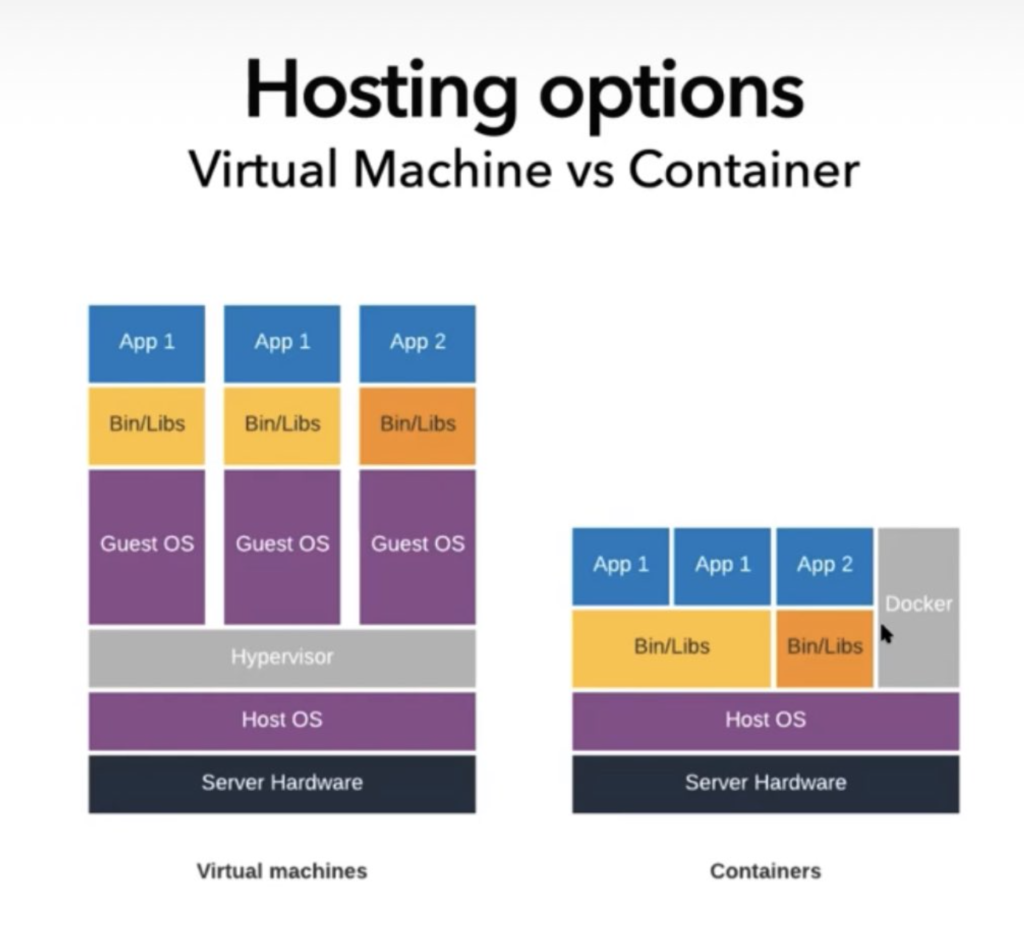
    This slide illustrates how docker saves space (and maintenance operations, updates…) of the guest operating system on each server. Everything is a container, so FileMaker Server containers can share an Operating System container (they can also NOT share it, in situations where we want to have some servers running FileMaker Server 19.2 (CentOS) and some running FileMaker Server 19.3 (Ubuntu).

    Virtual sever vs Container[/vc_column_text][/vc_column][/vc_row]

  • Sortie de FileMaker 19.3

    Sortie de FileMaker 19.3

    Claris l’avait annoncé : finies les traditionnelles grandes sorties du mois de mai. Le cycle “Agile” consiste en des mises à jour plus fréquentes, avec une répartition des nouveautés tout au long de l’année.

    Cette semaine, c’est la version 19.3 qui a été annoncée, et c’est une version importante même si surtout “technique”. Petit résumé des nouveautés les plus importantes :

    Du côté du serveur (FileMaker Server) :

    • FileMaker Server pour macOS tourne maintenant nativement sur processeurs M1. D’après les premiers tests, on observe un vrai gain de performances, ce qui tendrait à réabiliter le mac comme serveur FileMaker… s’il existait des mac serveurs. Malheureusement, il n’en existe plus, et donc à moins de vouloir vraiment héberger ses bases de données sur des mac mini, c’est une nouveauté louable mais qui ne va pas forcément changer le monde.
    • La version Linux change elle complètement de distribution : les versions 19.1 et 19.2 tournaient sur CentOS, mais malheureusement pour Claris RedHat a annoncé l’arrêt de CentOS seulement quelques jours après la sortie. Qu’à cela ne tienne, une distro Linux n’est pas si différente d’une autre, et Claris a pu relativement facilement changer son fusil d’épaule. La version 19.3 tourne donc désormais sur Ubuntu uniquement, ce qui oblige à mettre à jour l’OS si on veut mettre à jour FileMaker Server. Pour ceux qui se posent la question : cette opération sera transparente si vous utilisez notre service fmcloud.fm, car l’architecture docker nous permet de mettre à jour des centaines de serveurs en un clin d’œil, mais nous préférons attendre quelques jours après la sortie de la version finale pour nous assurer que tout fonctionne bien, ainsi qu’un éclaircissement sur les conditions d’utilisation (voir à la fin de ce billet).
    • Le retour du log viewer : on peut enfin à nouveau consulter les logs depuis la console d’administration du serveur sans avoir à les télécharger. La recherche est efficace, mais malheureusement on relèvera qu’il est impossible de copier du contenu en le sélectionnant à la souris ! Parfois on se demande quand même ce qui passe par la tête des développeurs pour faire une telle chose, mais enfin c’est une très bonne nouvelle. Peut-être un jour retrouvera-t-on également les graphiques qui permettaient de visualiser les appels distants et autres indicateurs depuis la console d’administration de FileMaker Server 16 ?
    • Les plug-ins sont désormais disponibles pour la Data API.
    • Il est désormais possible de créer un certificat SSL (CSR) depuis la console d’administration
    • L’admin API se voit ajouter des fonctionnalités qui n’étaient accessibles que par la ligne de commande.

    Attention : une modification pourrait engendrer quelques surprises : l’accès à une donnée de conteneur via Data API requiert désormais un token. Il n’est donc plus possible de fournir directement un API qui donnerait l’URL d’un fichier afin que le web service puisse utiliser cette URL pour aller chercher le fichier.

    Liste complète des nouveautés pour FileMaker Server

    Data migration tool

    L’outil de migration en ligne de commande est désormais compatible Linux (Ubuntu), ce qui signifie qu’il est possible de prévoir des automatisations côté serveur comme on pouvait le faire sous Windows et macOS. Ceci est une excellente nouvelle pour les éditeurs de logiciels sous FileMaker (SBA, Software Bundle Agreement). Bien entendu notre service fmcloud.fm proposera ce type de services dès que nous aurons validé la migration vers Ubuntu.

    Du côté du client (FileMaker Pro)

    Ici encore, il s’agit plutôt d’une mise à jour technique, mais pas des moindres !

    • sur macOS : FileMaker Pro est désormais une application universelle, qui tourne donc nativement (sans Rosetta) sur les processeurs M1. Gains de performances en perspective (voir le comparatif réalisé par notre confrère Vincenzo Menanno sur le blog de Beezwax)
    • Microsoft Edgesur Windows : c’est LA grosse nouveauté : le moteur de rendu des web viewers a été remplacé ! Enfin Internet Explorer 11 est abandonné au profit de Edge (Chromium). En termes de performances c’est le jour et la nuit, et surtout en termes de codage : on peut enfin utiliser un code propre pour afficher des contenus complexes ou simplement “modernes”.
      Attention toutefois : il n’est pas possible de choisir le moteur de rendu utilisé, et dans certains cas ce changement ne sera pas parfait. Un exemple tout simple auquel je me suis retrouvé confronté : Internet Explorer interprétait tout seul du HTML comme étant en UTF-8, ce n’est pas le cas de Edge. Il m’a donc fallu ajouter une balise meta au code HTML existant (<meta charset=”UTF-8″>). Pas une grosse affaire, mais le changement de moteur de rendu n’est pas un détail. Si vous utilisez beaucoup de web viewers, faites bien attention à tester votre application avant de faire la mise à jour en production.
    • les fonction d’écriture et de lecture de JSON (JSONSetElement et JSONGetElement) permettent désormais de travailler avec des clefs qui comportent des points (ce qui était la moindre des choses, certains appels à l’API Data de FileMaker même en exigeant !). Il faut pour cela utiliser des guillemets simples (du jamais vu en FileMaker). Par exemple pour extraire du JSON suivant :
      {"a":{"b.c":1234}}
      

      le contenu de “b.c”, il faut écrire :

      JSONGetElement ( $json ; "a['b.c']" )

      on dirait de l’écriture inclusive !

    Par ailleurs, de nombreux problèmes ont été réglés, comme des problèmes de formatage conditionnel de cases à cocher (mac) ou de survol de bouton (Windows).

    La liste complète des nouveautés et corrections est ici

    Malheureusement, trois loupés à signaler pour FileMaker Pro :

    • les mises à jour “in App” sur mac semblent de moins en moins fiables. Je vous recommande de télécharger l’application complète depuis votre lien de téléchargement (si vous ne l’avez plus et que vous avez acheté votre licence via 1-more-thing ou fmcloud.fm, il vous suffit d’écrire à malicence@1-more-thing.com). Il est vraiment dommage que ces problèmes de mises à jour interviennent si systématiquement. Maintenant que l’installation sur mac se fait par un simple glisser/déposer, j’en arrive à penser que Claris devrait plutôt renoncer aux mises à jour “in-App”, du moins s’ils ne trouvent pas le moyen de les rendre plus fiables
    • pour la millième fois (peut-être deux-millième, je suis lassé de compter), une mise à jour casse l’affichage des PDF stockés dans les conteneurs (quand ça n’est pas une mise à jour de Claris, c’est une mise à jour d’Acrobat ou du système d’exploitation : déjà ce mois-ci une mise à jour de Windows avait provoqué un problème similaire). Nous avons opté pour le développement d’un add-on, 1MT PDF Viewer, disponible depuis notre plateforme add-on-olam. D’ailleurs, je ne vous en ai pas encore parlé, il faut vraiment que je le fasse bientôt. Sachez déjà que c’est là que nous distribuons nos add-ons ainsi que ceux d’éditeurs tiers comme IU-Data. Pour revenir à ce bug, Claris assure être en train de travailler à une solution, il faut donc espérer que ce problème sera réglé dans les jours qui viennent.
    • Attention à un bug en particulier de cette version 19.3 : sous Windows, glisser un fichier vers un conteneur interactif (drag and drop) n’insère que la référence et n’ajoute pas réellement le fichier à la base de données. Gageons que ceci sera vite corrigé. En attendant, faites bien attention à insérer explicitement depuis le menu contextuel (clic droit)

    Vous constaterez l’absence d’une nouvelle version de FileMaker Go. Rien pour lui cette fois-ci.

    Pour finir (ou plutôt pour ne pas finir), un changement des conditions d’utilisation agite la communauté depuis la sortie. On y lit qu’il n’est désormais plus possible d’utiliser la Data API comme alternative à une licence utilisateur. Il faudrait donc en théorie payer une licence pour toute personne se connectant à l’API (alors que le trafic est déjà payant au-delà d’un certain seuil). Ce changement paraît pour le moins étonnant, mais nous attendons confirmation de la part de Claris. Nous mettrons cet article à jour dès que la chose aura été confirmée ou infirmée. Modifié le 8/7/2021 : Claris a précisé le sens de ce changement des conditions d’utilisation : il n’est pas permis de développer une application autonome alternative à FileMaker Pro et d’utiliser la Data API dans le but d’éviter l’achat de licence, mais vous avez toujours le droit de partager les données via la Data API avec les visiteurs de votre site web ou de votre boutique en ligne…

    Voilà, j’espère que cette lecture vous aura permis d’appréhender rapidement les nouveautés.

  • FileMaker Server sur Linux : la révolution fmcloud.fm 2.0

    FileMaker Server sur Linux : la révolution fmcloud.fm 2.0

    [vc_row bg_color=””][vc_column][vc_column_text]Il faut s’y habituer, avec les nouveaux cycles courts des sorties de FileMaker, les nouveautés importantes ne sont plus forcément à date fixe avec un nouveau numéro de version. Il ne suffit donc plus, pour qui s’intéresse à la plateforme FileMaker, de réserver un peu de temps au mois de mai pour s’enquérir des nouveautés de la version annuelle : il faut aussi faire très attention aux versions intermédiaires.

    C’est en effet dans une relative discrétion que Claris a annoncé mercredi 28 octobre une nouvelle version de FileMaker Server, la 19.1.2, qui est en soi une évolution majeure, mais qui permet aussi à des services d’hébergement de proposer des services et des performances totalement révolutionnaires.

    Linux !

    C’est bien entendu la grande nouvelle. Cette version, qui était disponible en beta depuis plusieurs mois, est désormais officielle. Elle est non seulement plus performante que ses cousines pour mac OS et Windows, mais surtout elle peut être déployée en docker.

    logo fmcloud.fmCela permet à des hébergeurs tels que nous —enfin, encore faut-il investir pour passer à ce genre d’architectures, et il semble qu’à ce jour nous soyons les seuls à l’avoir fait (🥇 – MISE À JOUR 16/12/2021 : notre service fmcloud.fm vient de se voir décerner le prix de la meilleure innovation par Claris ! le fameux Innovation Claris Excellence Award)— de proposer un service ultra-performant, ultra-portable (on peut déployer dans pratiquement tous les datacenters du monde) et… très peu cher. Par exemple, cela nous permet proposer un hébergement à 49€HT pour 5 utilisateurs, là où nos serveurs Windows (pour lesquels le nombre d’utilisateurs n’influence pas le prix, certes), commencent à 95€HT.

    Mais ici n’est pas le lieu pour vanter nos mérites, c’était juste pour vous donner un exemple. Si vous voulez voir nos tarifs et nos offres, c’est par ici :


    [su_button url=”https://www.1-more-thing.com/1-more-quote” target=”blank” background=”#c751587″ color=”#b60966″ size=”6″ center=”yes” radius=”0″ icon=”icon: database” id=”config”]Configurer mon serveur[/su_button]

    La version Linux apporte aussi une nouveauté très intéressante : OData, une norme moderne de traitement des requêtes vers une base de données. C’est finalement assez similaire à ce que propose l’interface ODBC/JDBC, mais permet de retourner les données en JSON ou en XML.
    Sans rentrer dans le détail, voici la documentation.

    Également, l’authentification AD FS est disponible pour la version Linux.

    En revanche, une fonctionnalité importante des versions pour macOS et Windows n’est pas reproduite en version Linux (ou plus exactement est désactivée) : la publication web personnalisée (PHP/XML). Pour passer à Linux, il vous faudra passer par Data API ou à OData. Si vous n’êtes pas à l’aise là-dessus, nous pouvons vous aider. Après avoir fait migrer plusieurs dizaines d’applications, nous sommes rompus à l’exercice, et c’est finalement étonnamment rapide.

    Autres points importants (je garde le meilleur pour la fin, vous êtes obligés de tout lire 🙂 )

    Quelques mises à jour techniques tout d’abord :

    • Support d’OpenSSL 1.1.1g
    • Compatibilité avec Tomcat 8.5.55
    • Il est désormais possible de gérer sa licence depuis la console d’administration du serveur.

    Mais surtout…

    • Les mises à jour de FileMaker Server sont maintenant en fait de vraies réinstallations… qui préservent les paramètres ! Comme nos clients d’hébergement le savent peut-être, nous étions les seuls à maîtriser la mise à jour avec conservation des paramètres, ce qui nous permettait de proposer à nos clients des mises à jour facilitées (beaucoup d’astuce et d’espièglerie nous avaient permis de percer les secrets de FileMaker Server ;)), mais désormais tout un chacun peut mettre à jour en confiance.
    • Un nouveau système de sharing lock permet de bien meilleures performances sur certaines actions, notamment les recherches et l’indexation
    • Script serveur de vérification de toutes les bases de données
    • Script serveur de vidage du cache ! (ça c’est très intéressant pour les serveurs très sollicités qui donnaient des signes de ralentissement après quelques jours/semaines sans redémarrage)
    • Enfin, cette nouvelle intéressera particulièrement les développeurs : les tris s’effectuent maintenant sur le serveur quand c’est possible (quand FileMaker décide tout seul que c’est plus intéressant de trier sur le serveur, en fonction de la quantité de données, de l’occupation du serveur… vous ne pouvez pas contrôler quand le tri sera effectué sur le serveur ou sur le client). C’est très efficace pour un tri sur une table locale, mais d’après nos tests cela ne fonctionne pas sur les enregistrements liés.


    Comme vous le voyez, cette 19.1.2 est la plus importante évolution de FileMaker Server depuis très longtemps.

    Je vous invite à lire les notes de version et à suivre les liens, c’est très instructif, ainsi que ce précieux document sur les améliorations de performances.

    [/vc_column_text][/vc_column][/vc_row]

  • FileMaker Server on Linux: the fmcloud.fm 2.0 revolution

    FileMaker Server on Linux: the fmcloud.fm 2.0 revolution

    You have to get used to it, with the new short release cycles of FileMaker, important new features are no longer necessarily on a fixed date with a new version number. It is therefore no longer enough, for those interested in the FileMaker platform, to set aside some time in May to inquire about the new features of the annual version: one must also pay close attention to the intermediate versions.
    It is indeed in a relative discretion that Claris announced on Wednesday, October 28th a new version of FileMaker Server, the 19.1.2, which is in itself a major evolution, but which also allows hosting services to offer totally revolutionary services and performances.

    Linux!

    This is of course the big news. This version, which had been available in beta for several months, is now official. Not only is it more powerful than its cousins for mac OS and Windows, but above all it can be deployed as a docker.
    Super fast FileMaker hosting on Linux servers
    This allows hosting providers such as us – well, you still need to invest in order to switch to this kind of architecture, and it seems that we are the only ones to have done so to date (🥇) – to offer a high-performance, ultra-portable service (it can be deployed in virtually any data center in the world) and … very inexpensive. For example, this allows us to offer hosting at $59 for 5 users, where our Windows servers (for which the number of users does not influence the price, of course), start at $99.
    But this is not the place to praise our merits, it was just to give you an example. If you want to see our prices and offers, it’s this way:
    [su_button url=”https://www.1-more-thing.com/1-more-quote” target=”blank” background=”#c751587″ color=”#b60966″ size=”6″ center=”yes” radius=”0″ id=”config”]Configure my server[/su_button]
    The Linux version also brings a very interesting new feature: OData, a modern standard for processing queries to a database. Quite similar to the ODBC/JDBC gateway, but with a JSON or XML output.
    Without going into detail, here is the documentation.
    Also, AD FS authentication is available for the Linux version.
    On the other hand, an important feature of the macOS and Windows versions is not reproduced in the Linux version (or more precisely, it is disabled): custom web publishing (PHP/XML). To switch to Linux, you will have to go through Data API or OData. If you are not comfortable with this, we can help you. After migrating dozens  of applications, we’re used to it, and it’s finally a surprisingly fast process.

    Other important points (I’m saving the best for last, you have to read everything 🙂 )

    Some technical updates first of all:

    • OpenSSL 1.1.1g support
    • Compatibility with Tomcat 8.5.55
    • It is now possible to manage your license from the server administration console.

    But above all…

    • FileMaker Server updates are now real re-installations… that preserve the settings! As our hosting customers may know, we were the only ones who mastered updating with parameters preservation, which allowed us to offer our customers easy updates (a lot of tricks and mischief had allowed us to unlock the secrets of FileMaker Server ;)), but now anyone can update with confidence.
    • A new system of sharing lock allows much better performance on certain actions, notably searches and indexing.
    • Server script for checking all databases
    • Cache dump server script! (this is very interesting for very busy servers that were showing signs of slowing down after a few days/weeks without rebooting)
    • Finally, this news will be of particular interest to developers: Sorting is now done on the server when possible (when FileMaker decides on its own that it is more interesting to sort on the server, depending on the amount of data, server occupancy… you can’t control when the sorting will be done on the server or on the client). It is very efficient for sorting on a local table, but according to our tests it doesn’t work on linked records.
    As you can see, this 19.1.2 is the most important evolution of FileMaker Server in a very long time.
    I invite you to read the release notes and follow the links, it is very informative, as well as this invaluable document on performance improvements (somehow difficult to find on the Knowledge Base).
  • FileMaker 19: get a list of IDs with Execute FileMaker Data API

    FileMaker 19: get a list of IDs with Execute FileMaker Data API

    [WARNING: this video is for advanced developers only and does not explain the details of the technique. It’s here to share an idea only, not code]


    One of my favorite features in FileMaker 19 is the new, undocumented script step, Execute FileMaker Data API.

    The FileMaker Data API used to be a FileMaker Server only feature, used to integrate FileMaker data to a web service or a workflow. It is now available on the client side (FileMaker Pro) !

    As I already wrote, it could be improved and I hope it will be in later releases, but it’s already a game changer.

    Today I’m sharing a technique based on it, hope I made it understandable.

    You can skip the long intro where I explain WHY I’m doing this by going directly to 5:40.


  • FIleMaker 19 : Obtenir une liste d’identifiants avec Exécuter FileMaker Data API

    FIleMaker 19 : Obtenir une liste d’identifiants avec Exécuter FileMaker Data API

    [ATTENTION: cette video en Anglais est réservée aux geeks :). Elle n’explique pas les détails de la technique. Elle n’est là que pour partager une idée, pas du code prêt à l’emploi]


    Une de mes fonctionnalités favorites de FileMaker 19 est la nouvelle instruction de script, non documentée, Exécuter FileMaker Data API.

    Comme je l’ai déjà écrit, elle pourrait être améliorer et j’espère qu’elle le sera dans les prochaines versions, mais c’est déjà en l’état une petite révolution.

    Aujourd’hui je partage une technique qui repose sur elle. J’espère avoir réussi à la rendre compréhensible.


    Si la longue introduction où j’explique POURQUOI j’aboutis à cette technique vous ennuie, vous pouvez vous rendre directement au time code 5:40.

  • FileMaker 19 : entrée dans un nouveau monde

    FileMaker 19 : entrée dans un nouveau monde

    [vc_row bg_color=””][vc_column][vc_column_text]FileMaker 19 vient de sortir, et il y a beaucoup à dire, tant sur les nouvelles fonctionnalités que sur l’évolution de la plateforme en général.
    Plutôt que de publier comme nous le faisons d’habitude une longue vidéo, nous avons pensé qu’un article de fond avait cette fois-ci plus de sens.

    Quelques éléments de contexte tout d’abord. Tout a changé cette année chez Claris, à commencer par le nom de la société, encore FileMaker Inc. il y a moins d’un an. FileMaker 19 est donc la première sortie majeure depuis le changement de nom, mais aussi et surtout depuis l’arrivée d’une nouvelle équipe dirigeante, dont Brad Freitag (CEO), et Srini Gurrapu (Vice President of Products & Design) sont les membres plus visibles (mais il y a aussi du changement aux niveaux marketing et commercial)… bref, beaucoup a changé, et la baseline —a priori un peu naïve— de Claris “Anything is possible” prend en fait son sens.

    En quelques mois, tout ce qui était impossible est devenu incontournable, donc possible.

    Les effets sont tellement nombreux et tellement enthousiasmants qu’on ne pourrait les lister tous, mais disons quelques mots sur les cycles de développement de la plateforme.

    Cycles de développement

    Srini Gurrapu, ClarisTout d’abord, il a fallu environ 28 secondes à Srini Gurrapu pour comprendre l’anachronisme que constituait la maintenance des versions Windows et mac OS de FileMaker Server. Les dépendances à Java et à ses implémentations rendent cela très coûteux, et une des premières choses annoncées à la DevCon était qu’on irait vers un serveur unique, ce que Romain Dunand et moi-même avions bien compris comme signifiant une version Linux. Ce point avait été confirmé par le même Srini lors de la FM Conf, en France en 2019.


    Donc sur le serveur, nous disposons maintenant —pour les tests uniquement à ce stade— d’une version Linux en plus des versions mac OS et Windows, et il est probable que ces deux dernières soient de l’histoire ancienne dans quelque temps [EDIT: la version Linux est désormais officielle. Nous avons annoncé le jour de la sortie notre service d’hébergement FileMaker révolutionnaire : fmcloud.fm. Non seulement nous utilisons la version Linux, mais sur architecture Docker, ce qui change tout (nous y reviendrons)]. Cela ne signifie pas que vous ne pourrez plus installer un FileMaker Server sur un Mac ou un PC sous Windows, mais vraisemblablement l’installation inclura une machine virtuelle ou dockers Linux (Cent OS est mentionné, mais d’autres distributions peuvent être utilisées).

    Sur les cycles de développement a proprement parler, FileMaker 19 est annoncée comme la dernière version numérotée. À partir de maintenant, on devrait avoir une sortie trimestrielle et non plus annuelle. La prochaine version devrait donc être la 2020.1, puis on aura 2020.2… Cela permet à Claris de diffuser des fonctionnalités beaucoup plus rapidement, et y compris dans un état “preview” afin de recueillir des feed-back d’utilisateurs plus tôt dans le cycle. C’est par exemple déjà le cas avec la fonctionnalité de création d’Add-ons, présente dans la version 19 mais susceptible de changer (et pleine de bugs d’ailleurs).

    On passe donc d’un cycle “à l’ancienne”, avec des fonctionnalités figées très tôt, un grand raout au mois de mai avec le besoin que les fonctionnalités soient suffisamment “bling-bling” pour que le marketing puisse en faire quelque chose, à des livraisons beaucoup plus agiles et des fonctionnalités plus adaptables et encore plus proches des besoins réels.[/vc_column_text][vc_column_text]

    Ecosystème

    La première chose qu’on remarque, c’est peut-être le changement d’icône. Voilà près de 30 ans que FileMaker est identifiable par un dossier en carton (ici l’icône de FileMaker 2.0, en 1992) [NB : les puristes —pour ne pas dire David Julot ;)— me feront remarquer que FileMaker 3 avait commis une infidélité], et d’un coup d’un seul cette image est abandonnée au profit d’une variante du logo de la société éditrice, Claris.

    FileMaker 2.0

    Il faut bien prendre en compte ici l’aspect stratégique de la chose : Claris n’est plus uniquement l’éditeur de FileMaker, elle a désormais d’autres cordes à son arc : Claris Connect, dont je reparlerai plus bas, et FileMaker Cloud. Ces deux derniers faisant de Claris une société de services en plus d’être un éditeur.

    Personnellement, j’aurais aimé que l’on pousse la logique jusqu’à changer le nom du produit. FileMaker, le “faiseur de fichier” (ou — littéralement— le faiseur d’embouteillage en néerlandais, ce qui est très vendeur…), n’évoque rien aux générations n’ayant pas connu un index papier. Tiens, d’ailleurs, vous souvenez-vous de l’infidélité commise par FileMaker 3.0 sus-mentionnée ?

    FileMaker Pro 3.0

    Donc quitte à changer, j’avoue que j’aurais été content qu’on se débarrasse aussi de cette association avec un monde révolu, qui vaut d’ailleurs souvent des remarques du genre “tiens, FileMaker ! ça existe encore ?” par des personnes ayant connu le logiciel au millénaire précédent. Mais ce n’est pas ce qui a été décidé. Passons donc à la suite.

    À propos de changement de nom, l’avez-vous remarqué ? FileMaker Pro Advanced a disparu, on parle maintenant de FileMaker Pro (le logiciel avait été unifié lors de la sortie de FileMaker 17, mais on avait opté -étrangement je trouve- pour le nom “Advanced”). Peut-être était-ce dans un premier temps pour que personne ne croit avoir perdu au change, mais quitte à garder ce nom antédiluvien, autant garder celui que tout le monde connaît : FileMaker Pro. C’est chose faite en 19.

    Autre point très important à noter : la fin de la compatibilité de FileMaker Pro avec les versions 32 bit de Windows. La plateforme FileMaker achève donc sa transition : c’est 64bits ou rien, côté serveur comme côté client. Là encore, ce sont des versions de moins à maintenir, et plus de ressources pour le développement et l’innovation.

    Probablement pour la même raison, la fenêtre de compatibilité a été réduite. Jusqu’à présent, le serveur supportait les clients jusqu’à 2 version antérieures ou postérieures (les clients 14 à 18 pouvaient par exemple se connecter à un serveur 16. Or FileMaker Server 19 n’est pas compatible avec les clients FileMaker Pro Advanced 17, et inversement.

    Le Runtime a disparu, comme annoncé il y a déjà 5 ans. Il n’est donc plus possible de distribuer des applications autonomes mono-utilisateur sur Mac et Windows. Mais les runtime existants ainsi que les copies de FileMaker 18 n’ont pas disparu dans la nuit, donc il reste encore un peu de temps aux éditeurs d’applications “runtime” pour se retourner. Notamment, rappelons que le iOS SDK permet de compiler des applications pour iOS.[/vc_column_text][vc_column_text]

    Premières impressions

    Les changements les plus immédiatement visibles sont réservés à la version mac. Fini l’installateur à l’ancienne : on glisse simplement l’application dans le dossier Applications, et c’est parti. Petit détail induit : pour ceux qui comme moi travaillent en Anglais sur un mac OS en français, il faut passer l’étape de la validation. Autrement dit : avant de farfouiller dans le contenu du paquet pour déplacer le dossier fr.lproj, il faut d’abord lancer une fois l’application en français, sans quoi la validation échouera.

    Autre point : le Dark mode. Pour les adeptes du mode sombre de mac OS, l’ensemble des interfaces de FileMaker -à l’exception du graphique des liens- a été adapté pour se conformer. Une fonction de calcul permet de savoir si l’application tourne en Dark mode ou non : Obtenir ( ApparenceSystème ). Personnellement, au-delà des considérations esthétiques, j’ai adopté le mode sombre pendant quelques mois pour pouvoir rapporter des problèmes à Claris, mais j’avoue avoir eu l’impression de recouvrer la vue en réactivant le mode clair. Malgré tout, nous avons plusieurs clients qui travaillent dans des environnements sombres (salles de projections, studios d’enregistrement…), et qui seront ravis de cette évolution.
    Autre bonne nouvelle associée : pour faire cela, Claris a été obligé de moderniser certaines interfaces, et plusieurs générations de boutons aux styles divers ont (enfin !) été uniformisées (par exemple la fenêtre de gestion des modèles).

    Nouveautés

    Les nouveautés sont très nombreuses et ont pour certaines d’entre elles des implications très importantes. Si vous êtes en train de lire ce long post de blog sur le site de 1-more-thing, c’est parce que vous savez que bien que passionnés par FileMaker, nous conservons une liberté de ton et un regard critique. Aussi vous trouverez dans les explications ci-dessous, comme dans nos habituelles vidéos, des regrets ou des critiques, mais sachez que dans l’ensemble nous sommes extrêmement enthousiastes à propos de cette version.
    J’aborderai ces nouveautés dans l’ordre d’importance, ce qui est bien sûr très subjectif. Toutefois, je regrouperai les fonctionnalités plus orientées FileMaker Go à la fin.

    Add-ons

    Cette fonctionnalité est en “preview”, entendez par là qu’elle n’est pas exempte de bugs, et qu’elle n’a pas encore livré tout son potentiel. Mais cette fonction va révolutionner complètement la manière des concevoir des applications FileMaker.

    Présents à titre d’exemple depuis FileMaker 17, les add-ons peuvent maintenant être conçus par des développeurs tiers ou par vous-mêmes. En mode modèle, on peut simplement glisser un module sur l’interface depuis le troisième onglet du volet gauche du mode modèle. Concrètement, on peut intégrer en quelques secondes un module de paiement, un calendrier, un éditeur de texte…
    Dès maintenant, je vous encourage à “bookmarker” notre page dédiée.

    Un nouveau pas de script, Save a copy as Add-on package, non documenté car en “preview”, est là pour créer un Add-on à partir d’une fenêtre ouverte.

    Au niveau des regrets —qu’il est encore une fois un peu tôt pour avoir, la fonctionnalité n’étant qu’en “preview”— on notera :

    • impossibilité de partager certaines ressources entre add-ons (si deux add-ons utilisent la même fonction, il faudra l’importer deux fois)
    • pas de mécanisme de mise à jour (si l’éditeur d’un add-on sort une nouvelle version)

    Intégration Javascript

    Deux nouvelles fonctionnalités concernent javascript : le pas de script Exécuter JavaScript dans Web Viewer et la possibilité depuis Javascript d’exécuter un script FileMaker : FileMaker.PerformScript

    Intrinsèquement liée à la fonctionnalité des add-ons car permettant d’utiliser Javascript comme interface de composants, on peut toutefois regretter que dans cette implémentation :

    • Javascript ne puisse être exécuté que dans un web viewer. Il serait tellement pratique et puissant de pouvoir utiliser Javascript dans un calcul ou un script indépendant de l’interface. Ainsi limité, on ne peut pas tirer profit de cette nouvelle possibilité dans les scripts serveur. Heureusement, il existe des plugins tiers pour ça (dont l’excellent MBS)
    • La commande FileMaker.PerformScript ne permet pas de contrôler la reprise d’un script en pause en FileMaker. C’est extrêmement dommage pour une programmation synchrone, dans laquelle un script appelant, en pause, attend le résultat d’une action faite par l’utilisateur dans un web viewer. [EDIT : la version 19.2 ajoute une fonction qui comble ce manque. FileMaker.PerformScriptWithOptions]
    • Enfin, toujours pas de nouvelles de LA demande de tous les développeurs depuis l’introduction des web viewer en version 8.5 (2006) : la possibilité d’obtenir le contenu d’un web viewer après exécution du javascript avec la fonction ObtenirAttributObjetModele.

    Ouverture d’un fichier par défaut

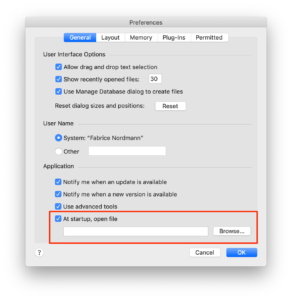
    Default fileÇa c’est le genre de petites choses qui changent tout. Déjà présente en version 18, mais réservée aux installations automatisées, une nouvelle préférence fait son apparition dans l’interface.
    Elle permet de configurer FileMaker Pro pour ouvrir systématiquement le même fichier dès le lancement. Une très grande majorité des utilisateurs de FileMaker utilisent toujours la même application personnalisée. Voici quelque chose qui leur simplifiera la vie.

    Petits regrets :

    • on ne peut toujours pas définir ce réglage par script, il faudra donc passer sur chaque machine (sauf en cas d’installation automatisée)
    • comme dans la fenêtre d’ouverture à distance, le chemin d’un fichier distant s’exprime en fmnet:/serveur/fichier et ne convertit pas une éventuelle URL en fmp://serveur/fichier. On n’est donc pas encore entièrement débarrassé de ces explications compliquées pour un utilisateur final. Un petit mémo ici, sur notre portail de support.


    Sélection de modèle

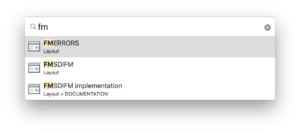
    Layout Quick OpenAutre point qui va cette fois-ci changer la vie des développeurs : la sélection d’un modèle par moteur de recherche.

    En mode modèle, utilisez la combinaison de touches cmd-alt-K (mac OS) ou ctrl-alt-K (Windows) pour activer un moteur de recherche permettant de sélectionner un modèle et de vous y rendre rapidement. La qualité de vie des développeurs sous Windows en sera grandement améliorée.


    Execute FileMaker Data API

    Ce pas de script, qui fait son entrée de manière très discrète puisque non mentionné dans la documentation (!) est en soi une petite révolution.

    Il permet d’exposer l’API Data au moteur de calcul de FileMaker. Autrement dit, si vous savez créer une requête en JSON pour l’API Data, vous savez aussi le faire au sein de FileMaker Pro (c’était préalablement réservé à FileMaker Server). Dans bien des cas, cela peut remplacer (avantageusement) la fonction ExecuteSQL.

    Plutôt que de décrire dans le détail ce pas de script, je vous mets en lien un poste de blog de Todd Geist qui a remarquablement synthétisé.

    https://www.geistinteractive.com/2020/05/20/filemaker-19-execute-filemaker-data-api-script-step/


    Malheureusement, et bien que je sois convaincu qu’il s’agisse d’un immense pas en avant (je serais prêt à parier que ce pas de script sera utilisé de manière intensive dans nos applications), il y a là encore matière à regrets.

    • Tout d’abord, il a été décidé d’implémenter cette fonctionnalité en tant que pas de script uniquement et pas en tant que fonction de calcul. Quel dommage ! Nous nous retrouvons donc avec ExecuterSQL qui est une fonction de calcul dont l’objet de la requête est la table et sans notion de contexte, et Execute FileMaker Data API qui est un pas de script qui requête un layout (modèle), et donc avec une notion de contexte. Faites votre choix ! Il aurait été tellement merveilleux de pouvoir requêter un contexte au sein d’un calcul !
    • D’un autre côté, la grosse limite de la fonction ExecuterSQL, c’est qu’elle ne prend en charge que la lecture (SELECT), et ce au prétexte que c’est une fonction, et donc qu’elle ne doit pas avoir d’effet de bord (passons sur le fait que l’API plugin permet depuis très longtemps à un plugin de contourner cela…). Et donc, l’avantage d’être un pas de script aurait pu être de permettre l’écriture ou l’exécution de scripts, ce que permet l’API Data. Et bien non ! Là encore, ce nouveau pas de script est limité à la lecture. On pourrait se dire que, si l’on a activé l’API Data sur le serveur et que les données entrantes ne sont pas comptabilisées dans la consommation de l’API (limitée en fonction de votre licence), il suffit pour cela d’utiliser Insérer depuis une URL pour poster des modifications de données. Ce serait oublier que la réponse faite par la Data API est elle une donnée sortante et est donc comptabilisée. Cela ne peut donc malheureusement pas être un mode viable de remplacement des écritures dans la base de données, sauf trafic très limité. Bref, on est passé à un cheveu d’une révolution, mais…

    Mais on peut aussi utiliser cette nouveauté pour récupérer une liste d’identifiants.

    Nombre de pages et notation scientifique

    Je ne vais pas faire long sur ces deux points. Ils arrivent avec une bonne vingtaine d’années de retard, ce qui nous a laissé tout le temps de trouver des contournements à ces manques, mais enfin… on peut enfin afficher le nombre total de pages d’un document imprimé ou d’un PDF sans recourir à des “trucs” et astuces. Également, on peut, au niveau du modèle formater un nombre au format notation scientifique (en puissances de 10 donc)

    Les fenêtre carte dans Web Direct

    Le titre dit tout. Les fenêtres cartes étaient déjà gérées mais occupaient toute la fenêtre du navigateur. Désormais on a le même comportement en Web Direct que FileMaker Pro. J’avoue que ça n’était pas un sujet qui me préoccupait beaucoup. Tant qu’on n’aura pas des interfaces vraiment responsive (avec “reflow”) ou des déclencheurs onObjectMouseOver, il me semble que Web Direct ne pourra pas faire illusion en termes d’interface. C’est toujours très adapté pour un intranet, mais si on est exigeant sur l’UX, un développement personnalisé comme nous les réalisons maintenant avec un vrai front end en Vue.js, et l’API Data en backend donne des résultats incomparables, et pour des budgets somme toute très raisonnables. J’avoue donc ne pas parvenir à l’extase avec cette nouveauté, mais c’est tout de même clairement un progrès.

    Et du côté FileMaker Go…

    Les fonctionnalités ci-dessous ne sont pas toutes strictement réservées à FileMaker Go, toutefois c’est dans ce cadre là qu’elles sont plus pertinentes, c’est pourquoi je les ai mises en fin de liste. Mais ça ne signifie pas que ce ne soit pas important.

    Core ML

    Core ML est le framework d’Apple permettant assez facilement aux application iOS et macOS d’intégrer des modèles extrêmement complexes d’intelligence artificielle (IA).

    Ce qui est implémenté ici, ce sont les modèles dont le résultat est une chaîne de caractères (plus précisément : des données scalaires). Les modèles retournant, par exemple, une image ou un array multidimensionnel ne sont pas implémentés.

    Concrètement, les modèles les plus utiles seront à n’en pas douter ceux de reconnaissance d’objet ou de régression… de quoi tout de même proposer des choses très intéressantes, par exemple dans des applications d’inventaire ou de gestion d’entrepôts.

    La “fonctionnalité” tient en deux éléments : un pas de script : Configurer le modèle de Machine Learning, et une fonction de calcul : ComputeModel.

    La compatibilité indiquée dans la documentation est : Oui pour FileMaker Go, et Partielle pour FileMaker Pro et pour FileMaker Server. Cela nous rappelle que CoreML est une composante de macOS. Les versions Windows, Linux, ou peut-être un jour Android ne sont pas concernées.

    Lecture NFC (Near Field Communication)

    Voilà une fonctionnalité qui tombe à pic ! À l’heure où tout contact est appréhendé comme un risque majeur pour la santé, FileMaker Go se dote de la capacité d’interagir avec des objets à proximité. Ainsi, avec notamment la facilité d’implémenter un paiement par carte au moyen d’add-on (voir ci-dessus), on peut en plus très facilement lire une carte sans contact. Ce n’est qu’une des nombreuses applications possible avec NFC, et c’est vraiment très simple à faire grâce au pas de script Configurer lecture du protocole NFC. Attention, il faut rappeler que l’iPhone est arrivé très tard au NFC (l’iPhone 6 le proposait déjà mais le réservait aux paiement avec Apple Pay, et il a fallu attendre l’iPhone 11 pour pouvoir en faire autre chose, il faut donc s’assurer que le parc hardware est compatible).

    Raccourcis Siri

    En ces temps de confinement, il est rassurant de savoir qu’on peut toujours, en cas de solitude extrême, parler à Siri.
    Il est désormais possible de configurer un script pour qu’il soit accessible par l’application Raccourcis (Shortcuts).
    Bon, je vous avoue qu’à titre personnel je ne suis pas trop fan des interfaces vocales mais j’ai testé et ça marche bien.
    En cas de sortie dans l’espace, n’oubliez pas de configurer un raccourci Siri pour le script d’ouverture de la porte, on ne sait jamais.

    Hal 9000

    L’Univers et le reste

    Bien sûr il y a beaucoup de choses à dire sur les fonctionnalités listées ci-dessus. Nous reviendrons notamment longuement sur les Add-ons, mais encore une fois, c’est la direction prise qui est passionnante.
    Les Add-ons couplés à l’intégration de Javascript vont véritablement révolutionner la manière de créer des “custom apps” avec FileMaker. Jusqu’ici, on avait de belles longueurs d’avance sur d’autres plateformes comparables, mais il faut reconnaître que certaines avaient aussi leurs avantages, et notamment une architecture modulaire qui faisait défaut. Non seulement le retard sur ce point est en passe d’être comblé, mais on vient de reprendre sur d’autres points encore de l’avance. FileMaker devient difficilement contestable comme leader des plateformes low code.

    Claris Connect

    Je voudrais conclure sur un point passé presque inaperçu il y a quelques semaines : les nouveaux tarifs de Claris Connect. Lors de la sortie de Claris Connect en mars, nous qui l’avions testé pendant de longs mois et qui étions hyper enthousiastes sur le produit lui-même, étions, pour le dire gentiment, un peu gênés par les tarifs et les plans annoncés. Pour le dire moins gentiment et de manière concise : ces tarifs ne pouvaient absolument pas permettre à cette nouvelle plateforme d’automatisation et d’orchestration d’éclore et de devenir un standard du marché.
    Or il semble que nous n’ayons pas été les seuls à penser ainsi. Et c’est intelligemment que l’équipe de Claris a décidé de réagir rapidement. Des nouveaux tarifs ont été publiés, et rendent non seulement la plateforme très intéressante, mais en font également un outil complémentaire de FileMaker. En effet si vous êtes client de FileMaker, le tarif pour Claris Connect (FM Plus) est devenu vraiment très abordable. Ceci signifie que nous entrons vraiment dans un monde beaucoup plus modulaire, où des applications complexes peuvent s’assembler plus facilement, dont les composantes peuvent être plus simples, plus robustes, et dont la maintenance est encore mieux assurée…

    Après une version 18 un peu décevante, cette version 19 est un pas de géant !

    Si cet article vous a plu, n’hésitez pas à laisser un commentaire ci-dessous.

    Je vous rappelle que vous pouvez également sélectionner la licence FileMaker qui vous correspond le mieux grâce à notre petit module (développé en Web Direct !). Merci de passer par nous pour commander et gérer vos licences FileMaker ![/vc_column_text][/vc_column][/vc_row][vc_row bg_color=””][vc_column width=”1/1″][ish_button el_text=”Sélectionnez la meilleure licence” url=”url:https%3A%2F%2Fwww.1-more-thing.com%2F1-more-quote%2F||target:%20_blank|rel:nofollow” size=”big” align=”center” color=”color7″ text_color=”color4″][/vc_column][/vc_row]

  • FileMaker 19: Entering a New World

    FileMaker 19: Entering a New World

    [vc_row bg_color=””][vc_column][vc_column_text]FileMaker 19 has just been released, and there’s a lot to be said about both the new features and the evolution of the platform in general.
    Rather than publishing a long video as we usually do, we thought a feature article made more sense this time.

    A few background elements first of all. Everything has changed this year at Claris, starting with the company name, still FileMaker Inc. less than a year ago. FileMaker 19 is thus the first major release since the name change, but also and especially since the arrival of a new management team, of which Brad Freitag (CEO), and Srini Gurrapu (Vice President of Products & Design) are the most visible members (but there are also changes at the marketing and sales levels)… in short, a lot has changed, and Claris’ – at first sight a bit naive – baseline “Anything is possible” actually makes sense.

    In just a few months, everything that was impossible has become inevitable, therefore possible.

    The effects are so numerous and so exciting that we couldn’t list them all, but let’s say a few words about the platform’s development cycles.

    Development cycles

    Srini Gurrapu, ClarisFirst of all, it took Srini Gurrapu about 28 seconds to understand the anachronism of maintaining the Windows and Mac OS versions of FileMaker Server. Dependencies on Java and its implementations make it very expensive, and one of the first things announced at DevCon was that we would move to a single server, which Romain Dunand and I had understood to mean a Linux version. This was confirmed by the same Srini at the FM Conf in France in 2019.

    So on the server, we now have – for testing purposes only at this stage – a Linux version in addition to the mac OS and Windows versions, and it is likely that the latter two will be history in a while. This doesn’t mean that you won’t be able to install a FileMaker Server on a Mac or a Windows PC, but likely the installation will include a Linux virtual machine or docker (Cent OS is mentioned, but other distributions can be used).

    Regarding the development cycles themselves, FileMaker 19 is announced as the last numbered version. From now on, we should have a quarterly release instead of an annual one. So the next version should be 2020.1, then we’ll have 2020.2… This allows Claris to release features much faster, and even in a “preview” state in order to collect feedback from users earlier in the cycle. This is already the case with the Add-ons feature, present in version 19 but likely to change (and full of bugs by the way).

    So we’re moving from an “old-fashioned” cycle, with functionalities fixed very early on, a big shindig in May with the need for functionalities to be “bling-bling” enough for marketing to do something with them, to much more agile deliveries and functionalities that are more adaptable and even closer to real needs.[/vc_column_text][vc_column_text]

    Ecosystem

    Maybe the first thing you notice is the change of icon. For nearly 30 years, FileMaker has been identifiable by a cardboard folder (here the icon of FileMaker 2.0, in 1992) [NB: the purists—not to say David Julot ;)—will point out to me that FileMaker 3 had committed an infidelity], and suddenly this image is abandoned in favor of a variant of the logo of the publishing company, Claris.

    FileMaker 2.0

    We must take into account the strategic aspect of this departure. Claris has freed itself from the FileMaker girdle by adding new strings to its bow: Claris Connect, which I’ll talk about below, and FileMaker Cloud. These two last ones make Claris a service company in addition to being a publisher.

    Personally, I would have liked to have pushed logic to the point of changing the name of the product. FileMaker, the “file maker” (or—literally—the “traffic jams maker” in Dutch, a very catchy marketing statement …), doesn’t evoke anything to the generations that didn’t get to experience paper indexes. Incidentally, do you remember the infidelity committed by FileMaker 3.0 mentioned above?

    FileMaker Pro 3.0

    So, even if we have to change, I must admit I would have been happy to get rid of this association with a bygone world, which is often worth remarks like “Hey, FileMaker! Does it still exists?” by people who knew the software in the previous millennium. But that’s not what has been decided. So let’s move on.

    Speaking of name changes, have you noticed? FileMaker Pro Advanced has disappeared, we are now talking about FileMaker Pro (the software had been unified when FileMaker 17 was released, but we had opted – strangely I find – for the name “Advanced”). Maybe it was at first so people would not feel they were shortchanged. Nevertheless, must we keep such antediluvian name, it better be streamlined to the name everyone knows: FileMaker Pro. It’s done in 19.

    Another very important point to note is the end of FileMaker Pro’s compatibility with 32-bit versions of Windows. The FileMaker platform thus completes its transition: it is 64 bits or nothing, server side as well as client side. Again, these are fewer versions to maintain, and more resources for development and innovation.

    Probably for the same reason, the compatibility window has been reduced. Until now, the server supported clients up to 2 versions earlier or later (clients 14 to 18 could for example connect to server 16. However, FileMaker Server 19 is not compatible with FileMaker Pro Advanced clients 17, and vice versa.

    The Runtime has disappeared, as announced 5 years ago. It is therefore no longer possible to distribute single-user standalone applications for Mac or Windows. Yet, existing runtime as well as copies of FileMaker 18 have not disappeared overnight, so there is still some time for editors of “runtime” applications to pull around. Notably, let’s recall that the iOS SDK allows to compile applications for iOS.[/vc_column_text][vc_column_text]

    First impressions

    The mac users can experience changes right from the outset. No more old-fashioned installer: just drag the application into the Applications folder, and off you go. Small extra bit incurred for those who, like me, work in English on a French (or any localised version) Mac OS: you have to pass the validation step. In other words: before fumbling around in the package contents to move the fr.lproj folder, you have to run the application once in French first, otherwise the validation will fail.

    Another point: the Dark mode. For the followers of the Dark mode of Mac OS, all the FileMaker interfaces – except the relationship graph – have been adapted to conform. A calculation function is available to determine whether or not the application is running in Dark mode: Get (System Appearance). Personally, beyond aesthetic considerations, I adopted the dark mode for a few months to be able to report problems to Claris, but I confess that I had the impression of recovering my sight by reactivating the light mode. Nevertheless, we have several clients who work in dark environments (projection rooms, recording studios…), and who will be delighted with this evolution.

    As a rather pleasing collateral effect, to implement Dark mode, Claris has been forced to modernise some interfaces, and several generations of buttons with different styles have (finally!) been standardised (for example the Manage Layouts window).

    New features

    There are many new developments, some of which have very important implications. If you are reading this long blog post on 1-more-thing’s website, it is because you know that although we are passionate about FileMaker, we maintain a freedom of tone and a critical eye. Therefore, you will find in the explanations below, as we usually do in our videos, some regrets or criticisms. Notwithstanding, know that overall we are extremely enthusiastic about this version.

    I will discuss these new features in order of importance, which is of course, very subjective. Note that I will discuss FileMaker Go oriented features together at the end.

    Add-ons

    This feature is in “preview”, meaning that it is not bug free, and that it hasn’t delivered its full potential yet. But this feature will completely revolutionise the way FileMaker applications are designed.

    Introduced as an example since FileMaker 17, add-ons can now be designed by third-party developers or by yourself. In Layout mode, you can simply drag an add-on onto the interface from the third tab in the left pane of Layout mode. In concrete terms, you can integrate a payment module, a calendar, a text editor, etc. in a few seconds.

    From now on, I encourage you to bookmark our dedicated page.

    A new script step, Save a copy as Add-on package, undocumented because in “preview”, is there to create an Add-on from an open window.

    In terms of regrets—which it is once again a little early to have, the functionality being only in “preview”—we will note :

    • impossibility to share some resources between add-ons (if two add-ons use the same function, it will have to be imported twice)
    • no update mechanism (if the editor of an add-on releases a new version)
    • obligation to have at least one table in an add-on. Too bad, it would have been a good way to share a theme, or a set of custom functions…
    • no way (to my knowledge) to have some hidden or compiled code, or to implement a licensing system for add-ons.

    Javascript integration

    Two new features relate to javascript: the Execute JavaScript in Web Viewer script step and the ability to execute a FileMaker script from within Javascript: FileMaker.PerformScript

    Intrinsically linked to the functionality of the add-ons because it allows to use Javascript as a component interface, we can however regret that in this implementation:

    • Javascript can only be executed in a web viewer. It would be so convenient and powerful to be able to use Javascript in a calculation or script independent of the interface. Thus limited, one cannot take advantage of this new possibility in server scripts. Fortunately, there are third party plugins for that (including the excellent MBS)
    • The FileMaker.PerformScript command does not control resuming a paused script in FileMaker. This is extremely unfortunate for synchronous programming, in which a paused calling script waits for the result of a user action in a web viewer.
    • Finally, still no news of THE request from all developers since the introduction of web viewers in version 8.5 (2006): the possibility to get the content of a web viewer after javascript has been executed, with the GetLayoutObjectAttribute function.

    Opening a default file

    Default fileThese are the kind of little things that change everything. Already present in version 18, but reserved for scripted installations, a new preference appears in the interface.

    Use it to configure FileMaker Pro to always open the same file at startup. The vast majority of FileMaker users always use the same custom application. Here’s something that will make their lives easier.

    Small regrets:

    • you still can’t define this setting by script, so you’ll have to go on each machine (except in case of scripted installation)
    • in the remote open window, the path to a remote file is expressed as fmnet:/server/file and does not convert a possible URL to fmp://server/file. So we are not yet completely rid of these complicated explanations for an end user. A small memo here on our support portal.


    Layout quick selector

    Layout Quick OpenAnother point that will this time change the life of developers: the selection of a layout by search engine.

    In template mode, use the key combination cmd-alt-K (Mac OS) or ctrl-alt-K (Windows) to activate a search engine to select a layout and quickly navigate to it. This will greatly improve the quality of life for Windows developers.


    Execute FileMaker Data API

    This script step, which makes its entrance in a very discreet way since it is not even mentioned in the documentation (!) is in itself a small revolution.

    It exposes the Data API to the FileMaker Calculation Engine. In other words, if you know how to create a JSON query for the Data API, you know how to create a JSON query within FileMaker. In many cases, this can replace (advantageously) the ExecuteSQL function.

    Rather than describing this script step in detail, I link you to a blog post by Todd Geist who has remarkably synthesised it.

    https://www.geistinteractive.com/2020/05/20/filemaker-19-execute-filemaker-data-api-script-step/


    Unfortunately, and although I’m convinced that this is a huge step forward (I’d be willing to bet that this script step will be used extensively in our applications), there’s still cause for regret.

    • First of all, it was decided to implement this feature as a script step only and not as a calculation function. What a pity! So we find ourselves with ExecuteSQL which is a calculation function whose query object is the table and without any notion of context, and Execute FileMaker Data API which is a script step that queries a layout (template), and therefore with a notion of context. Make your choice! It would have been so wonderful to be able to request a context from within a calculation! Well, then if the calculation engine is not able to evaluate from an unrelated context it’s a good reason to go for a script step but…
    • On the other hand, the big limitation of the ExecuteSQL function is that it only supports reading (SELECT), on the pretext that it’s a function, so it shouldn’t have a side effect (let’s skip over the fact that the plugin API has been allowing a plugin to bypass this for a very long time…). And so, the advantage of being a script step could have been to allow writing or executing scripts, which the Data API allows. Well no! Again, this new script step is limited to reading. One could say that, if you have activated the Data API on the server and the incoming data is not counted in the API consumption (limited according to your license), you just have to use Insert from URL to post data modifications. It would be forgetting that the response made by the Data API is an outgoing data and is therefore counted. Unfortunately, this can’t be a viable way to replace database queries, except for very limited traffic. In short, we’ve come very close to a revolution, but…

    Number of pages and scientific notation

    I’m not going to go long on those two points. They come with a good twenty years delay, which gave us plenty of time to find workarounds to these shortcomings, but finally… we can finally display the total number of pages of a printed document or a PDF without resorting to “tricks” and tips. Also, you can format a number in scientific notation format (in powers of 10) on the layout.

    Card windows in Web Direct

    The title says it all. Although card windows were already managed, they used to fill the whole browser window. Forthwith, we experience in Web Direct the behaviour we get in FileMaker Pro. I must admit that it wasn’t a subject that concerned me much. As long as we don’t have really responsive interfaces (with reflow) or onObjectMouseOver triggers, it seems to me that Web Direct won’t be able to create any illusions in terms of interface. It’s still very suitable for an intranet, but if you are demanding on the UX, custom development like we’re doing now with a real front end in Vue.js, and the Data API in the backend gives incomparable results, within very reasonable budgets. All in all, I’m not going to reach ecstasy with this new feature, but it’s clearly an improvement.

    As for FileMaker Go …

    The features below are not all strictly reserved to FileMaker Go, however it is in this framework that they are more relevant, that’s why I put them at the end of the list. Last but not least!

    Core ML

    Core ML is Apple’s framework that makes it relatively easy for iOS and macOS applications to integrate extremely complex artificial intelligence (AI) models.

    What is implemented here are models that result in a string (more precisely: scalar data). Models returning, for example, a multidimensional image or array are not implemented.

    In practice, the most useful models will undoubtedly be those of object recognition or regression… which will still offer very interesting things, for example in inventory or warehouse management applications.

    The “functionality” is made up of two elements: a script step Set up the Machine Learning model, and a calculation function ComputeModel.

    The compatibility indicated in the documentation is a Yes for FileMaker Go, and Partial for FileMaker Pro and FileMaker Server. This reminds us that CoreML is a component of macOS. Windows, Linux, or perhaps one day Android versions are not affected.

    Reading NFC (Near Field Communication)

    This is a very timely feature! At a time when any contact is considered a major health risk, FileMaker Go has the ability to interact with nearby objects. Thus, with the ease of implementing a card payment by means of add-ons (see above), it is also very easy to read a contactless card. This is only one of the many applications possible with NFC, and it is really very simple to do thanks to the Configure NFC protocol reading script step. Note that the iPhone arrived very late to NFC (the iPhone 6 already offered it but reserved it for payments with Apple Pay, and we had to wait for the iPhone 11 to be able to do something else, so we have to make sure that the hardware is compatible).

    Siri Shortcuts

    In these times of containment, it is reassuring to know that one can always, in case of extreme solitude, talk to Siri.
    It is now possible to configure a script to be accessible through the Shortcuts application.
    Well, I must admit that I’m not a big fan of voice interfaces but I tested it and it works well.
    In case of space outings, don’t forget to configure a Siri shortcut for the door opening script, you never know.

    Hal 9000

    The Universe and the rest

    Of course there is still a lot to say about the features listed above. We will revisit Add-ons at length. Once again, it is the direction taken that is exciting.
    Coupled with the integration of Javascript, Add-ons will truly revolutionise how FileMaker custom apps are created. Despite having a good head start on other comparable platforms, we have to admit that some of them also had their advantages, notably a modular architecture that was lacking. Not only is the delay on this point being made up, but we’ve just regained our lead on other points. FileMaker is becoming hardly questionable as a leader in low code platforms.

    Claris Connect

    I would like to conclude on a point that went almost unnoticed a few weeks ago: the new Claris Connect rates. When Claris Connect was released in March, we, who had tested it for many months and were very enthusiastic about the product itself, were, to put it mildly, a little embarrassed by the announced prices and plans. To put it less nicely and concisely: these prices could not in any way allow this new automation and orchestration platform to hatch and become a market standard.
    It appears that we were not the only ones to think this way. Claris team’s response was swift and and intelligent. New prices have been published, which not only make the platform very interesting, but also make it a complementary tool to FileMaker. Indeed, if you are a FileMaker customer, the price for Claris Connect (FM Plus) has become very affordable. This means that we are really entering a much more modular world, where complex applications can be assembled more easily, whose components can be simpler, more robust, and whose maintenance is even better assured…

    After a somewhat disappointing version 18, this version 19 is a giant step forward!

    If you liked this article, feel free to leave a comment below.

    I remind you that you can also select the FileMaker license that suits you best, thanks to our little module (developed in Web Direct!). Thank you for choosing us to order and manage your FileMaker licenses![/vc_column_text][/vc_column][/vc_row][vc_row bg_color=””][vc_column width=”1/1″][ish_button el_text=”Select the best license” url=”url:https%3A%2F%2Fwww.1-more-thing.com%2F1-more-quote%2F||target:%20_blank|rel:nofollow” size=”big” align=”center” color=”color7″ text_color=”color4″][/vc_column][/vc_row]

  • COVID-19-Triage disponible pour tous les hôpitaux

    COVID-19-Triage disponible pour tous les hôpitaux

    Devant le succès de l’application personnalisée dont nous vous parlions la semaine dernière, réalisée dans l’urgence pour l’hôpital Sint-Elisabeth de Zottegem (Belgique), nous avons décidé d’améliorer l’application et de la rendre disponible pour tous les hôpitaux.
    Elle s’appelle COVID-19-Triage, et permet de gérer un arbre de décision sur iOS. L’arbre de décision lui-même peut être édité sur n’importe quel éditeur de texte, puis communiqué au personnel soignant, qui peut naviguer dans cet arbre sur iPhone ou iPad.

    C’est tout simple, c’est gratuit, et apparemment ça aide à sauver des vies.

    C’est ici.

  • Covid-19 – arbre de décision pour un service hospitalier

    Covid-19 – arbre de décision pour un service hospitalier

    Comme vous le savez peut-être, 1-more-thing est particulièrement impliquée dans le combat contre le Covid-19. Nous avons notamment monté le projet 1app2recover dans le but d’aider les gouvernements à organiser une sortie du confinement quand ce sera possible.

    Mais il y a parfois des efforts plus directs et plus modestes par leur ampleur qui permettent d’aider très immédiatement les vrais héros de cette lutte : le personnel des services hospitaliers d’accueil des malades Covid-19.

    Hier matin, je trouve dans ma boîte mail un message de Chris Kubica (@chris_kubica), de join::table (@JoinTableTeam), un groupement qui met en relation des développeurs FileMaker avec des organisations sans but lucratif, pour participer à des projets bénévolement (pro-bono)

    Un consultant, Joop Verelzen, de GDPR, travaille auprès d’un hôpital a besoin d’aide pour un projet.

    Je me mets en relation avec lui, et il m’envoie cette photo :

    Hôpital : decision tree

    On y voit un médecin ou un infirmier qui a vraisemblablement décroché un poster du mur, avec un arbre de décision pour orienter les patients.

    On imagine comme la chose s’est faite dans l’urgence, mais aussi à quel point l’utilisation doit être contraignante, ne serait-ce que parce qu’il faut être devant le poster pour savoir quoi faire.

    Ni de une ni de deux, je me mets au travail, et une heure plus tard (ça va vite avec FileMaker) je renvoie à Joop ma copie : une application installable sur FileMaker Pro (que l’hôpital utilise déjà) ou sur FileMaker Go ou en Web Direct pour une mobilité dans le service.

    Elle permet au médecin de modifier l’arborescence facilement et de naviguer de manière très simple dans cet arbre.

    Ci-dessous une petite video sur la solution technique.

    Bien sûr si cette mini-application peut aider un autre hôpital, elle est disponible !

    PS : contrairement à ce que je croyais, l’hôpital en question est en Belgique et non aux Pays-Bas.

  • 1app2recover : l’initiative de 1-more-thing pour le déconfinement Covid-19

    1app2recover : l’initiative de 1-more-thing pour le déconfinement Covid-19

    Depuis l’explosion de l’épidémie de Covid-19 en Europe, nombreuses sont les initiatives du secteur du numérique qui contribuent à la lutte contre la pandémie ou ses effets.

    Certains partenaires de Claris (anciennement FileMaker Inc.) ont accepté de travailler bénévolement sur certains projets via l’initiative join::table ou à l’appel de Claris.

    Chez 1-more-thing, non seulement nous contribuons à certains de ces projets, mais nous avons également mis au point une solution, 1app2recover, que nous mettons à disposition des gouvernements.

    1app2recover vise à une reprise économique et sociale progressive en permettant les personnes à très faible risque (guéries ou immunisées) de reprendre une activité normale, et ce alors que le confinement est maintenu, voire comme c’est probable, durci.

    L’originalité de la solution est de répondre à cet enjeu colossal tout en respectant les lois sur la vie privée et les données personnelles (RGPD).

    Cette initiative illustre les valeurs qui sont les nôtres : nous sommes une entreprise impliquée dans la vie de la société, des technophiles certes, mais citoyens et attentifs à l’éthique. Comme bien souvent chez nos clients, notre apport est autant lié à notre vision qu’aux solutions techniques que nous apportons.

    Pour en savoir plus

    Nous avons publié un mini-site (avec vidéo et communiqué de presse), un compte Twitter (@1app2recover), et même une page Facebook ! N’hésitez pas à nous suivre et à partager !

  • FileMaker Inc. devient Claris

    FileMaker Inc. devient Claris

    Un petit mot en direct de la FileMaker DevCon, la conférence annuelle des développeurs FileMaker qui se tient cette année à Orlando, et à laquelle participent pour 1-more-thing Romain Dunand et votre serviteur.

    Brad Freitag, le nouveau CEO -qui avait occupé préalablement pendant six ans le poste de directeur des ventes— a fait quelques annonces fracassantes à l’occasion du keynote inaugural.

    La plus frappante est le changement de nom de la société FileMaker Inc. qui (re)devient Claris (le nom complet est Claris International Inc.). Il est important de noter que le nom du produit demeure FileMaker, ce changement de nom a donc un impact limité sur notre quotidien et celui de nos clients. Toutefois, cela représente une belle opportunité de marketing et de rafraichissement de l’image de notre plateforme, et cela lui donnera plus de visibilité.

    Giuliano Iacobelli
    Giuliano Icacobelli, fondateur de Stamplay & Fabrice Nordmann, 1-more-thing

    Mais la raison pour laquelle ce changement devait avoir lieu est en revanche extrêmement excitante : Claris aura désormais d’autres choses à vendre ! En effet, Brad Freitag a annoncé l’acquisition récente de Stamplay, une startup dont la technologie est parfaitement en ligne avec le positionnement “Workplace Innovation Platform” de FileMaker. Claris Connect, le nom sous lequel seront déclinés les produits de Stamplay permettra d’aller encore plus loin et plus vite dans l’orchestration de toutes les technologies et tous les services utilisés par une entreprise. Nous sommes absolument ravis de cette stratégie sur laquelle nous ne manquerons pas de revenir.


    Devcon Keynote Nutshell Console
    Brad Freitag, CEO de Claris, présente Marketplace et… Nutshell Console

    Enfin, nous avons eu le plaisir de voir notre produit, Nutshell Console, mis à l’honneur par Brad Freitag à l’occasion de l’annonce du Marketplace. Nutshell Console a d’ailleurs été cité plusieurs fois lors des sessions de la première journée, confirmant sa place de produit phare de cette saison de la grande série FileMaker. Pour fêter cela, Nutshell est d’ailleurs en promotion pendant la conférence (30% de réduction sur la première année avec le code fmdevcon19)

  • FileMaker Inc. becomes Claris

    FileMaker Inc. becomes Claris

    A quick note from Orlando, where 1-more-thing’s Romain Dunand and yours truly attend FileMaker DevCon’19, the annual FileMaker developer conference.

    Brad Freitag, the new CEO – who had previously held the position of sales manager for six years – made some sensational announcements at the inaugural keynote.

    The most striking is the name change of FileMaker Inc. which becomes (again) Claris (the full name is Claris International Inc.). It is important to note that the name of the product remains FileMaker, so this name change has a limited impact on our lives and those of our customers. However, this represents a great marketing opportunity and will refresh the image of our platform whilst giving it more visibility.

    Giuliano Iacobelli
    Giuliano Icacobelli, founder of Stamplay & Fabrice Nordmann, 1-more-thing.

    However, the reason for this change is extremely exciting: Claris will now have other things to sell! Indeed, Brad Freitag announced the recent acquisition of Stamplay, a startup whose technology is perfectly in line with FileMaker Software’s “Workplace Innovation Platform” positioning. Branded Claris Connect, Stamplay’s products will carry on enabling further and faster integration of all technologies and services used by companies. We are absolutely delighted with this strategy that we shall further discuss at some point.


    Devcon Keynote Nutshell Console
    Brad Freitag, CEO of Claris, presents Marketplace and … Nutshell Console

    Finally, we had the pleasure of seeing our product, Nutshell Console, honoured by Brad Freitag during the announcement of the Marketplace. Nutshell Console was also mentioned several times during the first day’s sessions, confirming its flagship position of this season’s FileMaker series. To celebrate, Nutshell is also being promoted during the conference (30% discount on the first year with code fmdevcon19)

  • dotfmp19

    dotfmp19

    [vc_row bg_color=””][vc_column][vc_column_text]As every year in June, the dotfmp unconference took place in Berlin last week, and as every year, it was the best FileMaker events for geeks.

    Thank you so much, Egbert, for making this event so interesting and pleasant.

    1-more-thing was there with 5 team members (Jean-Frédéric Struyven, Laurent Spielmann, Andries Heylen, Yann Trauchessec and myself)

    We saw of course a lot of good sessions and attended many open discussions, among which I’d mention some I considered eye-opening:

    And… of course we also presented some:

    • The coolest things you did this year: an open talk right at the beginning of the conference. Many people shared excellent experience and ideas during this unsession. It was really cool (I think)
    • Open talk about data validation. This was a completely improvised session following up a discussion that occurred during another “Open Cowboy Session”, held the previous day by Mads Chirstensen. And again the ‘unprepared’ and open shape of this session made it so interactive and interesting. Ian Jempson sent me this invaluable feed-back this morning:

    [/vc_column_text][/vc_column][/vc_row][vc_row color=”color15″ text_color=”color4″ bg_color=””][vc_column width=”1/1″][vc_column_text color=”color4″]

    Hi Fabrice
    Was nice to catch up with you at dotFMP.
    Also wanted to say that your session on data validation has proved helpful for me this morning as I get back to work. One of our tables has had the business rules change so many times over the years that the older records won’t validate anymore, so I’ve been doing a bit of refactoring of validations and going back to basics has simplified things nicely. Thanks for hosting so many great talks!
    Cheers
    Ian

    [/vc_column_text][/vc_column][/vc_row][vc_row bg_color=””][vc_column width=”1/1″][vc_column_text]

    • Andries held a session about OAuth implementations. He showed how he managed to tweet directly from FileMaker using OAuth.
    • ‘While Kevin isn’t here’: Sadly, Kevin Frank couldn’t make it to Berlin this year, but he had prepared a session about the new FileMaker 18 functions While and SetRecursion. So we agreed that I would take over and be his voice in Berlin. So yes Kevin! you were a Berliner.
      I presented those two functions but also derived to recursion in general in FileMaker. There was a lot to say after all. And thank you, Paul Jansen, for the fantastic idea!
    • Andries Heylen then presented a superb and dense session about Webhooks and APIs. He managed to make a lot of different concepts cristal clear.
    • Finally, I held a kind of closing jam session -I guess that’s how you call the last scheduled session, when everyone is already drinking beer ;-). It was an opportunity to present Nutshell Console together with its leading developer, Yann Trauchessec. If I can judge by the ratio attendees/sales, I think the product can be said attractive! thanks to all buyers, I hope you’ll enjoy it as much as I do. Oh! by the way, here is the feature request on Community that I tried to explain. Please support it if you liked it.

    Finally, I also want to say that it’s so fantastic to find people that can be fascinated by beautiful code such as Agnès Barouh’s functions, or Shaun Flisakowsky’s Tic-Tac-Toe. What a pleasure to share this passion for beauty :)[/vc_column_text][/vc_column][/vc_row]

  • dotfmp19

    dotfmp19

    [vc_row bg_color=””][vc_column][vc_column_text]Comme à chaque année, la dotfmp unconference a eu lieu à Berlin la semaine dernière et, comme à chaque année, ce fut le meilleur événement FileMaker pour les geeks.

    Merci beaucoup, Egbert, d’avoir fait en sorte que cet événement soit si intéressant et plaisant.

    1-more-thing y était, avec 5 membres de l’équipe (Jean-Frédéric Struyven, Laurent Spielmann, Andries Heylen, Yann Trauchessec et moi-même)

    Nous avons bien sûr vu beaucoup de bonnes séances et assisté à de nombreuses discussions ouvertes, parmi lesquelles je citerais certaines de celles que j’ai considérées comme révélatrices:

    Et bien sûr, nous en avons présenté quelques unes :

    • La chose la plus cool que vous ayez faite cette année: une discussion ouverte au tout début de la conférence. De nombreuses personnes ont partagé une excellente expérience et des idées au cours de cette session. C’était vraiment cool (je pense).
    • Discussion ouverte sur la validation des données. C’était une session complètement improvisée faisant suite à une discussion qui s’était déroulée lors d’une autre “Open Cowboy Session”, organisée la veille par Mads Chirstensen. Et encore une fois, la forme «non préparée» et ouverte de cette session l’a rendue très interactive et intéressante. Ian Jempson m’a envoyé ce précieux feedback ce matin :

    [/vc_column_text][/vc_column][/vc_row][vc_row color=”color15″ text_color=”color4″ bg_color=””][vc_column width=”1/1″][vc_column_text color=”color4″]

    Hi Fabrice
    Was nice to catch up with you at dotFMP.
    Also wanted to say that your session on data validation has proved helpful for me this morning as I get back to work. One of our tables has had the business rules change so many times over the years that the older records won’t validate anymore, so I’ve been doing a bit of refactoring of validations and going back to basics has simplified things nicely. Thanks for hosting so many great talks!
    Cheers
    Ian

    [/vc_column_text][/vc_column][/vc_row][vc_row bg_color=””][vc_column width=”1/1″][vc_column_text]

    • Andries a organisé une session sur les implémentations de OAuth. Il a montré comment il avait réussi à tweeter directement à partir de FileMaker en utilisant OAuth.
    • «Bien que Kevin ne soit pas là» : Kevin Frank n’a malheureusement pas pu se rendre à Berlin cette année, mais il avait préparé une session sur les nouvelles fonctions FileMaker 18 «While»et «SetRecursion». Nous avons donc convenu que je prendrais la relève et que je serais sa voix à Berlin. Alors oui, Kevin! vous étiez un berlinois.
      J’ai présenté ces deux fonctions, mais aussi touché à la récursivité en général dans FileMaker. Il y avait beaucoup à dire après tout. Et merci,  Paul Jansen, pour cette idée fantastique!
    • Andries Heylen a ensuite présenté une session superbe et dense sur les Webhooks et les API. Il a réussi à clarifier un grand nombre de concepts différents.
    • Enfin, j’ai organisé une sorte de jam session de clôture. J’imagine que c’est ainsi que vous appelez la dernière session planifiée, alors que tout le monde boit déjà de la bière ;-). C’était l’occasion de présenter Nutshell Console avec son principal développeur, Yann Trauchessec. Si je peux en juger par le ratio participants/ventes, je pense que le produit s’est révélé attrayant! merci à tous les acheteurs, j’espère que vous l’apprécierez autant que moi. Oh! au fait, voici la demande de fonctionnalité sur Community que j’essayais d’expliquer. S’il vous plaît la soutenir si vous l’avez aimé.

    Enfin, je tiens également à dire qu’il est si fantastique de trouver des personnes pouvant être fascinées par de beaux codes tels que les fonctions d’Agnès Barouh ou Tic-Tac-Toe de Shaun Flisakowsky. Quel plaisir de partager cette passion pour la beauté :)[/vc_column_text][/vc_column][/vc_row]

  • Quick Find: the forgotten feature

    Quick Find: the forgotten feature

    Released with FileMaker 11, more than 8 years ago in 2010, Quick Find is probably one of the most underestimated features in FileMaker.

    For some reason, there wasn’t even much emphasis in the product marketing when it was released. Platform evengelists would mention it as a ‘Google-like search engine within FileMaker’, product documentation said ‘search in all fields of current layout’, but it was never said clearly how powerful this feature is.

    And it is extremely powerful.

    First of all, let’s sum up the various implementations of Quick Find in the product.

    • Quick Find search field in the toolbar. This is probably the first thing one would mention while thinking about Quick Find: the Toolbar includes a search field where the user can type criteria and trigger the find hitting Enter. There’s already something to mention about it: this search field is available only in browse mode. It would, I think, make perfect sense to have it also in find mode. It is common to see users first think they want to find something and therefore switch to Find mode, then only to realise they could use Quick Find. They have then to go back to browse mode before they can use it, which is a bit odd and might be a reason why Quick Find isn’t as seamless as it could.
    • Perform Quick Find script step. Does the same as hitting enter while the search field is active, except the criteria can be specified. It is therefore trivial to build your own Quick Find interface, and it works in Find mode too!
    • In layout mode, Quick Find badges at the bottom right of layout objects. The Magnifying glass can be green or orange, depending on how fast FileMaker presumes the find will be. Basically, it’s green for indexed or indexable fields of current table, and orange for unindexed or related fields. Note that I wrote ‘layout object’ and not field: a text object including merge fields can be included in Quick Find index. Other types of objects can’t, even if they include layout level calculations (button bars, web viewers, tab panels) or merge fields (buttons).
    • In the inspector behaviour panel, a checkbox labeled ‘Include field for Quick Find’ is active when a field or a text object containing merge fields is active. Very unfortunately, FileMaker has decided from the beginning that every new field object added to the layout would be included by default in Quick Find. This is, from my point of view, the main reason why this feature is underestimated and, I would say, rather dangerous. Because the first Quick Find performed on a layout will trigger the indexing of all indexable fields included in the Quick Find, having all these fields included will cause a huge, unnecessary index. Quick Find is powerful because you can select which fields are included, but having them selected by default weakens the feature itself: who would like to search in a phone number or in a boolean in the context of a Quick Find? It ends up in returning irrelevant data, and causes the index to grow incredibly.
    • In the layout format dialog, a checkbox labeled ‘Enable Quick Find’, checked by default allows to disable Quick Find on the layout. The badges mentioned above are then greyed out, and the Quick Find search field is disabled in browse mode. Next to this checkbox, a button says ‘Reset Quick Find’, which basically will include all fields for Quick Find, because this is the default setting)
    • Finally, still in layout mode, in the View/Show menu, you can enable or disable the layout badges. By default they are disabled, which is a pity because this is your only chance to avoid having too many fields included in the Quick Find. These show options have to be adjusted before you upload the file on a server, otherwise you’ll have to set them again for every session.

    Tips and tricks

    Here are a few things you should know before we come to the core of this blog post

    • Quick Find doesn’t support operators like *, …, //, =, ==, etc.
    • There is no ‘constrain found set’ or ‘omit record’ equivalents. You can’t use Quick Find to fine tune a previously found set of records.
    • Error trapping is different for Quick Find than with a simple Perform Find. Namely, if you get a 401 error (no records found), the previous found set is preserved, whereas with Perform Find you end up with 0 (zero) record. So if you’re used to trapping the error with Get ( FoundCount ) = 0 instead of Get ( LastError ) = 401 , you’ll have to adapt your scripts for Quick Find.
    • Fields on the right hand side of the layout and therefore not visible in form and list views can be included in Quick Find. A very clear and easy way to manage fields that are included in Quick Find is to select all objects from the left (visible) part of the layout and uncheck the ‘Include field for Quick Find’ box, and on the right part, add a Quick Find zone with only the fields you want to search, and of course include them in Quick Find.
    • If your solution hides the toolbar completely and you’re sure the users won’t use the toolbar Quick Find search field, you can push this logic a bit further and disable Quick Find on the layout and create dedicated layouts with only the fields you want to perform Quick Find on. This way you’re sure than even if you add some fields to your main layout, they won’t be included in Quick Find, because it’s disabled there.

    Now the big thing

    But wait, didn’t I write that the power of Quick Find was underestimated? so where’s this power I was talking about?

    Well, it’s simply the way Quick Find does search. Because we’ve had the classic Find mode and Perform Find script step for so long, many overlooked the Quick Find feature thinking it was just like a find, but on many fields at a time.

    Say I have a Contact table with firstName, lastName, occupation, city, of which firstName is the only field not included in the Quick Find. And I’m looking for a plumber in Cincinatti. What you would do with the classic find is

    • go to find mode
    • enter ‘plumber’ in the occupation field
    • enter ‘Cincinnati’ in the city field
    • hit enter to perform the find

    In the old days, if one wanted to propose a ‘Google-like’ search (even before we’d heard of Google), he could add an indexed calculation field to the table like

    city & " " & lastName & " " & occupation

    and enter ‘plumber Cincinatti’ in find mode, and that’s because FileMaker considers individual words in the same field as criteria with an AND operator.

    But with Quick Find, you don’t have to create this field because what Quick Find does is NOT

    • go to find mode
    • enter ‘plumber cincinatti’ in lastName
    • new request (OR)
    • enter ‘plumber cincinatti’ in occupation
    • new request (OR)
    • enter ‘plumber cincinatti’ in city
    • perform find

    If it was this, then no records would be found because none of the fields contains the 2 words.

    What Quick Find does just cannot be done with Perform Find. It takes each word and does all possible combinations. So with ‘plumber Cincinatti’, it takes the first word (plumber) and finds all records where one of the 3 fields contains ‘plumber’ and then among those, it finds all records where one of the 3 fields contains ‘Cincinatti’. This explanation has nothing to do with HOW it does it (the process is probably very different from this). I’m only trying to explain WHAT it does.

    But the magic doesn’t stop here. This combinatory search also works with related records! So you can for instance search for ‘plumber Cincinatti approved supplier’ where ‘approved supplier’ is a value to be found in the related company table. The only thing you have to do is insert that field on the layout and make sure it’s included in the Quick Find.

    In the attached sample file, you will see a search engine that gets results from multiple tables. In the old days, you would have had to draw complex relationships with a bunch of ≤ and ≥ criteria, calculated fields and all. Look now how simple it is to perform Quick Finds, get the results to a global field and display the result with a simple relationship.

    I hope you learned something with this blog post. Please feel free to drop a line here under in the comments.

    [vc_row color=”color7″ text_color=”color4″ global_atts=”yes” style=”padding-x: 5px; padding-top: 25px; align: center; ” bg_color=””][vc_column width=”1/4″][ish_icon icon=”icon-download” align=”center”][/vc_column][vc_column width=”3/4″][vc_column_text global_atts=”yes” css_class=”btn btn-primary”]Download a sample file here. 1MT_QuickFind.zip

    Please share if you liked this post.[/vc_column_text][/vc_column][/vc_row][vc_row bg_color=””][vc_column width=”1/1″][vc_row_inner][vc_column_inner width=”1/1″][/vc_column_inner][/vc_row_inner][/vc_column][/vc_row]

  • Quick Find: the forgotten feature

    Quick Find: the forgotten feature

    Released with FileMaker 11, more than 8 years ago in 2010, Quick Find is probably one of the most underestimated features in FileMaker.

    For some reason, there wasn’t even much emphasis in the product marketing when it was released. Platform evengelists would mention it as a ‘Google-like search engine within FileMaker’, product documentation said ‘search in all fields of current layout’, but it was never said clearly how powerful this feature is.

    And it is extremely powerful.

    First of all, let’s sum up the various implementations of Quick Find in the product.

    • Quick Find search field in the toolbar. This is probably the first thing one would mention while thinking about Quick Find: the Toolbar includes a search field where the user can type criteria and trigger the find hitting Enter. There’s already something to mention about it: this search field is available only in browse mode. It would, I think, make perfect sense to have it also in find mode. It is common to see users first think they want to find something and therefore switch to Find mode, then only to realise they could use Quick Find. They have then to go back to browse mode before they can use it, which is a bit odd and might be a reason why Quick Find isn’t as seamless as it could.
    • Perform Quick Find script step. Does the same as hitting enter while the search field is active, except the criteria can be specified. It is therefore trivial to build your own Quick Find interface, and it works in Find mode too!
    • In layout mode, Quick Find badges at the bottom right of layout objects. The Magnifying glass can be green or orange, depending on how fast FileMaker presumes the find will be. Basically, it’s green for indexed or indexable fields of current table, and orange for unindexed or related fields. Note that I wrote ‘layout object’ and not field: a text object including merge fields can be included in Quick Find index. Other types of objects can’t, even if they include layout level calculations (button bars, web viewers, tab panels) or merge fields (buttons).
    • In the inspector behaviour panel, a checkbox labeled ‘Include field for Quick Find’ is active when a field or a text object containing merge fields is active. Very unfortunately, FileMaker has decided from the beginning that every new field object added to the layout would be included by default in Quick Find. This is, from my point of view, the main reason why this feature is underestimated and, I would say, rather dangerous. Because the first Quick Find performed on a layout will trigger the indexing of all indexable fields included in the Quick Find, having all these fields included will cause a huge, unnecessary index. Quick Find is powerful because you can select which fields are included, but having them selected by default weakens the feature itself: who would like to search in a phone number or in a boolean in the context of a Quick Find? It ends up in returning irrelevant data, and causes the index to grow incredibly.
    • In the layout format dialog, a checkbox labeled ‘Enable Quick Find’, checked by default allows to disable Quick Find on the layout. The badges mentioned above are then greyed out, and the Quick Find search field is disabled in browse mode. Next to this checkbox, a button says ‘Reset Quick Find’, which basically will include all fields for Quick Find, because this is the default setting)
    • Finally, still in layout mode, in the View/Show menu, you can enable or disable the layout badges. By default they are disabled, which is a pity because this is your only chance to avoid having too many fields included in the Quick Find. These show options have to be adjusted before you upload the file on a server, otherwise you’ll have to set them again for every session.

    Tips and tricks

    Here are a few things you should know before we come to the core of this blog post

    • Quick Find doesn’t support operators like *, …, //, =, ==, etc.
    • There is no ‘constrain found set’ or ‘omit record’ equivalents. You can’t use Quick Find to fine tune a previously found set of records.
    • Error trapping is different for Quick Find than with a simple Perform Find. Namely, if you get a 401 error (no records found), the previous found set is preserved, whereas with Perform Find you end up with 0 (zero) record. So if you’re used to trapping the error with Get ( FoundCount ) = 0 instead of Get ( LastError ) = 401 , you’ll have to adapt your scripts for Quick Find.
    • Fields on the right hand side of the layout and therefore not visible in form and list views can be included in Quick Find. A very clear and easy way to manage fields that are included in Quick Find is to select all objects from the left (visible) part of the layout and uncheck the ‘Include field for Quick Find’ box, and on the right part, add a Quick Find zone with only the fields you want to search, and of course include them in Quick Find.
    • If your solution hides the toolbar completely and you’re sure the users won’t use the toolbar Quick Find search field, you can push this logic a bit further and disable Quick Find on the layout and create dedicated layouts with only the fields you want to perform Quick Find on. This way you’re sure than even if you add some fields to your main layout, they won’t be included in Quick Find, because it’s disabled there.

    Now the big thing

    But wait, didn’t I write that the power of Quick Find was underestimated? so where’s this power I was talking about?

    Well, it’s simply the way Quick Find does search. Because we’ve had the classic Find mode and Perform Find script step for so long, many overlooked the Quick Find feature thinking it was just like a find, but on many fields at a time.

    Say I have a Contact table with firstName, lastName, occupation, city, of which firstName is the only field not included in the Quick Find. And I’m looking for a plumber in Cincinatti. What you would do with the classic find is

    • go to find mode
    • enter ‘plumber’ in the occupation field
    • enter ‘Cincinnati’ in the city field
    • hit enter to perform the find

    In the old days, if one wanted to propose a ‘Google-like’ search (even before we’d heard of Google), he could add an indexed calculation field to the table like

    city & " " & lastName & " " & occupation

    and enter ‘plumber Cincinatti’ in find mode, and that’s because FileMaker considers individual words in the same field as criteria with an AND operator.

    But with Quick Find, you don’t have to create this field because what Quick Find does is NOT

    • go to find mode
    • enter ‘plumber cincinatti’ in lastName
    • new request (OR)
    • enter ‘plumber cincinatti’ in occupation
    • new request (OR)
    • enter ‘plumber cincinatti’ in city
    • perform find

    If it was this, then no records would be found because none of the fields contains the 2 words.

    What Quick Find does just cannot be done with Perform Find. It takes each word and does all possible combinations. So with ‘plumber Cincinatti’, it takes the first word (plumber) and finds all records where one of the 3 fields contains ‘plumber’ and then among those, it finds all records where one of the 3 fields contains ‘Cincinatti’. This explanation has nothing to do with HOW it does it (the process is probably very different from this). I’m only trying to explain WHAT it does.

    But the magic doesn’t stop here. This combinatory search also works with related records! So you can for instance search for ‘plumber Cincinatti approved supplier’ where ‘approved supplier’ is a value to be found in the related company table. The only thing you have to do is insert that field on the layout and make sure it’s included in the Quick Find.

    In the attached sample file, you will see a search engine that gets results from multiple tables. In the old days, you would have had to draw complex relationships with a bunch of ≤ and ≥ criteria, calculated fields and all. Look now how simple it is to perform Quick Finds, get the results to a global field and display the result with a simple relationship.

    I hope you learned something with this blog post. Please feel free to drop a line here under in the comments.

    [vc_row color=”color7″ text_color=”color4″ global_atts=”yes” style=”padding-x: 5px; padding-top: 25px; align: center; ” bg_color=””][vc_column width=”1/4″][ish_icon icon=”icon-download” align=”center”][/vc_column][vc_column width=”3/4″][vc_column_text global_atts=”yes” css_class=”btn btn-primary”]Download a sample file here. 1MT_QuickFind.zip

    Please share if you liked this post.[/vc_column_text][/vc_column][/vc_row][vc_row bg_color=””][vc_column width=”1/1″][vc_row_inner][vc_column_inner width=”1/1″][/vc_column_inner][/vc_row_inner][/vc_column][/vc_row]

  • Master/Detail and Detail/Master

    Master/Detail and Detail/Master

    One of the most important features of FileMaker 17 is the “current found set portal”. It makes it easy and fast to display the list of found records on the layout (Master/Detail).

    Not only does it display them, but it allows to browse records with a single click, without having to write a script or add a button.

    Besides, it reflects the sort order, which means you can now design a real Master/Detail view.

    In this demo file, I’ll show you a few tips, among which:

    • how to use the new Get ( ActiveRecordNumber ) function to highlight the current record in the portal
    • use the found set portal to browse records, and a simple button bar to act as a sortable column header

    But also, on a second layout called Detail / Master, you will see what happens if we inverse the perspective and use the current found set portal as the main item of the layout body. We can suddenly use ‘list views’ on a form layout. Benefits:

    • avoid the annoying “No record message” of FileMaker list view when user clicks on the body
    • edit the record in a form without leaving the list view (right pane)
    • add an action / navigation bar on the whole list height (left pane)
    • you can now adjust the window and control its height

    There is a missing feature though: no sub summary layout parts.

    Enjoy!

    [vc_row color=”color7″ text_color=”color4″ global_atts=”yes” style=”padding-x: 5px; padding-top: 25px; align: center; ” bg_color=””][vc_column width=”1/4″][ish_icon icon=”icon-download” align=”center”][/vc_column][vc_column width=”3/4″][vc_column_text global_atts=”yes” css_class=”btn btn-primary”]Download a sample file here. 1MT_MasterDetail.zip

    Please share if you liked this post.[/vc_column_text][/vc_column][/vc_row][vc_row bg_color=””][vc_column width=”1/1″][vc_row_inner][vc_column_inner width=”1/1″][/vc_column_inner][/vc_row_inner][/vc_column][/vc_row]